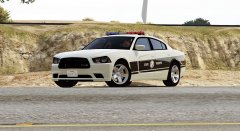
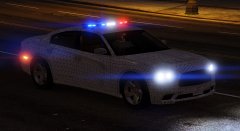
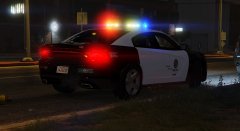
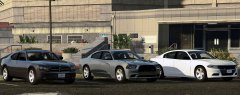
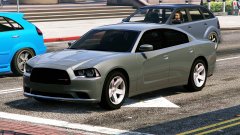
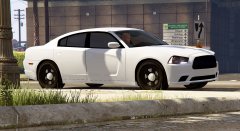
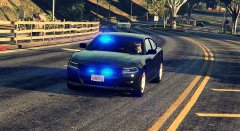
Chargers Share https://www.lcpdfr.com/gallery/image/55738-chargers/ Share on Facebook Share on X {lang="reddit_text" More sharing options... Followers 2010, 2014, and 2015 charger spotted at LS government facility Credit 06 Charger by Lt Caine 14 Charger fro Forza and Simraceway 15 Charger by IronicRainbow Hubcaps by Fartknockr All models converted by NIGHTKID Copyright © NIGHTKID GARAGE
SerekgPL Members November 21, 201510 yr Author stats I hope you'll release it soon :) Beautiful cars!
gavind85 Members November 22, 201510 yr (edited) Author stats Wow gorgeous line-up are these private or something you're working on for release? I'll take the middle one in dark blue to go with some NCIS peds I've been playing about with lol! Edited November 22, 201510 yr by gavind85
Fmr MSPR Members November 22, 201510 yr Author stats 5 hours ago, gavind85 said: Wow gorgeous line-up are these private or something you're working on for release? I'll take the middle one in dark blue to go with some NCIS peds I've been playing about with lol! He said it'll be in the download section for sure on the middle Charger. That's what I wanted too! lol
Han'SGarage Members November 22, 201510 yr Author stats 7 hours ago, gavind85 said: Wow gorgeous line-up are these private or something you're working on for release? I'll take the middle one in dark blue to go with some NCIS peds I've been playing about with lol! These will be eventually be available to download. It will take awhile tho.
SoUThPHiLLY20 Members November 22, 201510 yr Author stats the ones you will release will they have your great light set up i hope so they are the most realistic out there keep up the great work
SeaHawk14 Members November 24, 201510 yr Author stats xD How pretty they all look! The first and second are so damn gorgeous! In general I don't like the new 2015 Chargers, but still, very good work for every model! Congrats... By a while, do you mean several weeks, months or up to a year :O Just to get a time-frame in mind
Fmr MSPR Members November 24, 201510 yr Author stats 4 hours ago, SeaHawk14 said: xD How pretty they all look! The first and second are so damn gorgeous! In general I don't like the new 2015 Chargers, but still, very good work for every model! Congrats... By a while, do you mean several weeks, months or up to a year :O Just to get a time-frame in mind Yeah I want to know also :D.
Deactivated Member Deactivated December 5, 201510 yr Author stats If you look from left to right, you can see how Dodge made them uglier as the years go through. Not saying it's a bad conversion, just saying how ugly Dodge makes their bodystyles.
officerAMR Members January 21, 201610 yr Author stats On 12/5/2015 at 9:22 PM, Lundy said: If you look from left to right, you can see how Dodge made them uglier as the years go through. Not saying it's a bad conversion, just saying how ugly Dodge makes their bodystyles. I like the styling of the 2013 one, i agree about the 2009 and 15
Deactivated Member Deactivated January 22, 201610 yr Author stats 3 hours ago, officerAMR said: I like the styling of the 2013 one, i agree about the 2009 and 15 The 2009 is the only one I can really say I 'like'.
0taku Friends of LSPDFR January 22, 201610 yr Author stats 1 hour ago, Lundy said: The 2009 is the only one I can really say I 'like'. what about the the '10 they only changed the taillights ?
Deactivated Member Deactivated January 22, 201610 yr Author stats 47 minutes ago, 0taku said: what about the the '10 they only changed the taillights ? Well, I don't hate the 2010 model, I just don't care for it. I actually somewhat liked the older model.





Recommended Comments
Join the conversation
You can post now and register later. If you have an account, sign in now to post with your account.