Skip to content
View in the app

A better way to browse. Learn more.

LCPDFR.com

A full-screen app on your home screen with push notifications, badges and more.

To install this app on iOS and iPadOS
  1. Tap the Share icon in Safari
  2. Scroll the menu and tap Add to Home Screen.
  3. Tap Add in the top-right corner.
To install this app on Android
  1. Tap the 3-dot menu (⋮) in the top-right corner of the browser.
  2. Tap Add to Home screen or Install app.
  3. Confirm by tapping Install.
Due to overzealous filtering on Microsoft’s side, some emails to Outlook and Hotmail addresses may not be delivered. If you’re affected, please use a different email address or try again later.

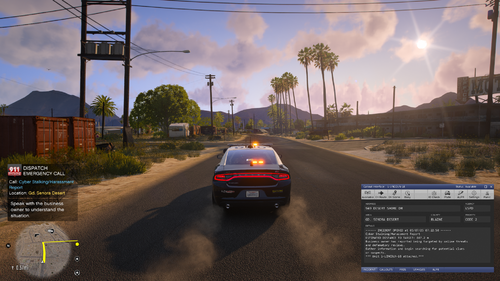
CHP control UI 1.0.0

(2 reviews)

1 Screenshot

SirenMaster UI by IcrazyOfficial
Important

Please do not upload this file anywhere else.

This UI was created by IcrazyOfficial on YouTube. Please do not sell, redistribute, or profit from this file in any way.

If you'd like to share it with others, please share the official download link from either my LSPDFR page or my Patreon (it's free). This helps ensure everyone receives the latest version and proper support.

🎥 YouTube: IcrazyOfficial

Installation Guide
Step 1 – Install SirenMaster

Before using this UI, you must install SirenMaster.

Download it here:

https://www.lcpdfr.com/downloads/gta5mods/scripts/54553-sirenmastery-ui-only-mode/?tab=comments&sort=newest

Step 2 – Install the UI
Open the downloaded UI folder.
Copy all of the included files.
Paste them into your Grand Theft Auto V main directory.
Allow Windows to replace any existing files if prompted.

Thank you for downloading and using my SirenMaster UI! If you enjoy it, be sure to check out IcrazyOfficial on YouTube for more GTA V LSPDFR content, mods, and showcases. 🚔

Edited by evvybwoy


Short Description

SirenMaster UI by IcrazyOfficial

User Feedback

Recommended Comments

jackywacky

Members

(edited)

I don't think we would like a user that uses leaks making a mod for the UI..

Edited by jackywacky

xDuvii

Members

(edited)

sick UI🔥

Edited by xDuvii

Djwhiteknight13

Members

On 7/31/2026 at 6:20 PM, jackywacky said:

I don't think we would like a user that uses leaks making a mod for the UI..

Who cares?

craio2lk

Members

On 7/31/2026 at 4:20 PM, jackywacky said:

I don't think we would like a user that uses leaks making a mod for the UI..

What are you on about? Your whole profile is just accusing people of stealing shit without any evidence. For example, your last comment: "why did you delete my comment, is this stolen? I was asking how this is different from the original stow the weapon."? Maybe check the code before you make accusations, lmfao. You're so weird.

jackywacky

Members

Haha! Man you are funny, so you are gonna talk about another post but not the main one? you could have commented on that one also haha! No if you want proof he uses leaks. Matter of the fact just stating. If you do not care perfect! Enjoy the mod.

3 minutes ago, craio2lk said:

What are you on about? Your whole profile is just accusing people of stealing shit without any evidence. For example, your last comment: "why did you delete my comment, is this stolen? I was asking how this is different from the original stow the weapon."? Maybe check the code before you make accusations, lmfao. You're so weird.

craio2lk

Members

(edited)

2 minutes ago, jackywacky said:

Haha! Man you are funny, so you are gonna talk about another post but not the main one? you could have commented on that one also haha! No if you want proof he uses leaks. Matter of the fact just stating. If you do not care perfect! Enjoy the mod.

Wheres the proof? All I hear is you crying wah wah wah wah wah

Edit:
It's weird how you responded in 3 minutes last time, but now you haven't said anything and it's been over 30 minutes. Is it because you don't have any proof? LMFAOOO

Edited by craio2lk

Create an account or sign in to comment

Account

Navigation

Search

Search

Configure browser push notifications

Chrome (Android)
  1. Tap the lock icon next to the address bar.
  2. Tap Permissions → Notifications.
  3. Adjust your preference.
Chrome (Desktop)
  1. Click the padlock icon in the address bar.
  2. Select Site settings.
  3. Find Notifications and adjust your preference.