Skip to content
View in the app

A better way to browse. Learn more.

LCPDFR.com

A full-screen app on your home screen with push notifications, badges and more.

To install this app on iOS and iPadOS
  1. Tap the Share icon in Safari
  2. Scroll the menu and tap Add to Home Screen.
  3. Tap Add in the top-right corner.
To install this app on Android
  1. Tap the 3-dot menu (⋮) in the top-right corner of the browser.
  2. Tap Add to Home screen or Install app.
  3. Confirm by tapping Install.
Due to overzealous filtering on Microsoft’s side, some emails to Outlook and Hotmail addresses may not be delivered. If you’re affected, please use a different email address or try again later.

C.E.S (Custom ELS Sirens) 1.8.0.1

(4 reviews)

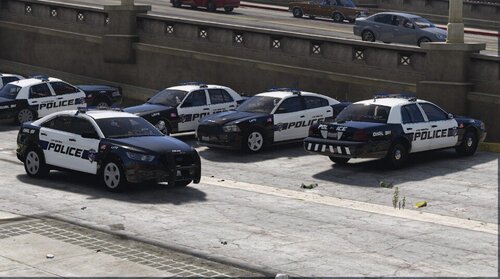
1 Screenshot

This plugin is designed to run ALONGSIDE ELS, it does NOT replace it!

GitHub: https://github.com/TheMagentaButterfly/Custom-ELS-Sirens

Requirements:

1. Grand Theft Auto V (Legit Copy)

2. RagePluginHook (Latest Version)

3. NAudio (Included)

4. ELS (Emergency Lighting System)

Installation:

1. Open the folder "Grand Theft Auto V" provided in this download.

2. Drag and drop all files and folders into your main GTA V installation directory.

(Where GTA5.exe is located).

Usage:

I suggest loading the Plugin on startup or else no sirens will work.

Drop your siren .WAV files in the "WAV" Folder.

Open the Menu (Default key: F10) and start customizing your sirens.

You can choose between a Global Profile (applies to all vehicles) and Vehicle Specific Profiles (overrides the Global Profile and only applies to a specific vehicle).

Showcase:

A note on the "Patch VCFs" Button:

This will turn off all sirens in the VCF .xml files inside your ELS -> pack_default Folder.

However C.E.S. will create a backup of your original VCFs.

After patching a game restart is required for the changes to take effect.

Although you can patch them yourself by searching for 'AllowUse="true"' under the <SOUNDS> category and setting 'true' to 'false'. Repeat for all.

How it should look:

<SOUNDS>

<MainHorn InterruptsSiren="true" AudioString="SIRENS_AIRHORN" />

<ManTone1 AllowUse="false" AudioString="VEHICLES_HORNS_SIREN_1" />

<ManTone2 AllowUse="false" AudioString="VEHICLES_HORNS_SIREN_2" />

<SrnTone1 AllowUse="false" AudioString="VEHICLES_HORNS_SIREN_1" />

<SrnTone2 AllowUse="false" AudioString="VEHICLES_HORNS_SIREN_2" />

<SrnTone3 AllowUse="false" AudioString="VEHICLES_HORNS_POLICE_WARNING" />

<SrnTone4 AllowUse="false" AudioString="VEHICLES_HORNS_AMBULANCE_WARNING" />

<AuxSiren AllowUse="false" AudioString="VEHICLES_HORNS_SIREN_1" />

<PanicMde AllowUse="false" AudioString="VEHICLES_HORNS_POLICE_WARNING" />

</SOUNDS>

Edited by TheMagentaButterfly

What's New in Version 1.8.0.1

Released

HOTFIX:
Hopefully resolved the choppy audio problem!

  • Direct ELS.ini syncing

  • Config.ini keybind & controller

  • Controller support

  • Per-vehicle custom light stage keypress tracking (J / DPadLeft)

  • Toggleable horn interrupts siren setting

  • Keyword-based emergency vehicle detection

  • Per-profile custom volumes

  • Bumped Assembly Version to v 1.8.0.1.

Known Bugs:

Plugin might/does not work with Hyprid ELS/DLS vehicles
Pausing the Game via. ESC doesn't mute the sirens


Short Description

C.E.S. allows you to have custom sirens for different ELS vehicles. With a In-Game editor it has never been easier to add Sirens

AI disclosure

The author has disclosed that AI tools were used in creating the following aspects of this file:

  • Mod and Mod Content (Moderate)

Ai helped me with the code where i couldn't find help online.

User Feedback

Recommended Comments

viktorboyman

Members

it loads but if i click my key it does not open, pls help!

TheMagentaButterfly

Members Author

7 minutes ago, viktorboyman said:

it loads but if i click my key it does not open, pls help!

Make sure you're pressing the correct key. If you changed the default key, please make sure it's a valid key (Microsoft Forms Key Enum) and make sure you're actually pressing it as the Key Enums varry from QWERTY to other keyboard layouts.

viktorboyman

Members

(edited)

29 minutes ago, TheMagentaButterfly said:

Make sure you're pressing the correct key. If you changed the default key, please make sure it's a valid key (Microsoft Forms Key Enum) and make sure you're actually pressing it as the Key Enums varry from QWERTY to other keyboard layouts.

i fixed it myself, thanks for responding tho

Edited by viktorboyman

Countypro911

Members

Good mod, I've been looking for something like this for a very long time.

One thing, is there a way to fix the small gap in between siren switches?

Roog07

Members

(edited)

Any intentions on adding controller support?
Edit: Just found the option in the menu, great plugin!

Edited by Roog07

Tissemyren

Members

I recorded my own sirens, but the wav files does not work. It just plays the default global siren.

What does the wav files we download from this site do differently?

TheMagentaButterfly

Members Author

4 minutes ago, Tissemyren said:

I recorded my own sirens, but the wav files does not work. It just plays the default global siren.

What does the wav files we download from this site do differently?

Tried reloading the plugin? If that doesn't work, something is wrong with your file.

Tissemyren

Members

(edited)

4 minutes ago, TheMagentaButterfly said:

Tried reloading the plugin? If that doesn't work, something is wrong with your file.

I've restarted GTA a couple of times. Playing the files in the windows media player works fine

Edited by Tissemyren

TheMagentaButterfly

Members Author

Just now, Tissemyren said:

I've restarted GTA a couple of times. Playing the files in the windows media player works fine

CES loads the audio files into memory for quick access. Maybe your ram is overloaded or the file too large?

Tissemyren

Members

Just now, TheMagentaButterfly said:

CES loads the audio files into memory for quick access. Maybe your ram is overloaded or the file too large?

Could be that the file is too large, actually. Do you know what the max size is?

TheMagentaButterfly

Members Author

3 minutes ago, Tissemyren said:

Could be that the file is too large, actually. Do you know what the max size is?

The max size depends on how much your system can spare under load and how much total RAM you have.

I cannot tell you that number as it's different from system to system

Lesbian Biker

Members

This is great! I see in the ini it has AutomaticAiSirenCutoff=True, does that mean I don't need Rich's Automatic Siren Cutout plugin?

TheMagentaButterfly

Members Author

1 hour ago, Lesbian Biker said:

This is great! I see in the ini it has AutomaticAiSirenCutoff=True, does that mean I don't need Rich's Automatic Siren Cutout plugin?

yes, exactly. does the same thing

Tissemyren

Members

(edited)

So I got my sirens to work, but now both my global and vehicle specific siren is playing (only for this specific vehicle), and then when I tab out of GTA, only the correct siren actually plays. Is there a known fix?

Edited by Tissemyren

Create an account or sign in to comment

Latest Mods

Account

Navigation

Search

Search

Configure browser push notifications

Chrome (Android)
  1. Tap the lock icon next to the address bar.
  2. Tap Permissions → Notifications.
  3. Adjust your preference.
Chrome (Desktop)
  1. Click the padlock icon in the address bar.
  2. Select Site settings.
  3. Find Notifications and adjust your preference.