



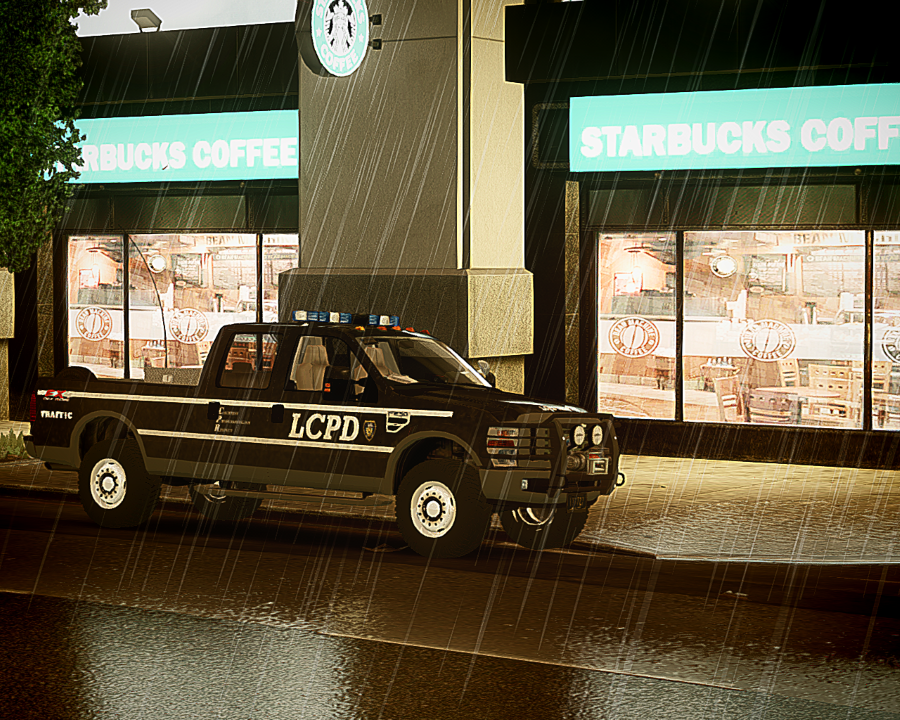


MODEL OVERVIEW
NAME: FORD F-250
VERSION: 1.0 ELS V7
MULTIPLE LIVERIES: YES (x4)
OPTIMIZED FOR: NSTOCKADE/POLPATRIOT
MOD STATUS: CLOSED/LOCKED.
------------------------------------------------------------------------------------------------------------------------------
CREDITS
GENERAL
- Model is original Ford F-250 From Driver SF, modified for and converted to GTAIV by PoliceFanatic
- Major model edits and fixes by PFCBarefoot
- Conversion from regular F-250 to FX4 by PFCBarefoot
- Wheels and rims are from an old GTA SA model I had. I Don't know who made them.(A side note from PFCBAREFOOT)
- Vehicle template and dirt mapping by SheriffVanDyck
LIGHTING EQUIPMENT
- LIGHTBAR is a Whelen Edge Modeled & converted for GTA IV by Bxbugs123
-Main textures made by Bxbugs123
- Lightforce Spotlights Model is original by Rockstar Games, textures modified By Lccop
- Lighting set-up by SheriffVanDyck
OTHER EQUIPMENT
- Go Rhino Wraparound made & converted by Bxbugs123
-Main textures made by Bxbugs123
- ROOF ANTENNAS are from Antenns v1.1 by PriMan
- Other antennas are original from Rockstar Games, modified for use as DEV parts by Sheriff VanDyck
- Spotlight(s) made by Cj24.
- Police Console by PFCBarefoot.
- Toughbook C19 by PFCBarefoot.
- Original Police Radio by Rockstar Games, removed for use as dev part by BRAVO 9 ACTUAL
- Uniden Bearcat Police Scanner
Motorola Spectra Radio
Whelen Siren Boxes
All these parts are made by Casey1989-
- Toolboxes, suitcase, drill, extinguishers, coffee cup, clipboard, and work sheets
are original from Rockstar Games, extracted and modified for use as DEV parts by SheriffVanDyck
- All skins/liveries are made by SheriffVanDyck (DOES NOT INCLUDE SOME OF THE LICENSE PLATES)
--------------------------------------------------------------------------------------------------------------------------------
YOU MUST NOT UPLOAD THIS PACKAGE ANYWHERE ELSE, NOR ANY OTHER WEBSITE WITHOUT
WRITTEN PERMISSION FROM THE ORIGINAL AUTHORS, SUCH AS PFCBAREFOOT FOR
THE MODEL AND SHERIFFVANDYCK FOR THE POLICE CONVERSION.
-----------------------------------------------------------------------------------------------------------------------------------
NOW KISS!
- Major model edits and fixes by PFCBarefoot
- Conversion from regular F-250 to FX4 by PFCBarefoot
- Wheels and rims are from an old GTA SA model I had. I Don't know who made them.(A side note from PFCBAREFOOT)
- Vehicle template and dirt mapping by SheriffVanDyck
- LIGHTBAR is a Whelen Edge Modeled & converted for GTA IV by Bxbugs123
-Main textures made by Bxbugs123
- Lightforce Spotlights Model is original by Rockstar Games, textures modified By Lccop
- Lighting set-up by SheriffVanDyck
- Go Rhino Wraparound made & converted by Bxbugs123
-Main textures made by Bxbugs123
- ROOF ANTENNAS are from Antenns v1.1 by PriMan
- Other antennas are original from Rockstar Games, modified for use as DEV parts by Sheriff VanDyck
- Spotlight(s) made by Cj24.
- Police Console by PFCBarefoot.
- Toughbook C19 by PFCBarefoot.
- Original Police Radio by Rockstar Games, removed for use as dev part by BRAVO 9 ACTUAL
- Uniden Bearcat Police Scanner
Motorola Spectra Radio
Whelen Siren Boxes
All these parts are made by Casey1989-
- Toolboxes, suitcase, drill, extinguishers, coffee cup, clipboard, and work sheets
are original from Rockstar Games, extracted and modified for use as DEV parts by SheriffVanDyck
- All skins/liveries are made by SheriffVanDyck (DOES NOT INCLUDE SOME OF THE LICENSE PLATES)
Recommended Comments