Skip to content
View in the app

A better way to browse. Learn more.

LCPDFR.com

A full-screen app on your home screen with push notifications, badges and more.

To install this app on iOS and iPadOS
  1. Tap the Share icon in Safari
  2. Scroll the menu and tap Add to Home Screen.
  3. Tap Add in the top-right corner.
To install this app on Android
  1. Tap the 3-dot menu (⋮) in the top-right corner of the browser.
  2. Tap Add to Home screen or Install app.
  3. Confirm by tapping Install.

Senora Valley Police Department Vehicle Livery pack 1.0.0

(0 reviews)

10 Screenshots

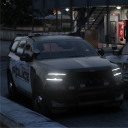
The Senora Valley Police Department patrols the Sandy Shores, Grapeseed and Senora Dessert area and got a HUGE budget increase! 


These liveries took me a really long time to complete, and let me just say im VERY proud of how they came out. Unfortunately, the purpose i wanted to use them for didnt work out. However, now I get the honor of sharing it with y'all! Enjoy


You can use these for any use, just credit me please.


If you want, Join my Discord! just started it, so if you want somewhere to talk about cop stuff or anything really come join! https://discord.gg/9jczVcVzhQ

Edited by Kingston Development


Short Description

Blue Springs, MO. PD Based

User Feedback

Recommended Comments

I like the Liveries, Keep up the Great Work.

Kingston Development

Members Author

2 hours ago, Razer Modifications said:

I like the Liveries, Keep up the Great Work.

Hey thanks for the support!!

xlThreelx

Members

whos durango?


Kingston Development

Members Author

1 hour ago, xlThreelx said:

whos durango?


Sheppy dev: https://sheppy.dev/

Just now, Kingston Development said:

Sheppy dev: https://sheppy.dev/

A very nice Durango I shall say

it also should've noted: The Durango skin is 100% fictional and NOT real on a real life bases. every other car however is tho.

Create an account or sign in to comment

Account

Navigation

Search

Search

Configure browser push notifications

Chrome (Android)
  1. Tap the lock icon next to the address bar.
  2. Tap Permissions → Notifications.
  3. Adjust your preference.
Chrome (Desktop)
  1. Click the padlock icon in the address bar.
  2. Select Site settings.
  3. Find Notifications and adjust your preference.