


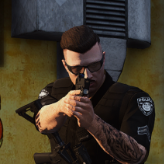


These were private skins i made for myself but someone told me to release them so i did.. If you don't like them, don't use them!!
This pack uses the
if you want me to make a vehicle for this skins pack just let me know in the comments 🙂
Edited by Domink98
added the F150 Blackout by EmergencyDistributors
What's New in Version 1.0.0
Released
add the F150 Blackout Pack by EmergencyDistributors
Short Description
just a skin pack i made. So, yeah...
The General Lee for making the cars
By EmergencyDistributors for the F150 Blackout
By EmergencyDistributors for the F150 Blackout













![Grapeseed Police Department EUP [Replace]](http://s3-screenshots.int-cdn.lcpdfrusercontent.com/resize/500/-/monthly_2026_04/mainthumbnail.thumb.png.70cc09e736714cc9fbd2cbea7f4fd4f4.png)


Recommended Comments
Create an account or sign in to comment