


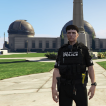


Los Santos Police Department Vest
Made for : EUP VEST&EARPIECE by @HANAKO
How to install ?
Step 1 : You need to install the vest 13 setup 3 of EUP VEST&EARPIECE by HANAKO
Step 2 : Drag and drop into your desktop the file "LSPD Vest Texture"
Step 3 : With OpenIV, go to : mods > update > x64 > dlcpacks > eup > dlc.rpf > eup_componentpeds.rpf > mp_m_freemode_01_mp_m_clothes_01
Step 4 : Right click on "task_diff_008_a_uni.ytd" and click on "Edit"
Step 5 : Click on "Replace" and choose the file "LSPD Vest Texture" on your desktop
This Is my first ever mod I’ve create. Hope you like it, enjoy your patrol officer !
Edited by Ficelo
What's New in Version 1.1
Released
Fixed an installation problem for some peoples.
New way to install texture.
Adding "How to install.txt" file into the .rar.
Short Description
Texture by Ficelo

.thumb.png.4deec47dddfa9b451f2914e13c09d10f.png)










![Los Santos County Sheriff Livery Pack [Berkeley County-based]](http://s3-screenshots.int-cdn.lcpdfrusercontent.com/resize/500/-/monthly_2026_04/20260415155948_1.thumb.jpg.4cd04373ce1cf72df8e99a993cf4a145.jpg)



![Clayton County Sheriff's Office [4K]](http://s3-screenshots.int-cdn.lcpdfrusercontent.com/monthly_2026_04/Screenshot_2511.thumb.png.e79613aafaa7abfbd34da660fe32acd3.png)
Recommended Comments
Create an account or sign in to comment