Skip to content
View in the app

A better way to browse. Learn more.

LCPDFR.com

A full-screen app on your home screen with push notifications, badges and more.

To install this app on iOS and iPadOS
  1. Tap the Share icon in Safari
  2. Scroll the menu and tap Add to Home Screen.
  3. Tap Add in the top-right corner.
To install this app on Android
  1. Tap the 3-dot menu (⋮) in the top-right corner of the browser.
  2. Tap Add to Home screen or Install app.
  3. Confirm by tapping Install.

Blaine County Sheriff Texture Pack 1.0.1

(0 reviews)

9 Screenshots

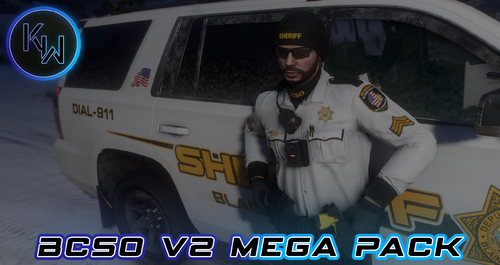
How is it going gals and guys? I have a BCSO pack here for you. The models are for OfficerArk's LSCSO pack. These are the same designs as my LSCSO texture pack. Just different top color and font for Blaine County. I hope you gals and guys enjoy them. Possibly more to come. 


**Do NOT Re-Upload Without My Permission**


VEHICLES 


'18 Charger

'20 FPIU

'21 Durango

'22 F-150

'21 Tahoe


Edited by PhaZe

What's New in Version 1.0.1

Released

Upon request, I have added the 21 Chevy Tahoe to the lineup.


Short Description

BCSO five car texture pack

User Feedback

Recommended Comments

OfficerArk

Insiders

As always, you have created some beautiful liveries! Keep up the amazing work 🙂

PhaZe

Members Author

On 6/6/2024 at 9:54 PM, OfficerArk said:

As always, you have created some beautiful liveries! Keep up the amazing work 🙂

Thank you OfficerArk. I sure will try to. You as well friend.

Robbie X

Members

Hello, could you do one for 21 tahoe?

PhaZe

Members Author

On 9/25/2026 at 11:24 PM, Robbie X said:

Hello, could you do one for 21 tahoe?

Sure thing. I will try to get it done in the next couple of days.

Robbie X

Members

12 hours ago, PhaZe said:

Sure thing. I will try to get it done in the next couple of days.

Thank you!

PhaZe

Members Author

2 minutes ago, Robbie X said:

Thank you for the Tahoe update! @PhaZe

No problem, sorry for the wait. I hope you enjoy it! 😄

PhaZe

Members Author

On 10/15/2026 at 12:27 AM, KID EUPHORIC Designs said:

DUDEEE AMAZING pack !!

Sure do appreciate it!

Create an account or sign in to comment

Account

Navigation

Search

Search

Configure browser push notifications

Chrome (Android)
  1. Tap the lock icon next to the address bar.
  2. Tap Permissions → Notifications.
  3. Adjust your preference.
Chrome (Desktop)
  1. Click the padlock icon in the address bar.
  2. Select Site settings.
  3. Find Notifications and adjust your preference.