


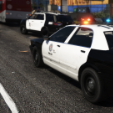


Ah, the San Andreas State Police - better known as the apex predator of the interstate. The lowest tax income in decades combined with the most boring shifts known to man almost ensures that you'll be pulled over soon enough, so watch your speed. Even without the iconc livery, you'll spot one of their cruisers from miles away - with the foggy, decade old lightbar (that's still being outfitted to new cruisers) being the dead giveaway.
This livery pack contains 3 liveries for the Vapid Scout, 2 liveries for the Vapid Torrence, and 1 livery for the Vapid Stanier, and was created with these packs in mind:
https://www.gta5-mods.com/vehicles/paleto-bay-sheriff-office-pack-add-on
https://www.gta5-mods.com/vehicles/sandy-shores-sheriff-office-pack-add-on
For installation instructions, please consult the readme file contained within the download.
Short Description
Crazy cALifornian - Lorified CALEA seal
- amenbrother and Sethy1124
-
 2
2


![Blaine County Sheriff's Office EUP Package [ADDON & REPLACE]](http://s3-screenshots.int-cdn.lcpdfrusercontent.com/resize/500/-/monthly_2026_06/Screenshot2026-06-06000350.thumb.png.fe09a5cf104f4c60ed93663b24da91c1.png)






![Texas DPS EUP Package [ADDON & REPLACE]](http://s3-screenshots.int-cdn.lcpdfrusercontent.com/resize/500/-/monthly_2026_06/Screenshot2026-06-05005718.thumb.png.371b7aedeca385b6384ad05056d122ab.png)





Recommended Comments
Create an account or sign in to comment