Skip to content
View in the app

A better way to browse. Learn more.

LCPDFR.com

A full-screen app on your home screen with push notifications, badges and more.
To install this app on iOS and iPadOS
  1. Tap the Share icon in Safari
  2. Scroll the menu and tap Add to Home Screen.
  3. Tap Add in the top-right corner.
To install this app on Android
  1. Tap the 3-dot menu (⋮) in the top-right corner of the browser.
  2. Tap Add to Home screen or Install app.
  3. Confirm by tapping Install.

ems skin 1 update 1 update

(3 reviews)

3 Screenshots

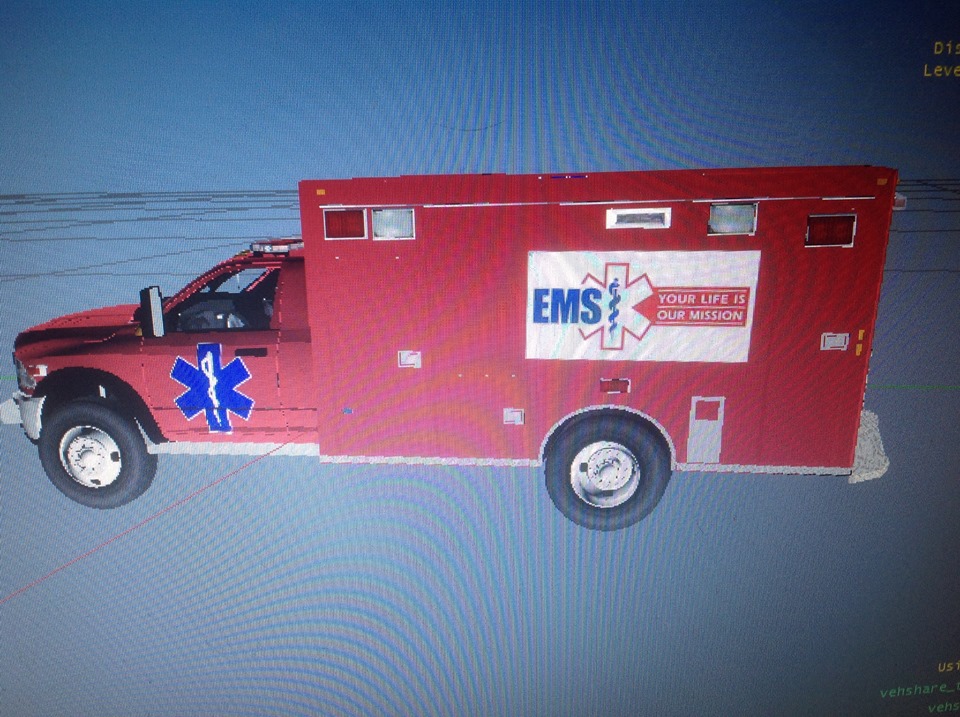
this is a updated now it look like a ems

User Feedback

Recommended Comments

JewishBanana

Members

It's literally just two colors. Why upload this? The people of the website, myself included, do not want just simple two colored textures like this. For what purpose would it serve? There are no badges to identify if it's even an ambulance. 1/5

gangrenn

Members

It's literally just two colors. Why upload this? The people of the website, myself included, do not want just simple two colored textures like this. For what purpose would it serve? There are no badges to identify if it's even an ambulance. 1/5

xbox7203

Members Author

it was my first one cut me a bark

xbox7203

Members Author

the person sayed ok but i will be working on a rail skin for it for v 2

xbox7203

Members Author

look guys i am working on a rail skin cum down

xbox7203

Members Author

it going to be a while for the next or fix or update verson come out

GamingFidelis

Members

it going to be a while for the next or fix or update verson come out

xbox7203

Members Author

i am working on the ems i will update it wane done

Nexx

Members

If you think about it, it kinda looks like a horizontal pokeball.

xbox7203

Members Author

GUYS i have it done it

JewishBanana

Members

Still looks like zero effort was put into it. All you did was add on two images you probably found via Google. I mean, it's better than the colorful template, but it's still not that great. Try making YOUR own decals and badges so the texture will actually look unique and not something that could be put together in five minutes with the help of Google Images to download someone Else's decals.

Still looks like zero effort was put into it. All you did was add on two images you probably found via Google. I mean, it's better than the colorful template, but it's still not that great. Try making YOUR own decals and badges so the texture will actually look unique and not something that could be put together in five minutes with the help of Google Images to download someone Else's decals.

Exactly what I was going to say.

DankAwesomeSauc

Members

Dude that's such an awesome screen capture software you have there! Such high quality! Where can I get it?

xbox7203

Members Author

i used a ipad becuse i have no other way to take a pic

xbox7203

Members Author

u know u dont have to downlode it

xbox7203

Members Author

guys u dont have to downlode just to comment

Mustu

Members

Okay. I would try and give some good points on this too and not give you such a hard time, but you just need some tips to take into consideration, because the cold hard truth will make it better, trust me as a modeler/vehicle modder. Okay, here it goes: First off, when someone starts looking for a skin/model to download, they expect a professional looking name, an interesting one and one that will perhaps catch their eye. Your title shows no knowledge of appropriate punctuation or effort towards even the name. Come on man, at least click a few more buttons to make at least the name better. Second, if a person still continues over to the already not so good looking mod, they want screenshots to prove them wrong, that is, in fact, better than they thought. What you did is the exact opposite. You took bad screenshots, and very bad ones at that. Instead of using your iPad, open your eyes and try the Snipping Tool. Simple enough, huh? Also, people prefer not to just see the plain raw skin (the picture not taken with the tablet device) or in OpenIV, but in fact, in the game. It'll help determine if the person actually wants to download it or not. Here on the LCPDFR, the don't judge a book by its cover saying doesn't apply. Thirdly, and most importantly, you showed minimal effort. Even basing it off a real EMS agency would have been a better option. Simply sticking a picture on some red doesn't make it 'EMS'. Also, the Star of Life is incredibly big and un called for. Why not try and put some sort of stripe or streak on there? Also, since you must be new here, claiming you are just a beginner also isn't a valid excuse on these forums, because you're not entitled to upload things. People, including me, rush their product and end up getting bad reviews on it, when it's totally expected. You should have waited before this release, taken inspiration from other textures and just opened your eyes! Let's say you live in LA. Would you really be proud of your ambulances as vehicles in terms of looks and how much it stands out in traffic? The reason we fuss about looks is because, although they look nice, they have a function! When you see an ambulance behind you, it's really mainly its markings and possibly the lights. And finally, hold off from the uploads for now. Upload to the gallery instead, seeking tips on making your textures better. And if you didn't read that because it was too long, expect bad reviews, because I'm trying to help. Also, if you're that impatient, just hold off from modding all together. I'm not being harsh, I'm being honest.

Create an account or sign in to comment

Latest Mods

Account

Navigation

Search

Search

Configure browser push notifications

Chrome (Android)
  1. Tap the lock icon next to the address bar.
  2. Tap Permissions → Notifications.
  3. Adjust your preference.
Chrome (Desktop)
  1. Click the padlock icon in the address bar.
  2. Select Site settings.
  3. Find Notifications and adjust your preference.