


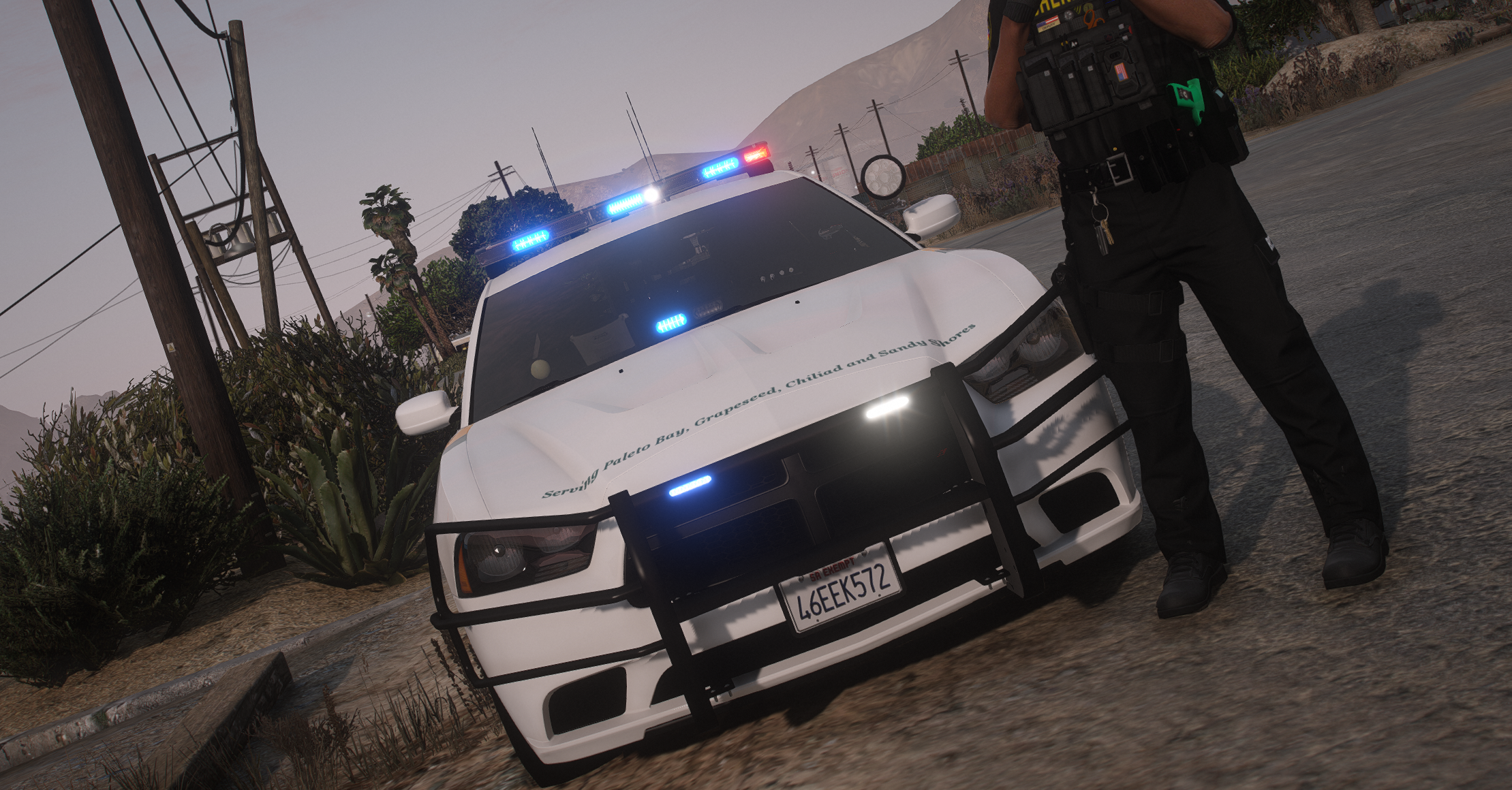

Proudly present you my BCSO Pack.Some Slicktops/some Marked 🙏
Full working Lods.Spotlight works as an Extralight.Toogle H to activate it.
Templates are Included
Cheers
Join my Discord for more https://discord.gg/v5UKZMACmJ
Skin is by @Chaz XL Designs.Check him out
CVPI Skin by @Tom3k.Check also his stuff out 🔥
Installation __ Models:Mods - Update - x64 - DlcPacks - Patchday (Most recent in your game) - dlc.rpf - x64 - levels - gta5 - vehicles.rpf (Replace/Drag and drop)
FREQUENTLY ASKED QUESTIONS:
Q: Why r ur lights so shiny pls help
A: I use QuantV with personal tweaks to make my lights bright, you will need something like this or another mod like it to make your lights as bright as mine.
Q: X isn't working why?
A: You may be doing something wrong, or I may have fucked something up. If you do find a bug or have a question please comment with a screenshot or video to give me a better idea of what is wrong and I will get back to you.
Q: My lightbar and windows are tinted
I try to fix those but sometimes it still happens. Go into vehicles.metafind the line that says diffusetint for the model and find the diffusetint value and replace the value with this<diffuseTint value="0x00FFFFFF" />
Please do not redistribute this pack, or any part of it including the liveries, or models, or screenshots, or use them in clans or public/private servers. Please do not upload this file or a part of it to any other site unless given explicit credit. Thanks for downloading. Please report the bugs in the comments before posting a review about them, it may be a misunderstanding or just an easy fix. Enjoy!
What's New in Version 1.0.0
Released
- Updated a Texture Loss glitch on the 18 Charger
- fixed the 11 Cvpi
Short Description
- Converted and textured by Thehurk
- Converted to PPV by Thehurk
- Templated by Thehurk
- Taillight textures by Five0
- Dodge Charger Steelie by Matt/Peralta
- L4 model by BxBugs123
- Further edits and overhaul by KLE0, including improved headlights, taillights, marker lights, new dirtmap, dials, buttons, remapped and smoothed dash, seats and floor, and more.
- Other bug fixes and optimizations by KLE0.
Goodyear Eagle RS-A
- Textures by Robert
- Original tire model by Matt
- Tire remapping and wisdom from Cj24
- Special thanks to GeorgieMoon, Matt and Cartres for their help
Additional acknowledgments
- Thank you Thehurk for releasing the original base for free for people to enjoy
- Thank you TacticalDonut for helping me beta-testing and finding bugs that I would have otherwise missed!
- Thank you RobertTM for allowing me to include the tire with the base! Check out more of his content on modding forum: https://www.modding-forum.com/forums/thread/428-dev-goodyear-eagle-rs-a-v1-5rsa-final/
18 Charger
Credits
- Original vehicle model is 2015 Dodge Charger from Forza, edited into the 2018 Dodge Charger Pursuit by Matt with parts from FH3 and Gamemodels
- Seats, center mirror, shifter and dash edits modeled and done by Kane104 - commissioned by Ranger Rick
- Major help from EVI for digital dial information and help to get the dials working and his patience to help me
- Rear bumper diffuser modeled by Patrol 31 Normal edits by Steinberg
- Big thanks to Cj24 for beta testing the model and help with spec maps and normal maps and his overall knowledge of gta materials
- Interior dial textures made by NeonLazer
- Interior button textures made by Slendis
- Rims from Gamemodels.ru Centercap edited by Matt
- Dome Light modeled by Matt
- A big thanks to Cj24, Kane104, EVI, Patrol 31, Steinberg , Desmond , NeOnLaZeR, Izick, Rekram, HDgamerzPC, and a big thanks to Ranger Rick who bought 3D parts so that i wouldn't give up on this project and bought me a Zmodeler license so that i can keep working on this project Thank you Rick.
- Thank you to everyone who supported me and the project...
Edited by DanWithDaVan
- 2015 Suburban by Carface converted to a 2019-2020 Tahoe PPV by Dan with da van
- Countless Textures and parts redone and remodeled by Dan with da Van
- Most included parts modeled and textured by Dan with da van
- Door sticker redone by Billy J.
- Thanks to Bigams for providing high quality pictures of a real Tahoe
- Mayor edits by Dan with da Van
- ENV from some lspdfr post oof
- Templated and normals redon by Dan with da van
- A huge thanks to everyone below for helping make this project as good as it is.
Krul, TickleMyElmo, Blaster, HP Deskjet, Bigams, INSAN1TY, Billy J and Maurice97
----2011 Ford Crown Victoria Police Interceptor-----
*Model from Forza horzion 3 ripped by DMN
Hevaily Edited by -Ess-
Converted for use in V by -Ess-
Texutered by -Ess-
*Wheels by -Ess-
texuter by -Ess-
*Weather Shileds by -Ess-
texuter by -Ess-
*Unity spotlight by -Ess-
texuter by -Ess-
*Spec Tweaks by Nolan8024
Original model is the Dodge Ram 3500 from Forza, extensively remodelled and edited into the 2014 2500 LE model by Kane104.
Ram 2500 interior, tyre, light, and template textures scratch made by Kane104.
Taillights by Cj24.
Original 2010 Ford Taurus from FM4, revamped, remodeled, and turned into a 2018 Ford Taurus Police Interceptor by GeorgieMoon.
Purchased by [MauriceUA #0666]
Console by BxBugs
Antenna by DanWithDaVan
-Antenna by BxBugs
-Pocket Printer - Model is scratch built by johnclark1102- Texture is made by diablozer0d617
- Toughbook stand Modeled, Textured by Cap'n Crunch. Textures by Cap'n Crunch. Converted to V by VooDoo
-Gun Rack by BlackJesus
-Partition-DanWithDaVan
Whelen Avengers by 0taku
Rambar by Carper
- Some textures by OfficerFiveO ^
Code 3 4-Pack Hide a blast scratch modeled by Five0/OfficerFive0
converted to gta 5 by Five0/OfficerFive0
main texture by five0
groove texture by neonlazer
emis textures by Five0/OfficerFive0, based off of CJ24's
FS CN SignalMaster modeled and textured by Cj24.
Code 3 RX2700 modeled and textured by Cj24.
thegreathah - 4inchmPower Fascia
- Code 3 CD5051 made by krul
Toughbook CF-31 modeled and textured by Cj24.
Taurus Go Rhino Heavy Duty by Paulmods
Go Rhino LR Pushbar by Paulmods
Setina Based Door Bars by LixLyte
Code 3 Wingman modeled and textured by Cj24.
Whelen Slimlighter modeled and textured by RobertTM, emissive colors by CJ24
Setina PB-400 Pack Modeled & Textured by Terry Sloman
Textures by Cj24















![Grapeseed Police Department EUP [Replace]](http://s3-screenshots.int-cdn.lcpdfrusercontent.com/resize/500/-/monthly_2026_04/mainthumbnail.thumb.png.70cc09e736714cc9fbd2cbea7f4fd4f4.png)


Recommended Comments
Create an account or sign in to comment