





READ THE FOLLOWING BELOW BEFORE PROCEEDING TO DOWNLOAD
(NEW) DECEMBER 16, 2024 (Grand Theft Auto V Update v3411) Update
Rockstar Games has released an update for Grand Theft Auto V (build 3411.0). While no issues or any incompatibilities are expected, I have NOT tested this plugin with the new update yet. This section will be updated as soon as I get a chance to test the new plugin with the new update and if any reports from users come in. No guarantees that the plugin will work flawlessly with the new update just yet.
✅: Compatible
❌: Not compatible
🔎: Currently testing
Compatibility status: ✅
NOTE # 1: I am NOT affiliated with Axon Enterprise, Inc. or TASER International, Inc.
NOTE #2: Please READ EVERYTHING outlined in the description below, the included README file and the INI file, it will save you time before reporting a bug or asking a question that's already been answered. Reported bugs and issues are outlined in the description below.
NOTE #3: Exercise caution to anyone blindly telling you (especially on Discord) to remove callout X or plugin Y or to disable antivirus without a proper reason why, there's a 99% chance they don't know what they are doing. If you are having a specific issue with my plugin, please do NOT seek support from third-party discord servers as they will not be of any useful assistance and I will NEVER have any clue that you're having an issue to begin with.
NOTE #4: While I appreciate suggestions and feedback, I will not accept all of them especially if it is not grounded in realism. Understand that I try to do research on this project with the limited available material online, if you have any credible sources as to the operations of these things, please provide them alongside your suggestions.
NOTE #5: Keep this in mind before using any kind of colorful language to describe any frustrations you may have with this plugin, and this can apply to any developer here on this website: I am alone, I do this in my free time voluntarily, Maintaining and updating a plugin can be stressful
NOTE #6: This plugin does not record any videos. This plugin only simulates the operation of an Axon Body and Axon Fleet with Axon Signal functionality. Any inquiries about this on Discord or the comments section below will be disregarded or closed as this has been addressed multiple times previously.
FEATURE UPDATE v1.2
COORDINATED UNIVERSAL TIME FORMAT (UTC)

(shoutout to jmwfilms/their video editor for stealing this, nothing serious, just absolutely hilarious the number of people who steal this GIF)
Want to use the legacy overlay format from older generation body-worn cameras? You can configure the body camera and dash cam overlay to display the time in UTC format as well as selecting a desired offset from your local time of choice.
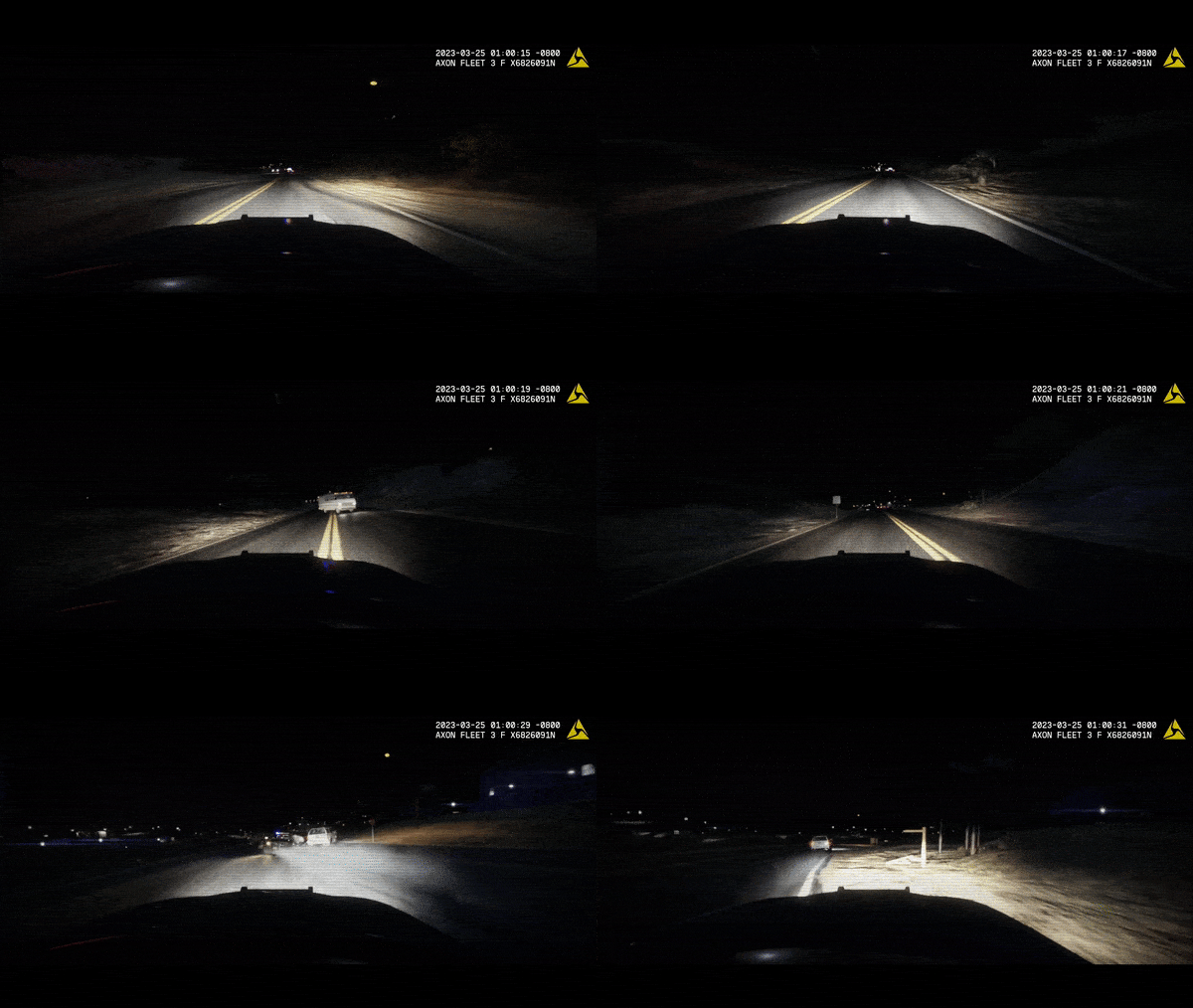
DASHCAM PANORAMIC LETTERBOX (includes 4:3 aspect ratio letterbox for interior camera)

courtesy of Ohio State Highway Patrol, reference photo for comparison
Get more immersed into an already unique patrol perspective. Starting with the AXON FLEET 3 generation of dashcams, depending on an agency's configuration on video resolution and aspect ratio, panoramic aspect ratios were introduced to compensate for the wide field-of-view on the newest generation dashcam.
BODY CAMERA ACTIVATION ANIMATION
New animation when activating or deactivating the body camera.
THE AXON FLEET DASHCAM UPDATE
Get a unique perspective of your patrols with the new Axon Fleet Dashcam System, featuring both a front and interior camera, whether you want to keep an eye on the action upfront or keep an eye on the cuffed offender behind your back.


REAL-TIME DASHCAM OFFSET, POSITION, and FOV EDITOR (type AxonSignalOffsetMenu in the RAGE console to access this menu)

REAL-TIME OVERLAY EDITOR (type AxonSignalOverlayConfigMenu in the RAGE console to access this menu)

BODY CAMERA TIMESTAMP OVERLAY *(requires font installation, font included)

Axon Signal is a standalone RagePluginHook plugin that simulates the operation of an Axon body worn camera and in-car dash camera. Alongside that is the ability for the body camera to automatically start recording if you unholster your weapon (list of weapons that will trigger the body camera can be defined in the AxonSignal.ini file) or activate your emergency lights (stage 3 ELS lighting or activating lights on a NON-ELS vehicle).

The following parameters can be changed in the plugin's ini file:
- The key to start/stop the recording of the body camera.
- If the body camera will start recording if you unholster your weapon
- List of weapons that will trigger the body camera recording function (WEAPON_PISTOL, WEAPON_STUNGUN, etc.)
- If the body camera will start recording if you activate your emergency lights (supports both ELS and NON-ELS vehicles, must be a valid police vehicle)
- If the plugin will display notifications on the bottom-left of your screen regarding the operation and activity of the plugin
- The amount of time in seconds between reminder beeps on the body camera (Default: 120 seconds)
- Body camera timestamp overlay parameters such as the model number, serial number, UTC offset, and if visible in third person or not
-
Rockstar Editor integration (disabled by default, keep in mind of the following limitations)
- Recording time: this is dependent on the number of entities around you and how many polygons those entities have (e.g. if you and 20 backup officers are in a shootout with 20 gang members with 10 addon cars exploding in the background, you will not have a lot of recording time)
- Addendum to the above, recordings are in clips, assuming you run out of recording time, rockstar editor will record another seperate clip, they may not be fused together perfectly, and this will be more apparent the shorter your recording time
- Rockstar editor usage is restricted in some areas (e.g. Fort Zancudo and the surrounding area, due to GTA Online protections)
- Your own storage space and hardware
- Speed threshold parameter to trigger the Axon Signal Vehicle while emergency lights are activated
- Delay between the trigger and the activation of the body camera
- Body camera overlay real-time editor to customize text and logo size, spacing, and position (accessible by RAGE console command AxonSignalOverlayConfigMenu)
- Several dashcam parameters, whether it is accessible on foot, overlay, toggling the dashcam effect, the serial of both the dashcam and the interior camera, and the dashcam model that appears on the timestamp, offset, position, and FOV (configurable in the real-time editor accessible by RAGE console command AxonSignalOffsetMenu)
- Hide minimap when viewing dashcam (enabling letterboxing of either the dashcam or interior camera will hide the minimap, regardless of the setting)
- Whether dashcam or bodycam overlay displays local time with offset or UTC time
- Enable or disable bodycam animations
- Enable or disable body camera button sounds
- Enable or disable dashcam or interior camera letterboxing
- NEW Enable or disable overlay help messages
You may also change the supplied body camera sounds and logo inside the provided AxonSignalSound folder, provided the filenames match and file size is within a reasonable level.

REQUIREMENTS
- A legal copy of Grand Theft Auto V
- An up-to-date version of RagePluginHook
- RAGENativeUI (minimum v.1.9.2)
INSTALLATION
1. Unzip the files using WinZip, WinRAR, 7-zip, or any other archive utility.
2. Drag the files inside the AxonSignal/Grand Theft Auto V/Plugins/ folder to the Grand Theft Auto V/Plugins folder and replace when prompted.
- FOR ADVANCED USERS: If you're upgrading from an older version, check to make sure all new assets, files and parameters in
the ini are included so you don't have to replace files such as the ini and reconfigure settings, otherwise just replace everything.
3. Read the README.text and configure the AxonSignal.ini settings to your preferences before seeking support or complaining of a
missing feature (SERIOUSLY), I have put my best effort in including all details.
4. You can load the plugin in two different ways:
- When in-game and RPH is running, open the console pressing F4 and type "LoadPlugin AxonSignal.dll" without the quotes
OR
- Go the Grand Theft Auto V root folder and edit your startup.rphs file and add AxonSignal.dll
5. RECOMMENDED BUT OPTIONAL: Install the font included in the zip file by simply double clicking it. This will make your bodycam overlay look closer to the real thing.
USER OPERATION
DOUBLE PRESS your assigned keybinding (Default: O key) to start the recording operation of the bodycam.
While the recording is in progress, a reminder tone will play at a specified interval (Default: 120 seconds).
The recording operation of the bodycam can also automatically start by either unholstering any of your selected weapons or activating emergency lights. (parameters customizable in the .ini file)
To stop the recording operation, regardless of how the body camera started recording, HOLD DOWN your assigned keybinding for approximately 3 seconds until a prolonged tone sounds signifying that the recording operation of the body camera has stopped.
If you want to toggle the plugin functionality, type 'AxonSignalToggleSystems' in the RAGE console.
To customize the size and position of the text and logo of the overlay, type 'AxonSignalOverlayConfigMenu' in the RAGE console.
To access the dash camera and interior camera, simply cycle through your player views (Default: V key). To view the interior camera, press your look back key (Default: C key) while in dashcam view
The dash camera and interior camera are accessible regardless if you are in a police vehicle or on foot (configurable in the INI).
To customize the positioning, direction, and offset of these cameras, type 'AxonSignalOffsetMenu' in the RAGE console.
AXON SIGNAL OVERLAY STUCK ON SCREEN?
Type 'AxonSignalResetScreen' to clear any stubborn elements that may be stuck on screen.

These plugins may potentially conflict or cause side effects with Axon Signal:
- Automatic Siren Cutout by Rich*
You may still use these plugins, however, it is highly recommended to disable or alter some of the parameters of the plugin.
Automatic Siren Cutout cycles through ELS Stage lighting to turn off the siren upon getting out of the car which may cause an inadvertent activation of the body camera.
*this can be mitigated by utilizing the new speed threshold feature to prevent inadvertent body camera activation while getting out of the car (assuming the car is not moving at speed while getting out)
KNOWN AND REPORTED ISSUES
- While browsing through the LSPDFR garage vehicle selection menu, switching vehicles will cause the camera angle set by LSPDFR when viewing vehicles to be reset, allowing camera mouse movement while in the garage which is not intended. Root cause unknown and currently under investigation. Fairly difficult to reproduce. This is a minor bug since it is neither game-breaking nor causing major issues or side effects. No emergency patch release needed. (thanks to @unitedOrange66 for reporting, thanks to @Godalph Games for testing)
- On rare instances, hiding the minimap when switching to dashcam view may fail or minimap may render on screen anytime while in dashcam view even if enabled, attempting to investigate and reproduce the bug. Minor bug, no emergency patch release needed. (thanks to @Godalph Games for reporting)
- Emergency lights or other bright light sources in-game can cause the screen to significantly darken, or in the case of rapidly flashing emergency lights: "flickering occurs". Cause and frequency of occurrence unknown. Investigating.
- Some graphics mods (reportedly NaturalVision Evolved or NVE) can cause the dashcam effect even if enabled not to render. It is suspected that some graphics mods disable some or all timecycle effects. Considering an alternate solution of rendering a transparent image file on screen instead to replace dashcam effect. Not tested as I personally do not use or have NaturalVision Evolved.
FIXED ISSUES
- Rarely, a Grand Theft Auto V Story Mode save file will cause the plugin to crash with an ArgumentOutOfRangeException due to a rare bug in the save file reporting an invalid month of "zero". Downloading a different save, or starting a new save should fix this problem. A minor patch is underway to mitigate this. (fixed as of v1.0.12.39893, thanks to @Alfie3241 for reporting)
- The overlay flickers considerably on occasion due to the rendering method used. A fix is already finished with a more refined code to allow better rendering with no flickers and is currently being tested by one of my testers to make sure it is stable. (fixed as of v1.0.15.9399)
- The in-game date may be invalid on occasion (e.g. February 30, 2013), causing the plugin to crash with an ArgumentOutOfRangeException. A current workaround is to advance your in-game date with the use of a trainer that supports the changing of the in-game date. I'll be releasing a minor patch to this by simply forcing the game to whatever date your computer is set to if I'm not busy. (fixed as of v1.0.15.29512, thanks to @rinbro for reporting)
- Enabling Rockstar Editor integration WILL crash on versions of the game older than v1.0.2802.0 with the exception message: address cannot be zero when starting the body camera recording. Currently under further investigation to see if a fix is feasible. (fixed as of v1.0.19.3574, thanks to @Godalph Gamesand @ThiccBewdyfor reporting and testing)
- Attempting to view the dashcam while on a police boat/helicopter will cause the plugin to endlessly cycle between first-person and the dashcam view. This plugin is not intended for use with police boats/helicopters. A fix is being worked on to be released in an upcoming update. Current workaround is to turn on Allow Independent Camera Modes in GTA V settings or simply unloading the plugin when using a police boat/helicopter. (fixed as of v1.2.52.42920, thanks to @Lieutenant Oliver for reporting)

If you are having issues with this plugin specifically, please do NOT seek support in your usual LSPDFR support Discord servers as they do not know anything and will not be able to effectively help you. I highly encourage you to join my Discord below or post your issue in the comments section. I need feedback and bug reports to continually improve this plugin.
If you need support, you may do so in the comments or join my Discord: https://discord.gg/e2qX6aW. Please do NOT seek for support in the reviews or give it a 1-star rating simply because something doesn't work.
Feedback is also appreciated as to what I can do to improve this plugin. This initial version of this plugin, as hinted by the build number, was programmed in the span of only 2 days. There may be issues or bugs that I may not be aware of although I can assure you this plugin has been tested fairly thoroughly.
INSTALLATION AND SHOWCASE VIDEO BY @Gameboyeg, @OfficerBenzo, and yours truly. THANK YOU!
Edited by Sergeant Nighthawk
What's New in Version 1.2.437.10095
Released
MINOR RELEASE VERSION 1.2.437.10095 (April 12, 2024) (NEW)
- Added option to disable overlay help messages, as popularly requested by @Double Doppler, @unitedOrange66, and several others
- Font warning is now visible on plugin load and when player is loaded into the world, old font warning was not visible if players loaded in RPH at start of game
- Changed a default ini value to be AXON BODY 4 with the corresponding serial number, this can be changed back if you wish
PREVIOUS CHANGELOG BELOW
MAJOR RELEASE VERSION 1.2.52.42920 (March 25, 2023)
- RAGENativeUI is now mandatory for whole plugin functionality (minimum v1.9.2)
- Added letterboxing to dashcam view to simulate the panoramic aspect ratio of Axon Fleet 3 dashcams (configurable in the INI)
- Added animation when activating or deactivating body camera
- Added tactile button sounds when activating or deactivating body camera
- Added option to hide minimap (which also hides the Player Location Display)
- Added option to display time on the overlay as UTC time, can be configured separately for both dashcam and bodycam
- Added option to disable cameras for a specific vehicle in the real-time dashcam editor
- Added option to configure both bodycam and dashcam layout properties separately in the real-time overlay layout editor
- Added option in the ini to configure the abbreviations shown in the overlay for both dashcam and interior camera in the vehicle
- Changed the way users disable the Axon Signal system from using a keybinding to typing console command 'AxonSignalToggleSystems' to prevent inadvertently turning off the system while attempting to run and turn on the bodycam simultaneously
- Fixed a rare plugin crash that may occur on startup or when loading the plugin due to a corrupted or failed font installation by using try-catch
- Added a warning if the font is not installed based on data observation from players using the plugin
- Fixed a bug that occurs when using a helicopter or boat that causes the camera to endlessly cycle between dashcam view and first person view with the player unable to switch back to third person view, fixed by prohibiting dashcam access entirely when inside any air or sea vehicle
- Added a filter to prevent dashcams from attaching to a helicopter or boat, will only attach to cars and valid law enforcement vehicles
- Minor code improvements
- Minor logging message changes for clarity
MAJOR RELEASE VERSION 1.1.31.41886 (March 4, 2023) "THE AXON FLEET DASHCAM UPDATE"
-
Added vehicle dashcam system alongside interior camera, cycle through and access these cameras by simply pressing your in-game GTA V keybinding to switch views (default key: V) and pressing the look back keybinding (default: C) to view the interior camera
- Separate overlay customization (serial number, model number)
- Real-time dashcam offset, position, and FOV editor, accessible via RAGE console command "AxonSignalOffsetMenu" (requires at minimum RAGENativeUI v1.9, v1.9.2 latest included)
- Cameras are remotely accessible even if the player is out of the vehicle, configurable in the INI file
- Dashcam effect, also configurable
- Added real-time editor to configure the overlay logo and timestamp size and position, accessible via RAGE console command "AxonSignalOverlayConfigMenu" (requires at minimum RAGENativeUI v1.9, v1.9.2 latest included)
- Some code optimizations and cleanup, equipping/unholstering a weapon not on the list of your INI will no longer reduce FPS
- Fixed a common crash that is caused by an unrepresentable DateTime by changing the way the plugin fetches the time in-game by using a game native that fetches in-game time in an integer format rather than a strict DateTime format, ArgumentOutOfRange crashes should now be completely impossible (this also fixes the issue of the plugin crashing when Sync With System Time Option is enabled)
- Added some mandatory dependency and file checks to prevent some crashes or issues, the plugin will check RAGEPluginHook, RAGENativeUI and Grand Theft Auto V versions if they are up-to-date and if files such as the sound and logo assets exist and are valid
- Plugin load notifications now display immediately if the player launches through RPH/LSPDFR and has loaded in
- Body camera overlay alongside the new dash cam overlays now work regardless if "Allow Independent Camera Modes" in GTA V settings are enabled or not
- Body camera operation notifications no longer cascade or stack on top of another and instead display all-in-one single notification handle to prevent screen clutter
- Formatted the INI file to be more readable
- Corrected typographical errors in the EULA
PATCH RELEASE VERSION 1.0.19.3574 (February 19, 2023)
Minor patch. Fixed a bug that occurs on game versions 1.0.2699.0 and older where enabling Rockstar Editor integration and activating the body camera (regardless if manually started or triggered) would crash the plugin with an "address cannot be zero" exception message, fixed by using native hash instead of native name. This is probably the most insignificant patch I've made but I have a few users/friends who run on older versions of the game.
EMERGENCY PATCH RELEASE VERSION 1.0.15.29512 (February 15, 2023)
Another minor patch release. Fixes a somewhat rare bug related to what was fixed in v1.0.12.39893 where the in-game calendar might be invalid (e.g. February 30, 2013) and can cause the plugin to crash with an ArgumentOutOfRangeException. This is mitigated by forcing the in-game calendar to the user's system date.
MINOR RELEASE VERSION 1.0.15.9399 (February 15, 2023) (requires new INI)
- Fixed the flickering in the body camera timestamp overlay caused by the render method, optimized code to allow the use of a better render method to prevent flickering
- Axon Signal Vehicle now has an added speed threshold parameter, this should hopefully mitigate some inadvertent body camera activations
-
Additional configurable settings in the .ini
- Option to completely disable/turn off the body camera timestamp overlay
- Set the delay (in seconds) from the trigger to the activation of the body camera (default: 2 seconds)
- Set the speed threshold at or above which with the emergency lights on, body camera activation occurs (default: 15 MPH)
- Minor additions to logging in the console
- Minor code optimizations
EMERGENCY PATCH RELEASE VERSION 1.0.12.39893 (February 12, 2023)
This minor patch release fixes a fairly nasty bug which would cause the plugin to crash with an ArgumentOutOfRangeException when the in-game month is set at zero. The fix simply and temporarily changes your in-game month to something acceptable to make sure the plugin does not crash.
INITIAL MAJOR RELEASE VERSION 1.0.10.39855 (February 10, 2023)
- Initial stable release
- Added bodycam overlay, check .ini file for configurable parameters
- Added try-catch to code (crash prevention) to prevent the plugin from crashing if the body cam sound file is not present
- Bodycam reminder tones will no longer play when the game is paused or you have alt-tabbed out of the game
-
Added Rockstar editor integration, NOTE: Rockstar editor has its own built in limitations such as:
- Recording time: this is dependent on the number of entities around you (e.g. if you and 20 backup officers are in a shootout with 20 gang members with 10 cars exploding in the background, you will not have a lot of recording time)
- Addendum to the above, recordings are in clips, assuming you run out of recording time, Rockstar editor will record another separate clip, they may not be fused together perfectly
- Rockstar editor usage is restricted in some areas (e.g. Fort Zancudo and the surrounding area, due to GTA Online protections)
- Your own storage space and hardware
- As such, this feature will be disabled by default
Short Description
The Delta Logo is property of Axon Enterprise, Inc. (NOT affiliated with Axon Enterprise, Inc. or TASER International, Inc.)
alexguirre and LMS for coding assistance and answering my inquiries on the LSPDFR Developers Discord
alexguirre and Guad for their awesome RAGENativeUI library









![Los Santos County Sheriff Livery Pack [Berkeley County-based]](http://s3-screenshots.int-cdn.lcpdfrusercontent.com/resize/500/-/monthly_2026_04/20260415155948_1.thumb.jpg.4cd04373ce1cf72df8e99a993cf4a145.jpg)



![Clayton County Sheriff's Office [4K]](http://s3-screenshots.int-cdn.lcpdfrusercontent.com/monthly_2026_04/Screenshot_2511.thumb.png.e79613aafaa7abfbd34da660fe32acd3.png)

.thumb.jpg.96a3b82b9866eade5618dbec8b4f2fae.jpg)

![[NON-ELS] Unmarked 2018 Ford Taurus - FiveM Ready](http://s3-screenshots.int-cdn.lcpdfrusercontent.com/monthly_2026_04/Screenshot_5040.thumb.png.b1168547b80673783144294d18805701.png)

Recommended Comments
Create an account or sign in to comment