


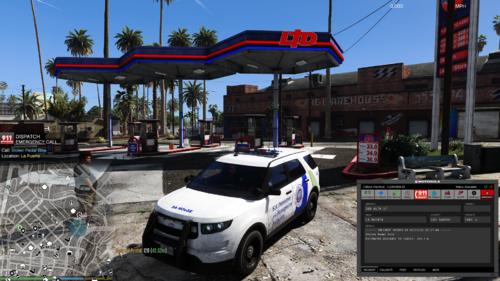
Hello! JosephW here! I have been working on a new GD vehicle livery today!
PLEASE NOTE: THE REAR OF THE LIVERY IN PHOTOS IS WRONG, HOWEVER IT HAS BEEN UPDATED IN THE DOWNLOAD!
Let me know on and thing that needs fixing or needs to be updated in the comments or message
me on discord (Joseph W.#1407).
The vehicle was made by @SGT Fozzy
https://www.lcpdfr.com/downloads/gta5mods/vehiclemodels/40731-act-police-iload-non-els/
Requirements: -The model download (https://www.lcpdfr.com/downloads/gta5mods/vehiclemodels/40731-act-police-iload-non-els/)
-OpenIV (Basic Knowledge)
Installation is quite simple:
Replace the drag and drop the model and .YTD into OpenIV and edit the iload_sign_1 to the .png for the GD livery.
Remember to click save. Open the .YFT and make sure everything works.
You can search a video if needed. It is the same process for all vehicles in GTA.
Short Description
Taillights - GrimmNuggetAU
ACT Police Gear - 1Kachy, textured by Fozzy
Rear Cage - 1Kachy
Other interior gear - Raz3r
Trunk Gear - GTA 5 Props retextured by Fozzy
Code 3 Pursuit - Kane
Other LEDs - Cj24 and Krul
Major edits and fixes to base model, various retextures, livery and putting it all together - Fozzy
I use Ozzys VICPOL livery template.





.thumb.png.616be9d67781977562d321f2d40aacd8.png)



![OCRP Postal Map - Fixed Duplicate Postals and Atlas Style [FiveM]](http://s3-screenshots.int-cdn.lcpdfrusercontent.com/resize/500/-/monthly_2026_07/624688352-f61f6a95-cab2-4dbf-8e15-eac238807cc7.thumb.jpg.f9356ce9ac807f74bb9d897e93a8242d.jpg)


Recommended Comments
Create an account or sign in to comment