


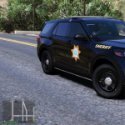


Here's a NMSP pack starting with a few vehicles. I will be adding a couple more from givens pack within the next few days.
You don't have to use my YTD or XML files. Only if you want red and white lights which I do recommend.
Edited by CursedSincexBirth
Info
What's New in Version 3.0.0
Released
Added 18 Charger skin and 2 Dodge Durango skins.
Added YTD for Slicktop Explorer from 21FPIU Pack.
Short Description
5 NMSP skins W/Cusom Lights&Pattern
Although I release a YTD file I take no credits for any model work. All Creds go to pack creators. Only thing I own are the skins.
- GTAKING23000 and Delgado24
-
 1
1
-
 1
1

.thumb.png.483d1ec6df12d0a3253ddd143c36f133.png)
.thumb.png.aba303ef3347895c10dd77447e0939d1.png)



![POLISH DISPATCH [v0.8 BETA] (AI)](http://s3-screenshots.int-cdn.lcpdfrusercontent.com/resize/500/-/monthly_2026_06/fdsfs.thumb.png.e1c967aa166bd9d1ced0352f308f4ced.png)









Recommended Comments
Create an account or sign in to comment