
Skip to content
View in the app

A better way to browse. Learn more.

LCPDFR.com

A full-screen app on your home screen with push notifications, badges and more.

To install this app on iOS and iPadOS
  1. Tap the Share icon in Safari
  2. Scroll the menu and tap Add to Home Screen.
  3. Tap Add in the top-right corner.
To install this app on Android
  1. Tap the 3-dot menu (⋮) in the top-right corner of the browser.
  2. Tap Add to Home screen or Install app.
  3. Confirm by tapping Install.

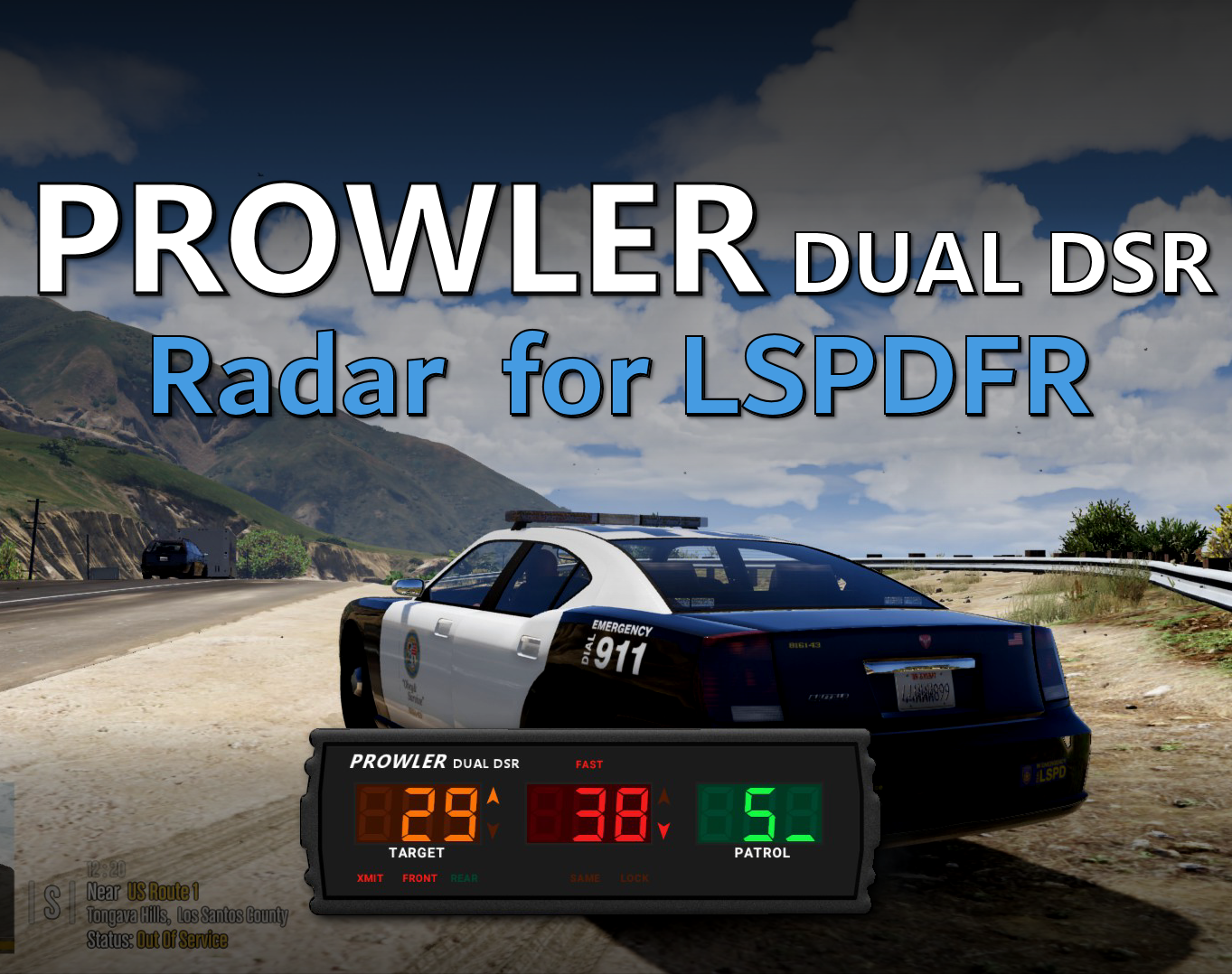
Prowler Radar 1.3.1

(37 reviews)

4 Screenshots


Discord: https://discord.gg/AuJCUag


Features:

  • A realistic radar system based on the real-world Stalker Dual DSR
  • Four different modes including stationary and moving
  • A "fast" tracker to differentiate between strongest and fastest signal
  • An "auto lock" feature that allows you to set a maximum speed


Prowler-Dual-DSR.pdf

Edited by opus49
Updated credits

What's New in Version 1.3.1

Released

Prowler Radar 1.3

  • Added on screen remote control
  • Added doppler sounds
  • Added "debug mode" so you can see the radar logic in real time
  • Made beam width configurable
  • Made police vehicle requirement optional
  • Added plate reader
  • Added minimum target speed


Short Description

A realistic police radar.

User Feedback

Recommended Comments

Troll96

Members

Awww this is really nice bud. thanks for the nicely pluging .....

suhdudez502

Members

My apologies if this has been answered. 

First off thank you for this. This is a MUST HAVE. 


Do you by chance known how to add a "modifier" key to the original key bindings you have in the ini? 

To many things being used for the numpad for me haha 


Thanks! 

opus49

Insiders Author

4 minutes ago, suhdudez502 said:

My apologies if this has been answered. 

First off thank you for this. This is a MUST HAVE. 


Do you by chance known how to add a "modifier" key to the original key bindings you have in the ini? 

To many things being used for the numpad for me haha 


Thanks! 


You should be able to add a modifier for any of the keys by appending Modifer to the name.  For example:


Power+SettingsKey=NumPad9

Power+SettingsKeyModifier=LControlKey

GenexGaming

Members

(edited)

If I click Numpad9 nothing happens. If I hold Numpad9, both the Prowler and the Settings Menu opens at the same time. I can't seem to work out why. 😕

Installed 'ProwlerRadar' folder, 'ProwlerRadar.ini', and 'ProwlerRadar.dll' in 'plugins/LSPDFR' folder.

ProwlerRadar.ini settings:

[Controls]
Power+SettingsKey=NumPad9
Xmit+AntennaKey=NumPad0
MovSta+SameOppKey=NumPad1
FastLockKey=NumPad4
StrongLockKey=NumPad6
AutoLockKey=NumPad5

[Display]
PosX=708
PosY=850
Scale=80

[Radar]
BlipLock=True
AutoLockLimit=75
Range=200
UseMetric=False
Volume=3
Voice=True
HoldInterval=500

[Advanced]
LogLevel=0


Edited by GenexGaming

cakuzma

Members

I was wondering if you could add the rear radar on as well as the front like how the fiveM version is, and have them both working this way u can see the front and back at the same time?

Spoiler

0a0699d4a6e15cf03a9fe81bbdbb8a49a9422bd1

also wondering if you can bring in that plate reader too, that be nice

Officer7432

Members

I absolutely love the owner manual's guide; it's got pictures details and so descriptive! 

eidwsatan

Members

Brilliant Plugin!

I've been playing some FiveM with my friends and we use a plugin similar to this.. I've been looking for one like that for ages!

Stooge

Members

This is a great mod. While watching some fivem streams I noticed they have a display of the plate for the car in front of and behind them, which makes it super easy to read the plates. Is that something that would be difficult to add to this mod? I poked around the dll a bit, and it seems like it would be able to obtain the information but it was late and I did not chase that rabbit too far down the rabbit hole. If you don't want to do that, which I totally understand, in your opinion would it be very difficult to create such a mod? I'm not necessarily opposed to making one myself, but I have not gotten into the guts of the system and I don't want to go down that road if it's ultimately a dead end or a very steep climb.

This is by FAR the best radar script for lspdfr. Have you considered making a second script that is inspired by the Genesis II select radar system? Should for the most part be a revision of the audio and textures. Would be amazing! Great work.


Robo22

Members

Great Mod, thank you

Yutsuko

Members

Having an issue of moving it to another spot and Scaling it. There No Bind Options like (8) to open the menu. 

I even type the settings in and it didn't work still the SettingsMenuKey=NumPad8 And Still Doesn't work


[Controls]
Power+SettingsKey=NumPad9
Xmit+AntennaKey=NumPad0
MovSta+SameOppKey=NumPad1
FastLockKey=NumPad5
StrongLockKey=NumPad4
AutoLockKey=NumPad2

[Display]
PosX=708
PosY=850
Scale=80

[Radar]
BlipLock=True
AutoLockLimit=75
Range=200
UseMetric=False
Volume=3
Voice=True
HoldInterval=500

[Advanced]
LogLevel=0
 

opus49

Insiders Author

2 hours ago, Yutsuko said:

Having an issue of moving it to another spot and Scaling it. There No Bind Options like (8) to open the menu. 

I even type the settings in and it didn't work still the SettingsMenuKey=NumPad8 And Still Doesn't work


[Controls]
Power+SettingsKey=NumPad9
Xmit+AntennaKey=NumPad0
MovSta+SameOppKey=NumPad1
FastLockKey=NumPad5
StrongLockKey=NumPad4
AutoLockKey=NumPad2

[Display]
PosX=708
PosY=850
Scale=80

[Radar]
BlipLock=True
AutoLockLimit=75
Range=200
UseMetric=False
Volume=3
Voice=True
HoldInterval=500

[Advanced]
LogLevel=0
 

Read the documentation 

Aviation110

Members

I dont have a menu settings line on the config settings so I cant open the menu?

opus49

Insiders Author

48 minutes ago, Aviation110 said:

I dont have a menu settings line on the config settings so I cant open the menu?

Read the documentation.

krontron

Members

Hey I have an issue with this. Whenever I press Numpad9 a red supercar spawns with 2 people who shoot me lol. What do I do?

opus49

Insiders Author

23 minutes ago, krontron said:

Hey I have an issue with this. Whenever I press Numpad9 a red supercar spawns with 2 people who shoot me lol. What do I do?

That has nothing to do with Prowler Radar.  It's probably from a trainer.

krontron

Members

18 minutes ago, opus49 said:

That has nothing to do with Prowler Radar.  It's probably from a trainer.

Yeah, I just turned on numlock and it worked great, good mod. I have a trainer so yeah.

chrisbrownwsu13

Members

Hi, no matter what i do i cant get plug in to load. someone plz help


Charlie686

Members

17 minutes ago, chrisbrownwsu13 said:

Hi, no matter what i do i cant get plug in to load. someone plz help


You should provide ample information in order for anyone to assist you.

This can include:

A) How you installed the plugin / when you are expecting it to load.

B) Your RagePluginHook log file - a text document found in your main directory.

C) What steps you have already taken in order to resolve your issue. 


It is highly recommended that you forward this information through the Discord server found here where we can more appropriately help you. 

chrisbrownwsu13

Members

Hello, i watched every tutorial. I drag the winar folder i opend to the main directory as in all the videos, it just wont open plugins on launch screen such as prowler, lpd, and so on but it loads compulite, eu, ultimate backup, and grammar police. they all were downloaded the same way and drag and dropped the same way

Speedbird001

Members

(edited)

when i download the mod, lspdfr crashes when i go on duty (i haven't checked those messages yet) but when i un-install the mod fully, i get these messages: [8/18/2022 9:14:09 PM.797] LSPD First Response: ==============================
[8/18/2022 9:14:09 PM.797] LSPD First Response: UNHANDLED EXCEPTION DURING GAME FIBER TICK
[8/18/2022 9:14:09 PM.797] LSPD First Response: ------------------------------
[8/18/2022 9:14:09 PM.797] LSPD First Response: Origin: Game fiber "Plugin "LSPD First Response" main fiber".
[8/18/2022 9:14:09 PM.797] LSPD First Response: ------------------------------
[8/18/2022 9:14:09 PM.797] LSPD First Response: Exception type: System.NullReferenceException
[8/18/2022 9:14:09 PM.797] LSPD First Response: Exception message: Object reference not set to an instance of an object.
[8/18/2022 9:14:09 PM.797] LSPD First Response: ------------------------------
[8/18/2022 9:14:09 PM.797] LSPD First Response: Inner exceptions:
[8/18/2022 9:14:09 PM.797] LSPD First Response: ------------------------------
[8/18/2022 9:14:09 PM.797] LSPD First Response: Stack trace:
[8/18/2022 9:14:09 PM.798] LSPD First Response: at ‪‏‪‭‬‮‍‫‫‪‏‫‏‏‎‌‍‬‭‬‬‌‫‭‍‫‮.‎‫‌‬‮‮‍‫‫‍‍‪‮‎‏‮‬‌‭‮()
[8/18/2022 9:14:09 PM.798] at ‮‫‪‪‎‬‏‭‏‪‪‌‭‬‏‭‏‫‎‮.‭‫‍‍‏‌‭‬‪‌‭‮‬‮‮‏‮‫‍‮‪‪‏‮‬‬‬‫‮(Boolean )
[8/18/2022 9:14:09 PM.798] at LSPD_First_Response.Mod.API.Functions.OnDutyStateChangedEventHandler.Invoke(Boolean onDuty)
[8/18/2022 9:14:09 PM.798] at tpVaDKrHxMEhmSNVSPKRHnbLrfWK.sTgtUsxlOVMFKTyYDNLOJvmDKliu(Boolean ) in D:\GTA V\LSPD First Response\LSPD First Response\Mod\PlayerDutyController.cs:line 69
[8/18/2022 9:14:09 PM.798] at tpVaDKrHxMEhmSNVSPKRHnbLrfWK.xSUvlUYEzjIhRIrZxMIVwdGQsCEp(Boolean , Boolean ) in D:\GTA V\LSPD First Response\LSPD First Response\Mod\PlayerDutyController.cs:line 371
[8/18/2022 9:14:09 PM.798] at tpVaDKrHxMEhmSNVSPKRHnbLrfWK.obVcplLiEhEpMNDWbAWrCdLGelUF(Boolean , Boolean , Boolean ) in D:\GTA V\LSPD First Response\LSPD First Response\Mod\PlayerDutyController.cs:line 291
[8/18/2022 9:14:09 PM.798] at tBCkIHVvKSkmuDLSCDiYRMBTCEI.UcJVaWsfRsxMGCBaiebhavuPpHQcb(XUbpSMBGWSEPtnPiAwzujOVqFyHU , Boolean ) in D:\GTA V\LSPD First Response\LSPD First Response\Mod\GamePlayer.cs:line 188
[8/18/2022 9:14:09 PM.798] at qSBwKYnXFHwTWUqewTKzkwsyypIi.UcJVaWsfRsxMGCBaiebhavuPpHQcb(XUbpSMBGWSEPtnPiAwzujOVqFyHU , RcVNrVMuwjnGlmtrapVWjXqjEUjX ) in D:\GTA V\LSPD First Response\LSPD First Response\Mod\Character\CharacterSwitchManager.cs:line 452
[8/18/2022 9:14:09 PM.798] at qSBwKYnXFHwTWUqewTKzkwsyypIi.yGtZhwxewSuyLymMfSGiFjwZFikiA(XUbpSMBGWSEPtnPiAwzujOVqFyHU , Vehicle , Boolean , Boolean , RcVNrVMuwjnGlmtrapVWjXqjEUjX ) in D:\GTA V\LSPD First Response\LSPD First Response\Mod\Character\CharacterSwitchManager.cs:line 325
[8/18/2022 9:14:09 PM.798] at qSBwKYnXFHwTWUqewTKzkwsyypIi.cNVSeNCBJIFRRjghHkMxpTqtoCmN(XUbpSMBGWSEPtnPiAwzujOVqFyHU , oPGrEkPnsqvJyErDZtzHJjWrvncJ , RcVNrVMuwjnGlmtrapVWjXqjEUjX ) in D:\GTA V\LSPD First Response\LSPD First Response\Mod\Character\CharacterSwitchManager.cs:line 245
[8/18/2022 9:14:09 PM.798] at qSBwKYnXFHwTWUqewTKzkwsyypIi.hWWxKANVqOekrVziGkVZctaVfscW(XUbpSMBGWSEPtnPiAwzujOVqFyHU , SwitchMode , SpawnPoint , RcVNrVMuwjnGlmtrapVWjXqjEUjX ) in D:\GTA V\LSPD First Response\LSPD First Response\Mod\Character\CharacterSwitchManager.cs:line 135
[8/18/2022 9:14:09 PM.798] at qSBwKYnXFHwTWUqewTKzkwsyypIi.avfjceesZprODuoZbBWicywnczvk(XUbpSMBGWSEPtnPiAwzujOVqFyHU , SwitchMode , SpawnPoint , RcVNrVMuwjnGlmtrapVWjXqjEUjX ) in D:\GTA V\LSPD First Response\LSPD First Response\Mod\Character\CharacterSwitchManager.cs:line 61
[8/18/2022 9:14:09 PM.798] at eilcMlRBmitBeNmgAlpWITnLJwvH.XYxjLUawXNjmoMadMvMjSapTsyLp() in D:\GTA V\LSPD First Response\LSPD First Response\Mod\LSPDFR.cs:line 362
[8/18/2022 9:14:09 PM.798] at eilcMlRBmitBeNmgAlpWITnLJwvH.hhfejtGvFgGCKcdxAHEBUxxqYvExB(Boolean ) in D:\GTA V\LSPD First Response\LSPD First Response\Mod\LSPDFR.cs:line 348
[8/18/2022 9:14:09 PM.798] at Rage.GameFiber.Main()
[8/18/2022 9:14:09 PM.798] LSPD First Response: ==============================
[8/18/2022 9:14:09 PM.798] LSPD First Response: 
[8/18/2022 9:14:09 PM.803] LSPD First Response: [FATAL] Forced termination
[8/18/2022 9:14:09 PM.806] LSPD First Response: [TRACE] Released 0 entities from DefaultContentManager
[8/18/2022 9:14:11 PM.852] LSPD First Response: [INFO] LSPDFR has shut down

Edited by Speedbird001

Speedbird001

Members

SOLVED THE ISSUE BY MYSELF, for some reason the ragenativeui.dll file got deleted

masterf5

Members

thanks

lolryder

Members

(edited)

works fine


Edited by lolryder

Create an account or sign in to comment

Latest Mods

Account

Navigation

Search

Search

Configure browser push notifications

Chrome (Android)
  1. Tap the lock icon next to the address bar.
  2. Tap Permissions → Notifications.
  3. Adjust your preference.
Chrome (Desktop)
  1. Click the padlock icon in the address bar.
  2. Select Site settings.
  3. Find Notifications and adjust your preference.

















