Skip to content
View in the app

A better way to browse. Learn more.

LCPDFR.com

A full-screen app on your home screen with push notifications, badges and more.

To install this app on iOS and iPadOS
  1. Tap the Share icon in Safari
  2. Scroll the menu and tap Add to Home Screen.
  3. Tap Add in the top-right corner.
To install this app on Android
  1. Tap the 3-dot menu (⋮) in the top-right corner of the browser.
  2. Tap Add to Home screen or Install app.
  3. Confirm by tapping Install.

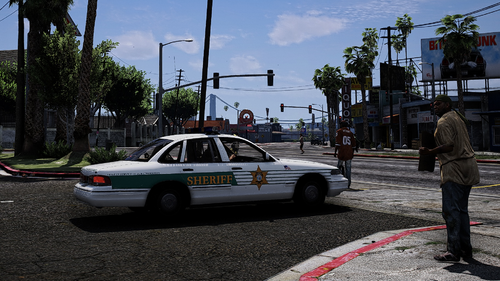
BCSO Black & White Texture Mini Pack 1.0.1

(0 reviews)

8 Screenshots

This is my first ever texture that i've uploaded here, let me know what you think about it, I'd really appreciate that.


If you have any questions, be sure to contact me on discord: Mantas#1730


Also if anyone wants to support me, you can do so by paypal, my paypal gmail is mantasnarbunt@gmail.com


This is a BCSO Black & White vehicle texture mini pack, original vehicle here:


Edited by Mantas Na

What's New in Version 1.0.1

Released

Added readme (Tutorial)


Short Description

Black & White BCSO Vehicle Texture Mini Pack

User Feedback

Recommended Comments

DarKKlusteR

Members

Remove the [ELS] from the title please. It almost confused me into thinking it was an actual vehicle model pack instead of a texture pack. 

Mantas Na

Members Author

8 hours ago, DarKKlusteR said:

Remove the [ELS] from the title please. It almost confused me into thinking it was an actual vehicle model pack instead of a texture pack. 

done, sorry lol i wasn't sure if people do that with texture files or not

DarKKlusteR

Members

4 hours ago, Mantas Na said:

done, sorry lol i wasn't sure if people do that with texture files or not

All good and nah it's usually always with Vehicle Models 🙂

Create an account or sign in to comment

Latest Mods

Account

Navigation

Search

Search

Configure browser push notifications

Chrome (Android)
  1. Tap the lock icon next to the address bar.
  2. Tap Permissions → Notifications.
  3. Adjust your preference.
Chrome (Desktop)
  1. Click the padlock icon in the address bar.
  2. Select Site settings.
  3. Find Notifications and adjust your preference.