Skip to content
View in the app

A better way to browse. Learn more.

LCPDFR.com

A full-screen app on your home screen with push notifications, badges and more.

To install this app on iOS and iPadOS
  1. Tap the Share icon in Safari
  2. Scroll the menu and tap Add to Home Screen.
  3. Tap Add in the top-right corner.
To install this app on Android
  1. Tap the 3-dot menu (⋮) in the top-right corner of the browser.
  2. Tap Add to Home screen or Install app.
  3. Confirm by tapping Install.

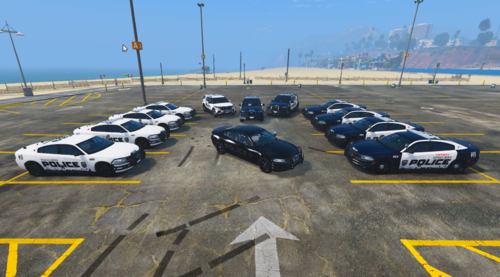
Mesquite, NV Charger Texture 1.0

(7 reviews)

3 Screenshots

This is a Mesquite, NV 2012 Dodge Charger texture. Model that you can download with it is by cj24 in the pack here: http://www.gta-modding-chest.com/database/111-liberty-city-police-department-pack-charger-cvpi-tahoe-els/index.html. Also one thing is different about texture and the picture is that the light bar in game is not colored red and blue. Constructive criticism is welcome. This looks best if you use and ENB (Which I used) and looks best if the car is cleaned without any dirt. If you have any question or suggestions, please comment or message me. Special thanks to Carrythxd for the screenshots. Enjoy! Based off the Dodge Charger below.

33k7gxl.jpg

What's New in Version 1.0

Released

  • Texture Created

User Feedback

Recommended Comments

Guest

Guest

Guests

Where did you end up finding your font?

Firefighter 5663

Members Author

What map is that?! awesome charger too!

Thanks, It's Nine30's map that he's going to release soon.

JayGames

Members

Nice what map addon is that?

Firefighter 5663

Members Author

Nice what map addon is that?

Thanks, It's Nine30's map that he's going to release soon.

Firefighter 5663

Members Author

Pack of Mesquite, NV police skins is coming!

krille48

Members

i think that the map is route 66 but Im not sure

Firefighter 5663

Members Author

i think that the map is route 66 but Im not sure

It is

Create an account or sign in to comment

Account

Navigation

Search

Search

Configure browser push notifications

Chrome (Android)
  1. Tap the lock icon next to the address bar.
  2. Tap Permissions → Notifications.
  3. Adjust your preference.
Chrome (Desktop)
  1. Click the padlock icon in the address bar.
  2. Select Site settings.
  3. Find Notifications and adjust your preference.