Skip to content
View in the app

A better way to browse. Learn more.

LCPDFR.com

A full-screen app on your home screen with push notifications, badges and more.

To install this app on iOS and iPadOS
  1. Tap the Share icon in Safari
  2. Scroll the menu and tap Add to Home Screen.
  3. Tap Add in the top-right corner.
To install this app on Android
  1. Tap the 3-dot menu (⋮) in the top-right corner of the browser.
  2. Tap Add to Home screen or Install app.
  3. Confirm by tapping Install.

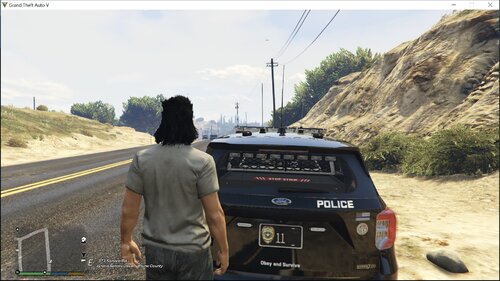
EUP replacement belt - Version 7 - Jake's Designs 7.0.0 7.0.0

(0 reviews)

1 Screenshot

EUP Replacement BELT - Version 7 - Jake's Designs 7.0.0


DISCORD LINK

https://discord.gg/hz5pnvj


____________________________________

**Credits**

Killdaa

**Software Needed**
-OpenIV
-EUP & EUP Law & Order


____________________________________

**Install**

**************************MAKE SURE TO BACK UP ORIGINALS FIRST******************************

1)
Start OpenIV and locate the following directory. 

    \Grand Theft Auto V\mods\update\update.rpf\x64\eup\eup_componentpeds.rpf\

2)
Copy files from each corresponding folder located inside the eup_componentpeds.rpf

accs_001_u.ydd Contains the belt
accs_diff_001_a_uni Contains a yellow Taser

accs_diff_001_b_uni Contains a black Taser

____________________________________


DONT TRY AND CRACK THIS
DONT TRY AND TAKE CREDIT FOR MY WORK


Donations are greatly appreciated!

paypal.me/JakeDesignss


Have a good day,

Jake


Screenshot (355).png

User Feedback

Recommended Comments

Jetty Bot

Members

Do your belts replace the same file? Or can you use multiple at the same time?

Either way keep up the great work!

Markren10086

Members

The nightstick looks really good!

MikMak86

Members

Looks great.  Didn't you also have a holster on here for a half second?

Jake.

Members Author

5 minutes ago, MikMak86 said:

Looks great.  Didn't you also have a holster on here for a half second?

I did yes but I decided to get rid of it as it caused issues

jeffisnotacop

Members

Just now, Jake's Designs said:

I did yes but I decided to get rid of it as it caused issues

do you plan on working on it and possibly bringing it back? i think a new holster would be epic

Jake.

Members Author

57 minutes ago, jeffisnotacop said:

do you plan on working on it and possibly bringing it back? i think a new holster would be epic

yea soon


MikMak86

Members

5 hours ago, Jake's Designs said:

I did yes but I decided to get rid of it as it caused issues


Gotcha.


One suggestion for a layout,  from the center of the buckle and working counter clockwise: Double cuff pouch, baton, taser, flashlight, radio, glove pouch center back, pepper, space for holster, and then triple mag pouch.  It's the duty belt set up I use, IRL, and would love to have it in game.

Jake.

Members Author

6 minutes ago, MikMak86 said:


Gotcha.


One suggestion for a layout,  from the center of the buckle and working counter clockwise: Double cuff pouch, baton, taser, flashlight, radio, glove pouch center back, pepper, space for holster, and then triple mag pouch.  It's the duty belt set up I use, IRL, and would love to have it in game.

If you could private message me a picture so I can get a better idea of it.

Devin Plays

Members

On 12/12/2019 at 2:11 AM, JrJet said:

Do your belts replace the same file? Or can you use multiple at the same time?

Either way keep up the great work!


You certainly can use multiple, but you may have to rename the files yourself to stop em from overwriting.  Look at the description of the video here and you can see all the different belts I'm using, most of them being Jake's awesome designs!


Ranger61

Members

My only complaint about any of the belts is the magazine holsters are too shiny around the corners. Is there any way you could reduce that? Beyond that, I really admire your work. This belt is pretty cool for when you play as a high risk 

Ailarian

Members

I'm a n00b when it comes to playing with mods, starting just a few days ago so there's probably a simple answer to my question (I hope...).

I can't find the path referred to in the installation manual \Grand Theft Auto V\mods\update\update.rpf\x64\eup\eup_componentpeds.rpf\. 

For me it stops at \Grand Theft Auto V\mods\update\update.rpf\x64. 

I have installed the packages listed as required EUP & EUP Law & Order and OIV

image.png

londonrials

Members

(edited)

On 12/22/2019 at 10:56 AM, Ailarian said:

I'm a n00b when it comes to playing with mods, starting just a few days ago so there's probably a simple answer to my question (I hope...).

I can't find the path referred to in the installation manual \Grand Theft Auto V\mods\update\update.rpf\x64\eup\eup_componentpeds.rpf\. 

For me it stops at \Grand Theft Auto V\mods\update\update.rpf\x64. 

I have installed the packages listed as required EUP & EUP Law & Order and OIV

image.png

It may be way too late, but you need to do that in OpenIV not File Explorer.

Edited by lujerex

officerorange2

Members

On 4/7/2020 at 12:24 PM, lujerex said:

It may be way too late, but you need to do that in OpenIV not File Explorer.

It is openIV...


TheRealKingRyan

Members

Dude makes awesome belts!!!

Lucky9752

Members

In which folder must the belt


Create an account or sign in to comment

Account

Navigation

Search

Search

Configure browser push notifications

Chrome (Android)
  1. Tap the lock icon next to the address bar.
  2. Tap Permissions → Notifications.
  3. Adjust your preference.
Chrome (Desktop)
  1. Click the padlock icon in the address bar.
  2. Select Site settings.
  3. Find Notifications and adjust your preference.