Skip to content
View in the app

A better way to browse. Learn more.

LCPDFR.com

A full-screen app on your home screen with push notifications, badges and more.

To install this app on iOS and iPadOS
  1. Tap the Share icon in Safari
  2. Scroll the menu and tap Add to Home Screen.
  3. Tap Add in the top-right corner.
To install this app on Android
  1. Tap the 3-dot menu (⋮) in the top-right corner of the browser.
  2. Tap Add to Home screen or Install app.
  3. Confirm by tapping Install.

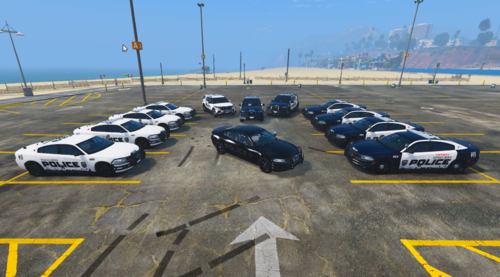
Pasco County Sheriff [LF, Vapid Scout & SSO] 1.0.0

(0 reviews)

5 Screenshots

Hey there! This excellent texture is originally made by Slendis, who then gave me permission to convert and release it for these true Lore Friendly Vehicles.

Included is a Readme, a 4K and 2K version of the textures for each car.


[Slendis' Original File]


[Links to Lore Friendly Vehicles]


[VAPID SCOUT POLICE UTILITY]

https://www.gta5-mods.com/vehicles/2012-vapid-scout-police-utility-add-on-mapped


[VAPID TORRENCE SSO]

https://www.gta5-mods.com/vehicles/2015-vapid-torrence-sso-vapid-interceptor-add-on-replace-mapped


TO BE CLEAR - I DID NOT CREATE ANY LOGOS OR TEXT FOR THESE VEHICLES, I ONLY CONVERTED THE EXISTING TEXTURES AFTER BEING GIVEN PERMISSION BY THE CREATOR.


Pasco Cover.png

User Feedback

Recommended Comments

OfficerNicolas

Members

so the link you posted of the scout doesnt have the valor lightbar where can i find the one with the valor?

PacificProjects

Members Author

4 hours ago, OfficerNicolas said:

so the link you posted of the scout doesnt have the valor lightbar where can i find the one with the valor?

Whoops! These are older screenshots using a couple private models. I'll get some updated screenshots with the models linked soon. 🙂

OfficerNicolas

Members

10 hours ago, Smellybrick said:

Whoops! These are older screenshots using a couple private models. I'll get some updated screenshots with the models linked soon. 🙂

ahh got it no prob

Create an account or sign in to comment

Account

Navigation

Search

Search

Configure browser push notifications

Chrome (Android)
  1. Tap the lock icon next to the address bar.
  2. Tap Permissions → Notifications.
  3. Adjust your preference.
Chrome (Desktop)
  1. Click the padlock icon in the address bar.
  2. Select Site settings.
  3. Find Notifications and adjust your preference.