Skip to content
View in the app

A better way to browse. Learn more.

LCPDFR.com

A full-screen app on your home screen with push notifications, badges and more.

To install this app on iOS and iPadOS
  1. Tap the Share icon in Safari
  2. Scroll the menu and tap Add to Home Screen.
  3. Tap Add in the top-right corner.
To install this app on Android
  1. Tap the 3-dot menu (⋮) in the top-right corner of the browser.
  2. Tap Add to Home screen or Install app.
  3. Confirm by tapping Install.

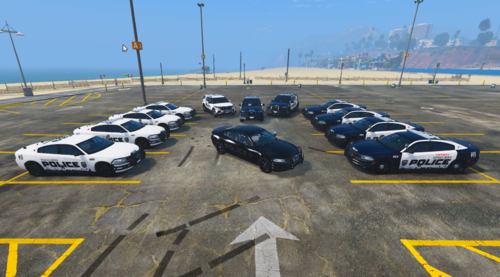
[4K] LSPD PACK (SEASIDE PARK, NJ) 1.0.0

(0 reviews)

11 Screenshots

here is a simple black and white design. its loosely based off of seaside park, nj police. hope you enjoy...


if you notice anything wrong or out of sorts, message me and ill fix it!


I USED THIS VEHICLE PACK:


Image result for SEASIDE PARK NJ POLICEImage result for SEASIDE PARK NJ POLICE

🤗


User Feedback

Recommended Comments

GhostDaGhost

Members

Nice work on the liveries man!

Trooper Pippy

Members

Hey, I like the look of this pack and am considering downloading. I do have one critique regarding this pack; namely the the livery is lore friendly but the license plate isn't. Is there a possibility of either changing it to be lore friendly or adding an option? 

KA266

Members Author

5 hours ago, Trooper Pippy said:

Hey, I like the look of this pack and am considering downloading. I do have one critique regarding this pack; namely the the livery is lore friendly but the license plate isn't. Is there a possibility of either changing it to be lore friendly or adding an option? 

Yea sure I’ll change them. By the end of the day I’ll have them all updated. 

springnick

Members

very nice liveries, i like this simple design! Will you add liveries for newer chargers (like 2015/2016) in the future?

Create an account or sign in to comment

Account

Navigation

Search

Search

Configure browser push notifications

Chrome (Android)
  1. Tap the lock icon next to the address bar.
  2. Tap Permissions → Notifications.
  3. Adjust your preference.
Chrome (Desktop)
  1. Click the padlock icon in the address bar.
  2. Select Site settings.
  3. Find Notifications and adjust your preference.