


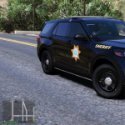


Made these as personals because these are what they use in my area (Santa Rosa New Mexico) just slightly different due to lighting set ups, but I still love them regardless and decided maybe some of you can enjoy these yourself. (They're not 100% accurate models but pretty damn close to it). All Files are included to make what you see in the pics.
Edited by CursedSincexBirth
What's New in Version 1.0
Released
Did a full redo of textures.
Added skin for 2020 Explorer.
Red & White lighting is optional and included in download.
Models used below. FPIU1 is the model I used from 2020 FPIU pack.
Short Description
Guadalupe County Skins
Credits to Ripple for his model and letting me edit and release his YTD file with textures and credits to OfficerAnderson266 for Fonts used.















![Arkansas State Police [4K]](http://s3-screenshots.int-cdn.lcpdfrusercontent.com/resize/500/-/monthly_2026_05/Screenshot_2716.thumb.png.206c8db8b3e9230c2692e6b5b347b435.png)

Recommended Comments
Create an account or sign in to comment