Skip to content
View in the app

A better way to browse. Learn more.

LCPDFR.com

A full-screen app on your home screen with push notifications, badges and more.

To install this app on iOS and iPadOS
  1. Tap the Share icon in Safari
  2. Scroll the menu and tap Add to Home Screen.
  3. Tap Add in the top-right corner.
To install this app on Android
  1. Tap the 3-dot menu (⋮) in the top-right corner of the browser.
  2. Tap Add to Home screen or Install app.
  3. Confirm by tapping Install.

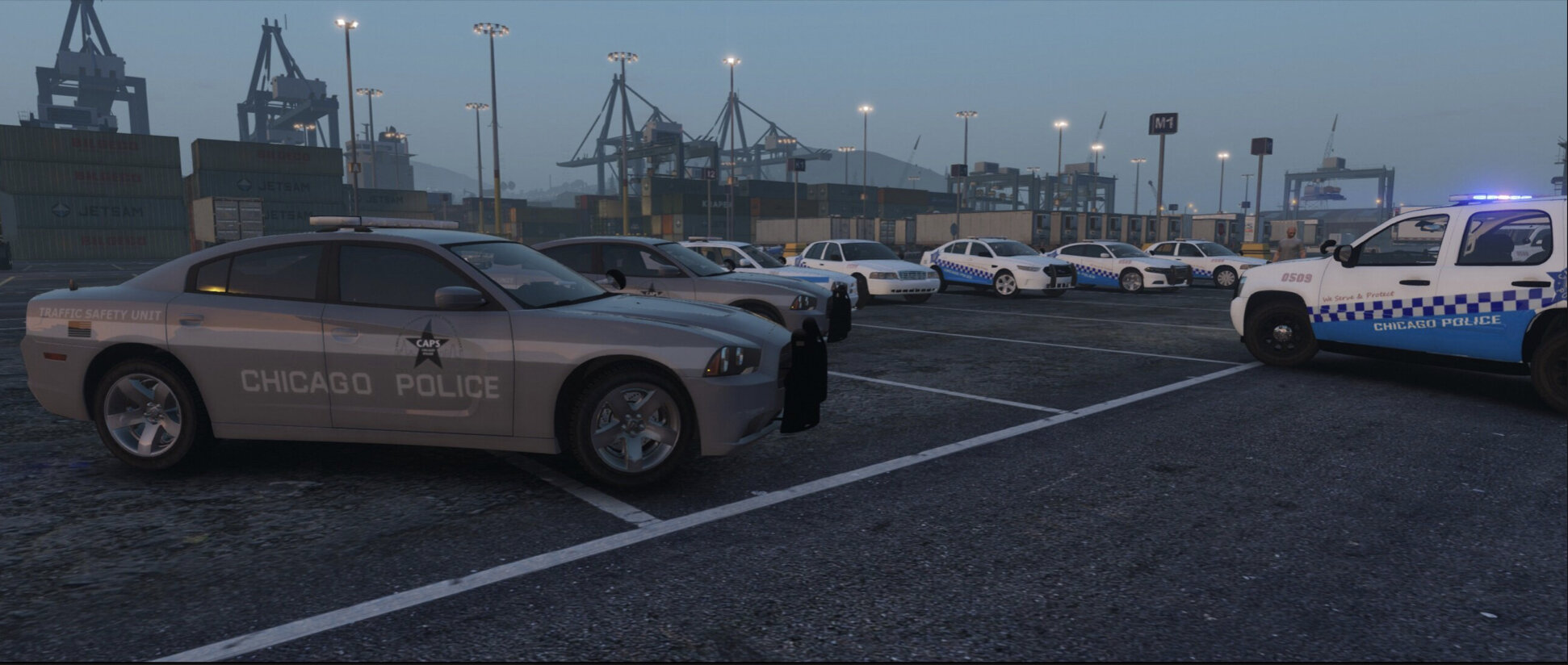
Chicago Police Department Pack 2019 1.0

(2 reviews)

9 Screenshots

THIS MOD PACK ONLY HAS VEHICLE LIVERIES 


Vehicl Model:


HOW TO INSTALL?


  1. Extract folder
  2. replace the vehicle livery with your favorite one (There are 2 different textures the regular one and the traffic safety unit one)
  3. Use Open IV to replace livery.
  4. Enjoy the game and let me know if you need help
  5. if you made a video on it let me know on instagram (username: _abdul.exe)

and also let let me know what country, state, city or county livery you guys want me to make

What's New in Version 1.0

Released

Added ss 


User Feedback

Recommended Comments

PEEP

Members

I would recommend uploading some screenshots so people know what it looks like in game.

but other than that this is actually really well made 5/5  

ABDUL BASITH

Members Author

I would love to do that. But the thing is my game won’t open up due to some script mods. 

Thank you! 


JTWilson23

Members Contributor

45 minutes ago, Gta4gmming said:

I would love to do that. But the thing is my game won’t open up due to some script mods. 

Thank you! 


These look great!  I'll see if I can get a few in-game shots for you!

Schroeder

Members

Very nice! Are there any plans for a lore-friendly version in the future?

ABDUL BASITH

Members Author

57 minutes ago, Schroeder said:

Very nice! Are there any plans for a lore-friendly version in the future?

Yes I’m going to upload Illinois state police pack soon and then Cook County sheriff pack my gta 5 isn’t working so I want someone to screenshot my work and I can give credits 

sledge5557

Members

I love your skins as i told you in the reviews but i have a problem i have never seen before i have your skins in a file on my desktop but i try to change them in open iv its like there is no skins in my file, have you ever seen this before???


please help a 63 year old kid lol

ABDUL BASITH

Members Author

1 hour ago, sledge5557 said:

I love your skins as i told you in the reviews but i have a problem i have never seen before i have your skins in a file on my desktop but i try to change them in open iv its like there is no skins in my file, have you ever seen this before???


please help a 63 year old kid lol

Hopefully this video will help


sledge5557

Members

Thanks but my problem is not installing them, i have 31 moded cars its youe file dos,ent show on openiv. I will send pictures of what it does and you will see.


thank you very much for fast reply.

ABDUL BASITH

Members Author

4 minutes ago, sledge5557 said:

Thanks but my problem is not installing them, i have 31 moded cars its youe file dos,ent show on openiv. I will send pictures of what it does and you will see.


thank you very much for fast reply.


Np and can you send me the pictures of it so many ppl downloaded it they had no problem I’ll see if I can help


acedecepticon

Members

from Chicago humbolt park keep up the great wrk love to see more !!!

ABDUL BASITH

Members Author

27 minutes ago, acedecepticon said:

from Chicago humbolt park keep up the great wrk love to see more !!!

I live in downtown Chicago 

johnny52704

Members

On 7/22/2019 at 7:20 PM, ABDUL BASITH said:

I live in downtown Chicago 

Oh for real where? Because most of these cars do not exist. Infact only 1 does. 

Zaku063

Members

skins dosn't show up when i try to inport them to OpenIV

IcelandicPolice

Members

On 7/24/2019 at 4:27 AM, johnny52704 said:

Oh for real where? Because most of these cars do not exist. Infact only 1 does. 

 nope those exist the new design is on crown vic also, (just not all district have it only very few that actually have the new design on them)

also Chicago pd hace safety unit but in real life they just use the old skin with TRAFFIC SAFETY on the side door 
I think this in the pack is just fictional skins not based on real life 

On 7/24/2019 at 4:27 AM, johnny52704 said:

Oh for real where? Because most of these cars do not exist. Infact only 1 does. 

here is a photo of the crown vic parked in front of one of district in Chicago 

111.jpg

to those that says Chicago doesent have a traffic safety unit yes they do, here is a pic of it in real life.

the skin in the pack is fictional not based on real life design of Chicago pd 

il_chicago_police_traffic_6719-1.jpg

slinkykilla

Members

chicago police don't use taurus's
chicago police don't use charger's
chicago police don't use red/amber lights
chicago police don't use alloy wheele
chicago police don't use grey cars
chicago police use a beat number on the top of the lightbar (where is it?)


gonna give this a 0 out of 5 stars bro, totally wrong cars xD I'm gonna also take a guess that the flashing pattern is incorrect as well.

Ellvir

Members

On 8/25/2020 at 1:43 AM, slinkykilla said:

chicago police don't use taurus's
chicago police don't use charger's
chicago police don't use red/amber lights
chicago police don't use alloy wheele
chicago police don't use grey cars
chicago police use a beat number on the top of the lightbar (where is it?)


gonna give this a 0 out of 5 stars bro, totally wrong cars xD I'm gonna also take a guess that the flashing pattern is incorrect as well.

these are fking textures.. but what would u know

Chris Johnson8

Members

On 5/7/2020 at 8:19 AM, IcelandicPolice said:

 nope those exist the new design is on crown vic also, (just not all district have it only very few that actually have the new design on them)

also Chicago pd hace safety unit but in real life they just use the old skin with TRAFFIC SAFETY on the side door 
I think this in the pack is just fictional skins not based on real life 

here is a photo of the crown vic parked in front of one of district in Chicago 

111.jpg

to those that says Chicago doesent have a traffic safety unit yes they do, here is a pic of it in real life.

the skin in the pack is fictional not based on real life design of Chicago pd 

il_chicago_police_traffic_6719-1.jpg


You're clearly not from Chicago if you find this pack realistic. Chicago Police HAD a Traffic Safety "program" and by that, I mean, you can find 2 cars on the entire internet that say "traffic safety" on the side. One is the older explorer you posted and another is an older ford E350 Van. Both of those vehicles have been removed from CPD's fleet for quite some time now. Obviously CPD does NOT have Chargers and they most definitely would not have chargers in the new livery. They have Taurus' but very very few, I've only seen 3 in my life. They do NOT have the Taurus in their new livery. To my surprise, they do actually have a handful of crown vic's in the new livery. On the entire internet, there are two pictures of CPD crown vic's with the new livery. One with the pushbar that you showed, one with no pushbar. They most definitely do not have tahoes newer than 2013/2014 and very few tahoe's that are unmarked. Even if the pictures of the crown vic in the new livery exist and the traffic safety pictures exist, you will definitely not see ANY of these today, on the streets. So, obviously, this pack is fictional. CPD has a very very simple fleet, and if you are from Chicago you would know this. Typically it seems like 50% of their marked units are the 2016-2020 FPIU's (half of which being the new livery), with maybe 30% being the 2013 FPIU's (none of which being the new livery), and the other 20% being either 2013 Tahoe, Crown Vic, or Taurus (none of which being the new livery). Unmarked units are typically FPIU's with a few crown vics, Tauruses, and tahoes. With the actual fleet being this simple, it's not that hard to make textures that reflect it.

IcelandicPolice

Members

On 1/15/2021 at 10:25 AM, Chris Johnson8 said:


You're clearly not from Chicago if you find this pack realistic. Chicago Police HAD a Traffic Safety "program" and by that, I mean, you can find 2 cars on the entire internet that say "traffic safety" on the side. One is the older explorer you posted and another is an older ford E350 Van. Both of those vehicles have been removed from CPD's fleet for quite some time now. Obviously CPD does NOT have Chargers and they most definitely would not have chargers in the new livery. They have Taurus' but very very few, I've only seen 3 in my life. They do NOT have the Taurus in their new livery. To my surprise, they do actually have a handful of crown vic's in the new livery. On the entire internet, there are two pictures of CPD crown vic's with the new livery. One with the pushbar that you showed, one with no pushbar. They most definitely do not have tahoes newer than 2013/2014 and very few tahoe's that are unmarked. Even if the pictures of the crown vic in the new livery exist and the traffic safety pictures exist, you will definitely not see ANY of these today, on the streets. So, obviously, this pack is fictional. CPD has a very very simple fleet, and if you are from Chicago you would know this. Typically it seems like 50% of their marked units are the 2016-2020 FPIU's (half of which being the new livery), with maybe 30% being the 2013 FPIU's (none of which being the new livery), and the other 20% being either 2013 Tahoe, Crown Vic, or Taurus (none of which being the new livery). Unmarked units are typically FPIU's with a few crown vics, Tauruses, and tahoes. With the actual fleet being this simple, it's not that hard to make textures that reflect it.

nobody cares mate

Create an account or sign in to comment

Account

Navigation

Search

Search

Configure browser push notifications

Chrome (Android)
  1. Tap the lock icon next to the address bar.
  2. Tap Permissions → Notifications.
  3. Adjust your preference.
Chrome (Desktop)
  1. Click the padlock icon in the address bar.
  2. Select Site settings.
  3. Find Notifications and adjust your preference.









