





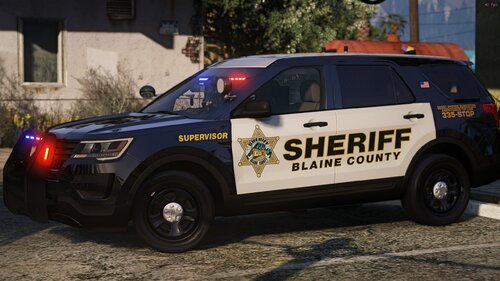
Nothing too fancy, I'm working on a military police themed callout pack so I wanted some cars to use. Just replace Tau_Sign_1-5 with the ones from the pack.
I've included an ELS and Non-ELS version, since I'm waiting on the latest ScriptHook before I can use ELS again!
I'm going to work on the Tahoe, Charger and Crown Vic from the ELS pack below also.
ELS Model
The FPIS from the Los Santos County Sheriff Department Pack 1.0.1 by Fabe
https://www.lcpdfr.com/files/file/16488-els-los-santos-sheriff-departement-pack/
Non-ELS Model
2015 Ford Police Interceptor Sedan LSPD 1.1 by MattJeter
https://www.lcpdfr.com/files/file/11448-2015-ford-police-interceptor-sedan-lspd/
It's my very first upload, so please do bear that in mind. And no photoshop here, all done in paint.net (and it kinda shows)
![[ELS][Addon] Los Santos County Sheriff's Department](http://s3-screenshots.int-cdn.lcpdfrusercontent.com/resize/500/-/monthly_2026_08/PGTA52115079501.png.be571ddbe42a9ab8437eb2035f2fd5bc.thumb.png.4e47642158ad4c67138b7a707ad2bc05.png)



![[ELS-Hybrid | Addon] Sandy Shores 2011 CVPI Pack](http://s3-screenshots.int-cdn.lcpdfrusercontent.com/resize/500/-/monthly_2026_06/1.thumb.png.0352936a973262bab2cefb608858e393.png)




![[RELEASE] LASD/LSSD Livery Pack [WIP / Expanding]](http://s3-screenshots.int-cdn.lcpdfrusercontent.com/resize/500/-/monthly_2026_08/21FPIUGANGU.thumb.png.f0e6002acd0292503460afc05196e30a.png)

![[FiveM Ready] Ko's Tactical Weapon Reanimations](http://s3-screenshots.int-cdn.lcpdfrusercontent.com/monthly_2026_07/thumb.png.b283ec2bda81273e772accb09e4fee78.thumb.png.5420bd422737991c0354bba03593a37c.png)

Recommended Comments
Create an account or sign in to comment