


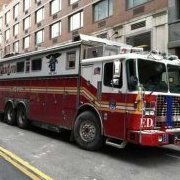


My first anything for GTA V, I was actually surprised that it turned out so well.
Any suggestions/criticism is welcome.
I may add a few more skins later, but for now it's about done.
Recommended to be used for:
FPIU:
FPIS:
Impala:
Freightliner Ambulance:
I know this pack takes some space and effort, but it is the only sufficient ambulance I could find for this.
Use ambulance3 and rename it to any model of your choice, and then continue with the usual steps.
Remember, if you don't wish to use the SWAT vehicle, then you don't have to download the fire & EMS pack. The same goes with all other skins in this pack.
I didn't test any other models, so I don't know if it would work or not.
Directory to put the models: GTA V directory/mods/update/x64/dlcpacks/latest patchday/dlc.rpf/x64/levels/gta5/vehicles.rpf
You need OpenIV or a program like it to do this.
What's New in Version 2.6.0
Released
Tweaked Explorer skin, changed Pittsburgh decals to say Los Santos
Trooper Goetz (Impala)
East Coast Design (Taurus)
medic4523 (Freightliner Ambulance)













![Grapeseed Police Department EUP [Replace]](http://s3-screenshots.int-cdn.lcpdfrusercontent.com/resize/500/-/monthly_2026_04/mainthumbnail.thumb.png.70cc09e736714cc9fbd2cbea7f4fd4f4.png)


Recommended Comments
Create an account or sign in to comment