


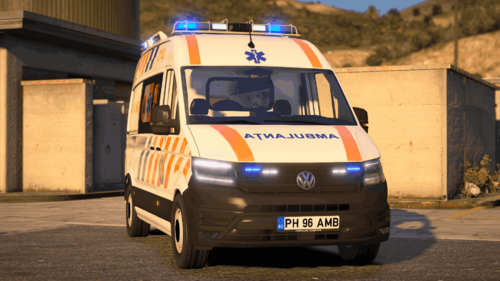
A Hazardous Area Response Team - Incident Support Unit based on the West Midlands Ambulance Service Mercedes.
Included in this
- Vehicle Texture
- Vehicle Model
SJA Paramedic
Britishpolicemods
Britishpolicemods
A better way to browse. Learn more.
A full-screen app on your home screen with push notifications, badges and more.

A Hazardous Area Response Team - Incident Support Unit based on the West Midlands Ambulance Service Mercedes.
Included in this
- Vehicle Texture
- Vehicle Model



.thumb.jpg.f15f1e67a08ebe6124caac2aad8d61bb.jpg)



![[2009] Chevy Corvette ZR1](http://s3-screenshots.int-cdn.lcpdfrusercontent.com/resize/500/-/monthly_2026_04/Screenshot_2024-10-16_033313.thumb.png.ab26f76fd4a05c0dc039376d550874f5.png)
![[!] Whelen Cencom Howler I Authentic](http://s3-screenshots.int-cdn.lcpdfrusercontent.com/resize/500/-/monthly_2026_04/image_2026-04-19_150654634.thumb.png.f3ec4b2a0ab4a6aa5c1227a5d6459400.png)
![GT-PR 4100 Siren [CUSTOM] - Romanian New Ambulances Siren](http://s3-screenshots.int-cdn.lcpdfrusercontent.com/resize/500/-/monthly_2026_04/sirena-electronica-gt-pr4100-gt-pr4100.thumb.png.562ffd6ef840bea39b0a484997193ed2.png)
![[Non-ELS/DLSv2] LAPD BMW R1200RT-P [Addon/FiveM]](http://s3-screenshots.int-cdn.lcpdfrusercontent.com/resize/500/-/monthly_2026_04/1.Thumbnail.thumb.png.ee831bb3bb39882cf936bde4872b0c88.png)
![Flint (MI) Police Department MEGA Pack - [ELS] [REPLACE] [REFLECTIVE]](http://s3-screenshots.int-cdn.lcpdfrusercontent.com/resize/500/-/monthly_2026_04/GTA52026-04-1911-55-43.thumb.png.f2837c08cd5b534a2be0735966c5dd47.png)
![[NSD][DLS] Federal Signal Valor 2020-2022 Ford F-250 Pack](http://s3-screenshots.int-cdn.lcpdfrusercontent.com/monthly_2026_04/Grand_Theft_Auto_V_Screenshot_2026_04_09_-_04_13_05_09.thumb.png.c8b8d400e72f1136fe004d7b9e96698f.png)

![2026 Chandler Police Pack [N-ELS] [DLSV2] [Addon]](http://s3-screenshots.int-cdn.lcpdfrusercontent.com/monthly_2026_04/271590_20260410123339_1.thumb.png.e35ec0859a5743a4e66c109be9e69f49.png)
Recommended Comments
Create an account or sign in to comment