
Skip to content
View in the app

A better way to browse. Learn more.

LCPDFR.com

A full-screen app on your home screen with push notifications, badges and more.

To install this app on iOS and iPadOS
  1. Tap the Share icon in Safari
  2. Scroll the menu and tap Add to Home Screen.
  3. Tap Add in the top-right corner.
To install this app on Android
  1. Tap the 3-dot menu (⋮) in the top-right corner of the browser.
  2. Tap Add to Home screen or Install app.
  3. Confirm by tapping Install.

New Hampshire State Police - Dodge Charger

(6 reviews)

4 Screenshots

a New Hampshire State Police texture for the Dodge Charger ( )

To install it: open SPARK IV and go to modelscdimagesvehicles.img then replace the skin of the car with this one.

Remember

Do no reupload or modify without my permisson.

Don't forget to make BACK UPS.

Based of:
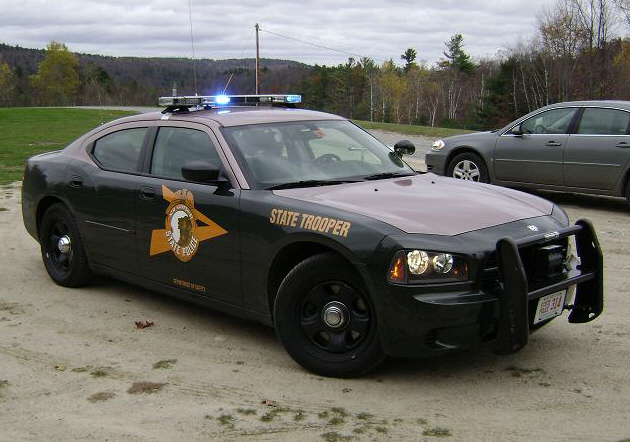
cnpca11887-vi.jpg

User Feedback

Recommended Comments

J.J Designs

Members

im not sure if is you pic wrong but the color you have on your car are not it the colors should bee green and light brown on top

coreygg

Members

can you make a video plz

Rollyhood

Members

harder to tell from your photo but our SP cars are forest green and light brown/dark tan on top. and gold writing

keegs2000

Members

The top is supposed to be "Military Pink".

Create an account or sign in to comment

Account

Navigation

Search

Search

Configure browser push notifications

Chrome (Android)
  1. Tap the lock icon next to the address bar.
  2. Tap Permissions → Notifications.
  3. Adjust your preference.
Chrome (Desktop)
  1. Click the padlock icon in the address bar.
  2. Select Site settings.
  3. Find Notifications and adjust your preference.










