
Skip to content
View in the app

A better way to browse. Learn more.

LCPDFR.com

A full-screen app on your home screen with push notifications, badges and more.

To install this app on iOS and iPadOS
  1. Tap the Share icon in Safari
  2. Scroll the menu and tap Add to Home Screen.
  3. Tap Add in the top-right corner.
To install this app on Android
  1. Tap the 3-dot menu (⋮) in the top-right corner of the browser.
  2. Tap Add to Home screen or Install app.
  3. Confirm by tapping Install.

LSPD Pack [ELS] 4.0

(59 reviews)

16 Screenshots

We haven't gotten an upload from that loser hah in like 2 weeks... Where is he?


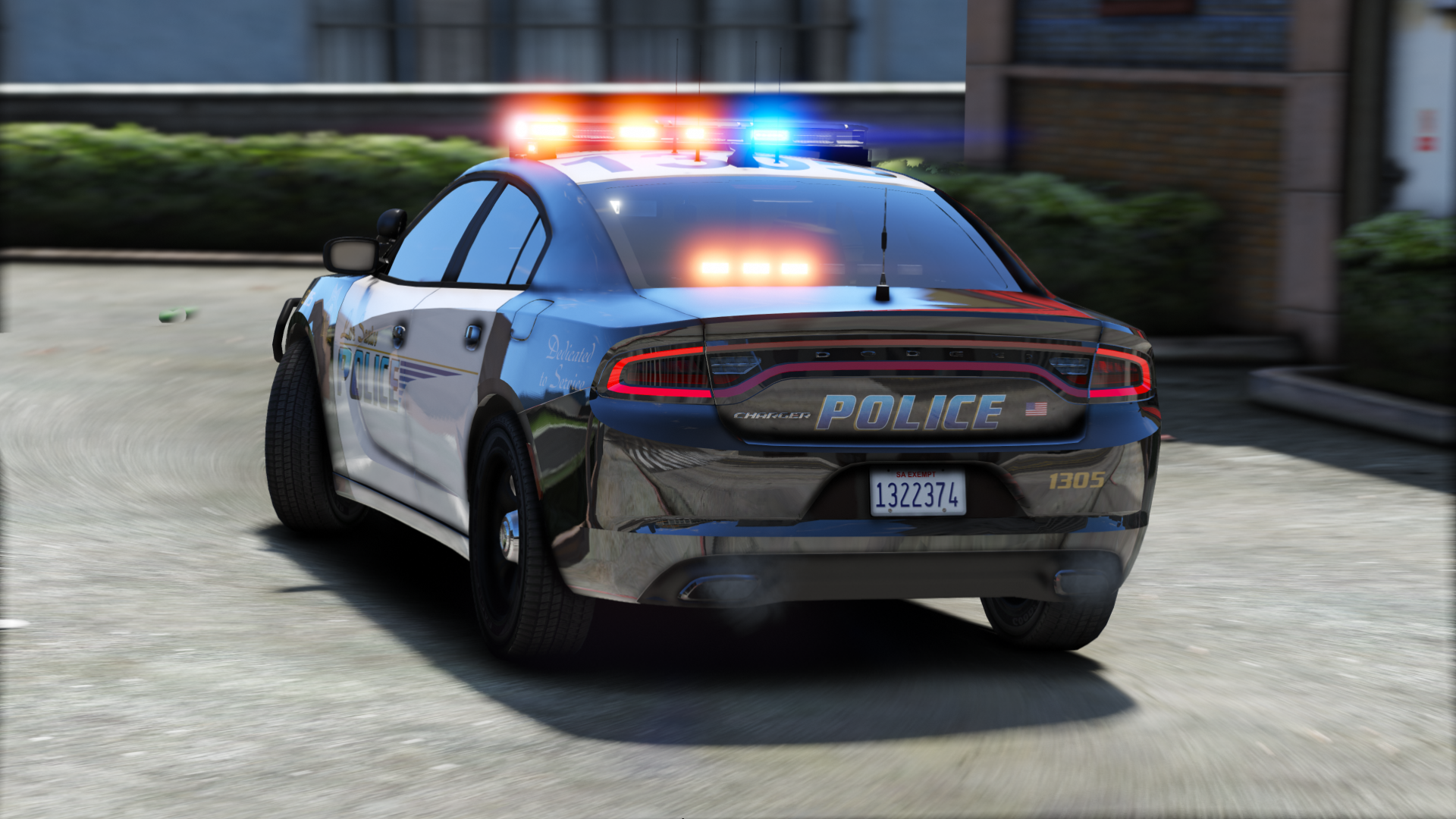
Contains seven sexy vehicles, outfitted with a good amount of lights, and sexy skins from Getinmybelly! 


Please lemme know if I missed a credit!

What's New in Version 4.0

Released

-Redid much of the 2016 FPIU (Push bar is also an extra now)

-Fixed dirt mapping on FPIU

-Added window tint to 2014 Charger

-Added partition to 2015 Charger


Note: I messed up the screens for the FPIU. There are dual spotlights despite what it looks like on the screenshot.

User Feedback

Recommended Comments

ThePatrickHero

Members

Why is that whenever any of the vehicles get dirty, the vehicle adds like a tint effect making the lights more difficult to see and covering the back windows lightbar? It is very annoying having to keep on cleaning the vehicle everytime.

thegreathah

Friends of LSPDFR Author

On 3/17/2017 at 10:36 AM, ThePatrickHero said:

Why is that whenever any of the vehicles get dirty, the vehicle adds like a tint effect making the lights more difficult to see and covering the back windows lightbar? It is very annoying having to keep on cleaning the vehicle everytime.

That's a game mechanic issue, and nothing any of us can fix unfortunately. It sucks.

ThePatrickHero

Members

(edited)

20 hours ago, thegreathah said:

That's a game mechanic issue, and nothing any of us can fix unfortunately. It sucks.

I see, thanks for the reply. How come other cars do not get affected by this issue? For example bxbugs els cvpi.

Edited by ThePatrickHero

Diablo223

Members

Can we expect a OIV file to install?


Chargo

Members

I can get the car mod to work but the emergency lights don't work. How do I install them?

10 DAVID 01

Members

The FPIS spawns a duplicate of itself upon colllisions.


Spoiler

20170323033914_1.thumb.jpg.9ca55e6c330db551754086765b55fabf.jpg


besides that i love this pack.

UltimaA380

Members

Is it possible to install all these cars at once without using the sheriff slots?

RINGISKONG

Members

how about a 13 explorer?

krystalbudz

Members

Thanks for the models, they look great.


I have a big problem, however. All of the models except the first one are glitched very badly. I followed all of the installation instructions, so I have no clue what the problem is.


20170326104334_1.jpg

20170326104338_1.jpg

20170326104402_1.jpg

thegreathah

Friends of LSPDFR Author

Just now, krystalbudz said:

Thanks for the models, they look great.


I have a big problem, however. All of the models except the first one are glitched very badly. I followed all of the installation instructions, so I have no clue what the problem is.


I'm almost certain you didn't install it correctly, because no one else has had this problem. It looks to me like the ytd files are improper. I'd recommend making sure you are dragging the files out of the rar or 7zip window and onto your desktop before putting it into OpenIV.

krystalbudz

Members

7 minutes ago, thegreathah said:

I'm almost certain you didn't install it correctly, because no one else has had this problem. It looks to me like the ytd files are improper. I'd recommend making sure you are dragging the files out of the rar or 7zip window and onto your desktop before putting it into OpenIV.


I did make sure to extract it first and then drag the files into OpenIV. I will try again though.

I have retried, and now every vehicle except the Tahoe works. I assure you I am installing it correctly - extracting it from the zip, dragging the files into OpenIV, dragging the xml files in appropriate location.

A quick update:


When I look in the files, the tahoe contains a police3.ytd but no police2.ytd


http://prntscr.com/eonwgp

Jake1812

Members

I have got all the cars in apart from one however my ELS isn't working.Does this look right for all of the cars?

ELS Lights.png

Deactivated Member

Deactivated


Hello. I have a question. Could it be done so that the FPIU was in the slot "police3" and FPIS "police2"? Regards

GabLeGamer

Members

awesome pack, the cars look great. I did find a minor bug though. Couldn't put it into words so I made a video:


after I stopped recording, I tried just ripping the car's door off and it does the same thing even without the explosion. Hope this helps!

23 hours ago, krystalbudz said:

Thanks for the models, they look great.


I have a big problem, however. All of the models except the first one are glitched very badly. I followed all of the installation instructions, so I have no clue what the problem is.


Make sure you don't have and +hi files for those models installed... this pack's vehicles have 3 files and some models from other creators have 4... if you don't delete that 4th file from the other models you installed previously, it'll glitch them out.

Mr.DudeMan

Members

2 hours ago, GabLeGamer said:

awesome pack, the cars look great. I did find a minor bug though. Couldn't put it into words so I made a video:


after I stopped recording, I tried just ripping the car's door off and it does the same thing even without the explosion. Hope this helps!


Make sure you don't have and +hi files for those models installed... this pack's vehicles have 3 files and some models from other creators have 4... if you don't delete that 4th file from the other models you installed previously, it'll glitch them out.

thats because body parts that fly off become another car for some reason happens on a lot of other cars

nascar24tb

Members

hey @thegreathah! LOVE this pack! One issue: why does the 2016 Charger lean inward when it turns? I have tried swapping the handling line to something else to try and fix the issue and I have changed what slot the car is in but I cannot fix it. Please let me know if you know how to fix it! I really want to use the Charger because it looks so good!

thegreathah

Friends of LSPDFR Author

Just now, nascar24tb said:

hey @thegreathah! LOVE this pack! One issue: why does the 2016 Charger lean inward when it turns? I have tried swapping the handling line to something else to try and fix the issue and I have changed what slot the car is in but I cannot fix it. Please let me know if you know how to fix it! I really want to use the Charger because it looks so good!

It's a problem with the DEV model unfortunately. No one seems to know or understand how to fix.

nascar24tb

Members

5 minutes ago, thegreathah said:

It's a problem with the DEV model unfortunately. No one seems to know or understand how to fix.

:'( Dam that's a massive disappointment. That's literally one of the best looking cars in the pack IMO but it (no pun intended) drives me nuts having that issue. Thanks for the quick reply! Now if you'll excuse me, I need to go install your new LSSD pack. Keep up the good work man!

Deactivated Member

Deactivated

Hello. I have a question. Could it be done so that the FPIU was in the slot "police3" and FPIS "police2"? Regards

playdrewtv

Members

Im having issues installing this pack properly, Is there anyone who would be willing to guide me through it?

Much Appreciated 

nixxx621

Members

18 hours ago, Kapereq said:

Hello. I have a question. Could it be done so that the FPIU was in the slot "police3" and FPIS "police2"? Regards

Yes. But you have to know how to edit the vehicles.meta so the police3 or police2 slots have the correct handling lines and vehicle sounds. If you're using anything with livery's as police4 you also have to know how to edit the carvariations.meta file so the color overlays don't screw things up. It's actually not that complicated but takes some practice to get right. Google and youtube are your best friends for doing these type of edits. I taught myself how to do everything and I am no where near as qualified as some of these model makers.

On 3/17/2017 at 7:36 AM, ThePatrickHero said:

Why is that whenever any of the vehicles get dirty, the vehicle adds like a tint effect making the lights more difficult to see and covering the back windows lightbar? It is very annoying having to keep on cleaning the vehicle everytime.

My fix for this is to remove the vehicle window tint. Export the window tint image file from the ytd and then use paint.net to reduce to opacity from 255 to 50 or so, then re-import to ytd and you won't have the dirt problem anymore.

Narobic

Members

(edited)

aww man, wish there was a 2013 FPIU to match the light pattern :(

Edited by Narobic

Narobic

Members

what's the best handling line for the 2016 charger?

Gr4nd

Members

hey, i cant put in my own skin on the explorer and i just wanted to know if there was nay help. The problem is that the roof is just black.

gp

Members

(edited)

Hello, the extra for the takedown is inverted on the FPIU leading to light behind produced at the back of the vehicle instead of the front ( I mean the env light effect, not the lightbar).


Also, on that same vehicle, the rear left indicator appears broken. The right one works fine.


Also not sure if this is an issue on my end but turning on full beams would remove any lights at the front of the vehicle (the spotlight would be lit, but it wouldnt shine).

Edited by gp

Create an account or sign in to comment

Latest Mods

Account

Navigation

Search

Search

Configure browser push notifications

Chrome (Android)
  1. Tap the lock icon next to the address bar.
  2. Tap Permissions → Notifications.
  3. Adjust your preference.
Chrome (Desktop)
  1. Click the padlock icon in the address bar.
  2. Select Site settings.
  3. Find Notifications and adjust your preference.

















