Skip to content
View in the app

A better way to browse. Learn more.

LCPDFR.com

A full-screen app on your home screen with push notifications, badges and more.

To install this app on iOS and iPadOS
  1. Tap the Share icon in Safari
  2. Scroll the menu and tap Add to Home Screen.
  3. Tap Add in the top-right corner.
To install this app on Android
  1. Tap the 3-dot menu (⋮) in the top-right corner of the browser.
  2. Tap Add to Home screen or Install app.
  3. Confirm by tapping Install.

Andreas State Patrol Slicktop Tahoe

(23 reviews)

3 Screenshots

tJ5gHQ4.png
456ee0afd07351bea6b8fc1310f0dd2b.gif

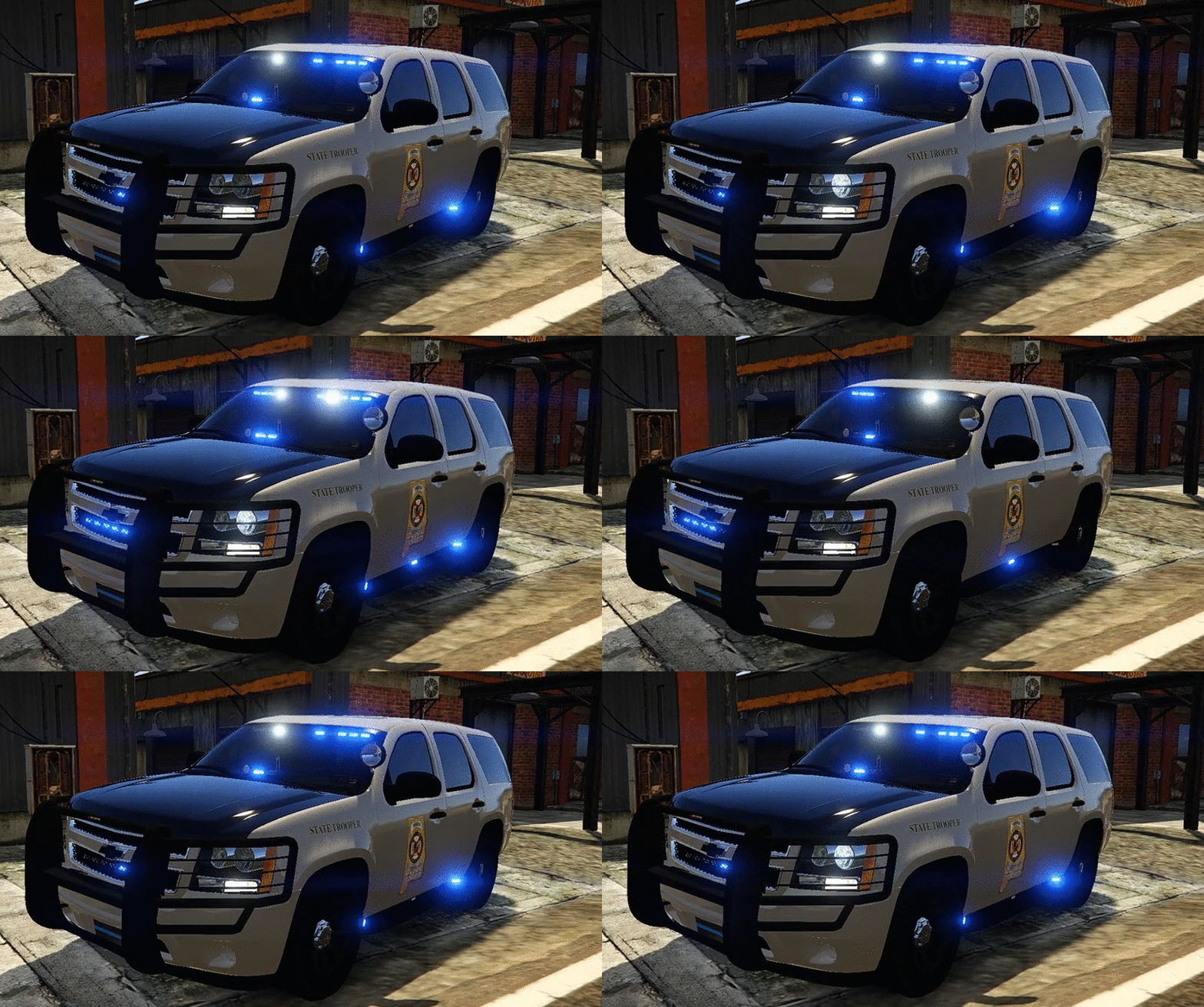
I'm very happy to present to you guys the 2013 Chevrolet Tahoe Andreas State Patrol with the livery made to look like Alabama SP.


You will have 5 extra's to choose from:
extra_1 -Wilson CB Antenna
extra_2 -ALPR's
extra_3 -Spotlight
extra_4 -Stalker Radar
extra_5 -Rambar with wrap


 Installation:
You can rename the .yft and .ytd to whatever you want,you don't have to use police.yft.

    For RDE users: Install into update.rpf\update\x64\dlcpacks\rde\dlc.rpf\x64\levels\gta5\vehicles.rpf\
    Non-RDE users will have to rename the cars to whatever you want, then place in the latest patchday: update.rpf\update\x64\dlcpacks\patchday9(or 10)\dlc.rpf\x64\levels\gta5\vehicles.rpf\
        The sirensettings is 1, so change the .metas accordingly, if you need to(Probably won't at this point)


To edit handling for the tahoe:


Go to the necessary vehicles.meta, and change the handling id of the slot your using for the tahoe. Replace the handling id with "baller" or "baller2"


Credits:
-  Model from free 3D site, author unknown.
-  Converted and edited by GeorgieMoon.
-  Interior by 4x4 Hummer merged and textured by GeorgieMoon.
-  Interior converted by FightingNote
-  Wheels by BxBugs123
-  Livery by Gump
-  Spotlight by BlackJesus
-  ALPR's by BxBuggs123
-  Antenna's by Gump,Priman and Vertex3D
-  Rambar and wrap by Carper
-  Watchgard 4RE by CAP N' CRUNCH
-  Console by Sheriffvandyke
-  Toughbook CF31 by Ridgerunner
-  Stalker radar by CAP N' CRUNCH with edits by Gump
-  Whelen Dominator by Tomcat8492
-  Whelen Avenger by Trumapak
-  Code 3 XT3 by Macgregor
-  Federal Signal Solaris ILS by M67v



Stay vigil and thirsty my friends..

User Feedback

Recommended Comments

ETFStorm

Members

Does this vehicle allow multiple liveries, as no matter what I do with the .meta I can't get more multiple to work

atalley19

Members

How do I fix the windows? They are messed up and I can't see the lightbar in the rear windshield.

MoparNate

Members

(edited)

This is an awesome mod! Are you thinking about doing a model with a lightbar up top? 


Edited by MoparNate

ethan919

Members

4 hours ago, MoparNate said:

This is an awesome mod! Are you thinking about doing a model with a lightbar up top? 


A lightbar up top would be awesome! I hope he does this. 

shonole

Members

Any ideas on how to fix the dashcam to show the hood of the car?  I'm sure it's a simple setting, but I don't know where to begin and I'm not apt on messing anything up.  That and the lights in the rear quarter windows only being visible once the windows are smashed are the only issues I see.

Excellent model!


Thanks!

Deactivated Member

Deactivated

Could you add an option to remove the thin blue line on the back window? I've tried to do this and the windows turn pure black to the point where I cannot see out of them anymore.

RINGISKONG

Members

when i remove the blue strip in the back window all the windows get moved around. Anyone know a fix or a new window template without the blue strip?

Plano911

Members

On 6/25/2016 at 8:27 PM, Lundy said:

It's called a joke... they're meant to be taken as such. If I make a joke to someone, I know I'm not offending them, I don't just go out and say shit, it's called thinking ahead. If Gump was a modeler/skinner who DID have Down's Syndrome or some kind of lacking of knowledge, and I was bashing him for the spelling of the name wrong, then I'd be in the wrong. Seriously, man. Calm down. The term Redneck isn't even a specific term, it's a very loose adjective. VERY loose.

I'm sorry, but i don't see how it looks or reads as a joke? If it was or were a joke, there would have been a LOL or JK or JJ or JUST KIDDING or JUST JOKING but i don't so there fore it is not a joke sir. Until i see that he has quoted me back saying it was, i am taking as not a joke. Sorry Lundy but it doesn't seem to me and i'm sure others would agree on this. Sorry for any inconvenience this has been. Thank you. 

Deactivated Member

Deactivated

4 hours ago, countryboy3131 said:

I'm sorry, but i don't see how it looks or reads as a joke? If it was or were a joke, there would have been a LOL or JK or JJ or JUST KIDDING or JUST JOKING but i don't so there fore it is not a joke sir. Until i see that he has quoted me back saying it was, i am taking as not a joke. Sorry Lundy but it doesn't seem to me and i'm sure others would agree on this. Sorry for any inconvenience this has been. Thank you. 

Well you shouldn't take things so seriously, here. Most of the people here would probably agree it was a joke, though, but see it how you want, I guess.

abecker221

Members

On ‎6‎/‎26‎/‎2016 at 4:06 PM, has307 said:

For anyone having stability issues ( car rolling over), the solution I found is to change handling id to  BALLER OR BALLER2  in vehicle.meta  that fixed the issue. The car is very stable and usable now!  the difference is that baller2 seems a bit faster.

Happy patrolling

Where would I find that vehicle.meta?

has307

Members

50 minutes ago, abecker221 said:

Where would I find that vehicle.meta?

Depending on where you replace the car: 

 GTA\mods\update\update.rpf\common\data\levels\gta5\       **for all vanilla police cars (POLICE, 2, 3, 4, fbi, fbi2, sheriff, sheriff2) 

GTA\mods\update\x64\dlcpacks\rde\dlc.rpf\common\data\levels\gta5\    **if you added cars in any DLC, just change " rde " to any dlc you want 

Hope it helps! 

abecker221

Members

59 minutes ago, has307 said:

Depending on where you replace the car: 

 GTA\mods\update\update.rpf\common\data\levels\gta5\       **for all vanilla police cars (POLICE, 2, 3, 4, fbi, fbi2, sheriff, sheriff2) 

GTA\mods\update\x64\dlcpacks\rde\dlc.rpf\common\data\levels\gta5\    **if you added cars in any DLC, just change " rde " to any dlc you want 

Hope it helps! 

Thanks!

lucianboi

Members

nobody is addressing the white dials inside?whenever u enter the vehicle,the speedometer and stuff becomes white and messed up,when u exit it turns back to normal

OfficerEight

Members

Hey guys. Quick question! I know how to edit the vechicle.metas but where would I go to install this in police2? Which meta at what location should I edit? Thx

hoty528

Members

How to make the blue light light more brightly?Now is too dark

TrooperA1868

Members

why are the windows so tinted that the lights dont show????

Jeff Favignano

Members

Love it but no coronas :(

bwallac7

Members

So I installed this model as a stand alone. Works fine minus the physics. What do I need to do to create/modify a  vehicles.meta  file?

firesq38

Members

Any help to correct this issue would be great. The lights looks perfect but when it does flip over, there are blue lights just hanging out mid air. See photo attached.

Screenshot 2016-08-26 23.24.31.png

SoarHawk

Members

19 minutes ago, firesq38 said:

Any help to correct this issue would be great. The lights looks perfect but when it does flip over, there are blue lights just hanging out mid air. See photo attached.

Screenshot 2016-08-26 23.24.31.png

The lights that you see floating are actually the coronas of the vehicle being hidden which allows for all blue lights, I believe. This is done purposely by the creator of the car and there's not much to do to fix it... It's just part of the model. 

BCG coreyman

Members

any one know why it crashes my game?


Reddington

Members

@Gump

Slightly confused.  In the download there is the "extra options", which contained the all blue lighting images.  Do we have to install those to get the all blue lights, or are they all blue by default?

Create an account or sign in to comment

Account

Navigation

Search

Search

Configure browser push notifications

Chrome (Android)
  1. Tap the lock icon next to the address bar.
  2. Tap Permissions → Notifications.
  3. Adjust your preference.
Chrome (Desktop)
  1. Click the padlock icon in the address bar.
  2. Select Site settings.
  3. Find Notifications and adjust your preference.









