Skip to content
View in the app

A better way to browse. Learn more.

LCPDFR.com

A full-screen app on your home screen with push notifications, badges and more.

To install this app on iOS and iPadOS
  1. Tap the Share icon in Safari
  2. Scroll the menu and tap Add to Home Screen.
  3. Tap Add in the top-right corner.
To install this app on Android
  1. Tap the 3-dot menu (⋮) in the top-right corner of the browser.
  2. Tap Add to Home screen or Install app.
  3. Confirm by tapping Install.

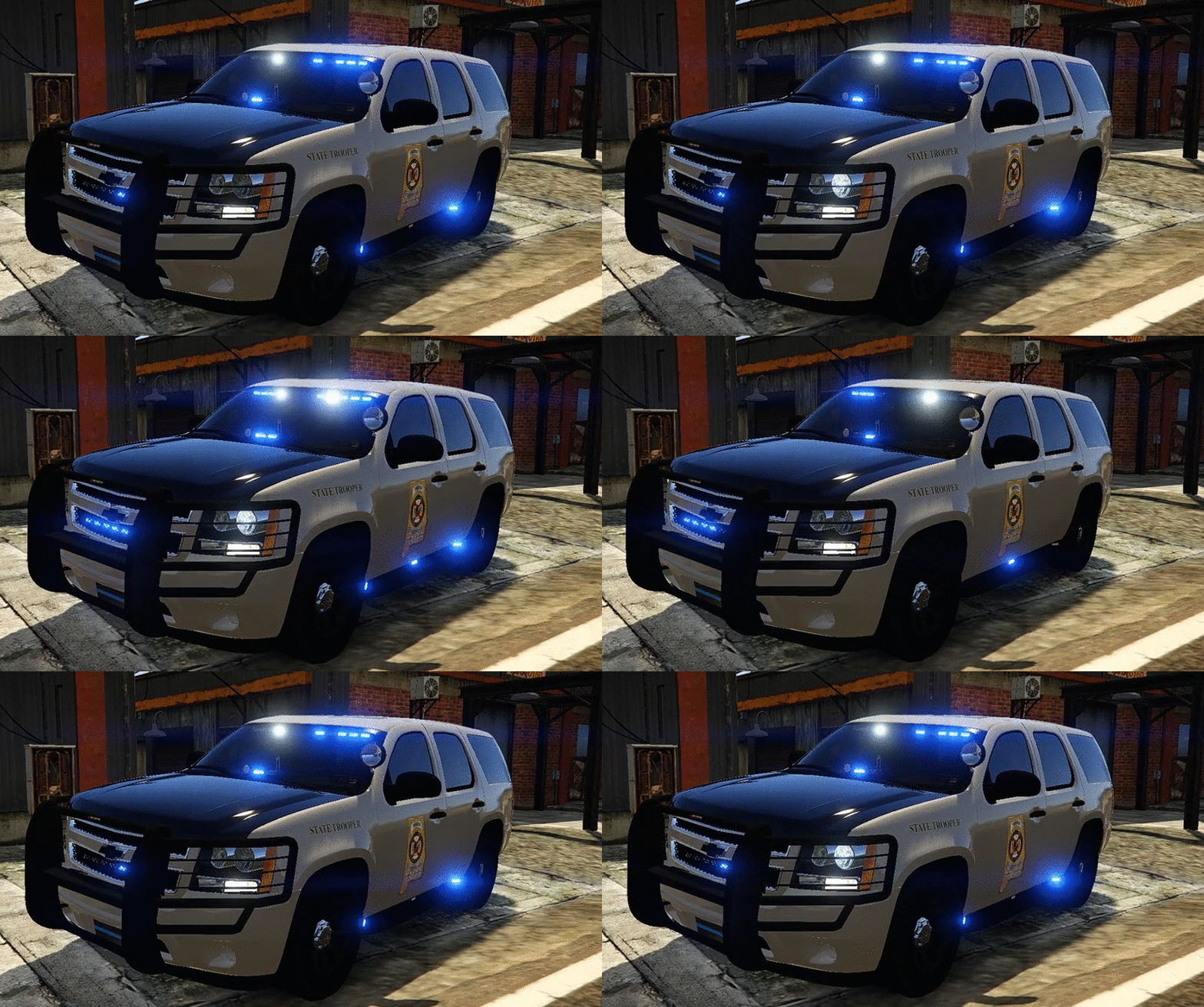
Andreas State Patrol Slicktop Tahoe

(23 reviews)

3 Screenshots

tJ5gHQ4.png
456ee0afd07351bea6b8fc1310f0dd2b.gif

I'm very happy to present to you guys the 2013 Chevrolet Tahoe Andreas State Patrol with the livery made to look like Alabama SP.


You will have 5 extra's to choose from:
extra_1 -Wilson CB Antenna
extra_2 -ALPR's
extra_3 -Spotlight
extra_4 -Stalker Radar
extra_5 -Rambar with wrap


 Installation:
You can rename the .yft and .ytd to whatever you want,you don't have to use police.yft.

    For RDE users: Install into update.rpf\update\x64\dlcpacks\rde\dlc.rpf\x64\levels\gta5\vehicles.rpf\
    Non-RDE users will have to rename the cars to whatever you want, then place in the latest patchday: update.rpf\update\x64\dlcpacks\patchday9(or 10)\dlc.rpf\x64\levels\gta5\vehicles.rpf\
        The sirensettings is 1, so change the .metas accordingly, if you need to(Probably won't at this point)


To edit handling for the tahoe:


Go to the necessary vehicles.meta, and change the handling id of the slot your using for the tahoe. Replace the handling id with "baller" or "baller2"


Credits:
-  Model from free 3D site, author unknown.
-  Converted and edited by GeorgieMoon.
-  Interior by 4x4 Hummer merged and textured by GeorgieMoon.
-  Interior converted by FightingNote
-  Wheels by BxBugs123
-  Livery by Gump
-  Spotlight by BlackJesus
-  ALPR's by BxBuggs123
-  Antenna's by Gump,Priman and Vertex3D
-  Rambar and wrap by Carper
-  Watchgard 4RE by CAP N' CRUNCH
-  Console by Sheriffvandyke
-  Toughbook CF31 by Ridgerunner
-  Stalker radar by CAP N' CRUNCH with edits by Gump
-  Whelen Dominator by Tomcat8492
-  Whelen Avenger by Trumapak
-  Code 3 XT3 by Macgregor
-  Federal Signal Solaris ILS by M67v



Stay vigil and thirsty my friends..

User Feedback

Recommended Comments

NicholasCage

Members

(edited)

If you were the last person on Earth, the zombies wouldn't attack you, purely out of respect.

It looks amazing.

Keep on, keepin' on Gump

tumblr_lx9jj4B0rN1qad2ozo1_500.gif

Edited by NicholasCage

TacoRatte

Members

The car looks AMAZING! :)

But I have a problem....I have installed Radiance V....I tryed it with and without Radiance....but the emergencylights are always white :( 

Can you help me fix it? 

P.S. Sorry for my bad English, I come from Germay

HZ30

Members

17 minutes ago, TacoRatte said:

But I have a problem....I have installed Radiance V....I tryed it with and without Radiance....but the emergencylights are always white :( 

Can you help me fix it? 

Turn your Post FX in your graphic settings on high or above.

Deactivated Member

Deactivated

mfw lazy rednecks who can't take the time to spell their own state name.

TacoRatte

Members

22 minutes ago, ablaze said:


14 minutes ago, HZ30 said:

Turn your Post FX in your graphic settings on high or above.


I've already done but that did not help :(

ALLENjr12

Members

How do you attach so many siren's together?great work

tragicEM

Members

:pirate:great job on the wheels.. and whole setup

EthanO

Members

(edited)

Sorry, I'm sure this is a 'newbie' question but how would I go about changing the handling name for this vehicle? I have the vehicle under the "fbi2" slot in patchday4.

Any help would be greatly appreciated, thanks ahead of time! 

p.s. great model by the way!

UPDATE:

Nevermind, figured it out!

Edited by emanoneal

CODEX12

Members

Job well done jump ehh i mean gump :)

EthanO

Members

3 hours ago, ablaze said:

scrren 6.jpg

Beautiful skin! Do you have a link possibly? 

ISPfan12

Members

Installed into police4 slot and in game the windows are solid black, in openIV they look like they should. Any idea?

cjr10621

Members

7 minutes ago, ISPfan12 said:

Installed into police4 slot and in game the windows are solid black, in openIV they look like they should. Any idea?

Trainer >vehicle options>mod menu>window tint> none or stock :) should fix it

ISPfan12

Members

16 minutes ago, cjr10621 said:

Trainer >vehicle options>mod menu>window tint> none or stock :) should fix it

cool, thank you much!

Griswald

Members

2 hours ago, emanoneal said:

Beautiful skin! Do you have a link possibly? 

Its mine and im working on it right now so its still in beta but will be released in a week or two.

Plano911

Members

(edited)

5 hours ago, Lundy said:

mfw lazy rednecks who can't take the time to spell their own state name.

Why is it always the rednecks get blame for everything that is messed up or spelled wrong. Could have been someone that is from another country and there English might not be too could or maybe it might be someone with down syndrome that likes to make skins.Could have been someone from another sate. Never judge a book by the cover sir. People like you always blame us and never anyone else.  WHY?    To all admins, if this is wrong to the rules of the website, plz take it down but i don't think that it is right making certain people look "you know what". His quote needs to be removed  or to be warned for being derogatory. Thank you.

Edited by countryboy3131

skilled123456

Members

Quick question does anyone here know where to edit the Police Ranger in the vehicles.meta because thats what I put this tahoe as and it flips on every turn lol.

Deactivated Member

Deactivated

1 hour ago, countryboy3131 said:

Why is it always the rednecks get blame for everything that is messed up or spelled wrong. Could have been someone that is from another country and there English might not be too could or maybe it might be someone with down syndrome that likes to make skins.Could have been someone from another sate. Never judge a book by the cover sir. People like you always blame us and never anyone else.  WHY?    To all admins, if this is wrong to the rules of the website, plz take it down but i don't think that it is right making certain people look "you know what". His quote needs to be removed  or to be warned for being derogatory. Thank you.

It's called a joke... they're meant to be taken as such. If I make a joke to someone, I know I'm not offending them, I don't just go out and say shit, it's called thinking ahead. If Gump was a modeler/skinner who DID have Down's Syndrome or some kind of lacking of knowledge, and I was bashing him for the spelling of the name wrong, then I'd be in the wrong. Seriously, man. Calm down. The term Redneck isn't even a specific term, it's a very loose adjective. VERY loose.

Lazerus

Members

Best dam Tahoe model ever. Nice job as always Gumpster! <3

Deactivated Member

Deactivated

where should i install the vehicles meta?

has307

Members

Great job, the model is really nice!

One problem though, What handling id are you using it with? or recommend ? 

I have used all police handling id (police, police2, police3), the car just flips over with the slightest turn. 

Meow Overlord

Members

yeah I replaced the Police4 and I flip with the slightest turn which Vehicle.meta should I go into to fix that (P.S Im a noob at this so I dont know where anything is and where it should go). 

nh1256

Members

10 hours ago, Lundy said:

mfw lazy rednecks who can't take the time to spell their own state name.

didnt you put this same comment on of prophets pics of bxbugs123 cvpi lmao

Illusionyary

Members

Why cut "San" off? It's not like the GSP cars, you could easily fit it in on the badge. Just "Andreas" is stupid in my opinion, sorry.

Aside from that, the model is nice.

Create an account or sign in to comment

Latest Mods

Account

Navigation

Search

Search

Configure browser push notifications

Chrome (Android)
  1. Tap the lock icon next to the address bar.
  2. Tap Permissions → Notifications.
  3. Adjust your preference.
Chrome (Desktop)
  1. Click the padlock icon in the address bar.
  2. Select Site settings.
  3. Find Notifications and adjust your preference.










