


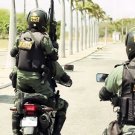


PILOT CIOPAER - BRAZILIAN POLICE
This is a skin of a Pilot CIOPAER (Coordenadoria Integrada de Operações Aéreas) in English (Coordination Integrated Air Operations) SSPDS Military Police the State of Ceará (Brazil).
Created and modified by: Felipe Mikeyas®, BPRAIO.
www.youtube.com/FelippePvP
How to install:
1º - Extract the files of the skin.
2º - Open OpenIV or SparkIV.
3º - Go in "GTAIV/pc/models/cdimages/componentpeds.img"
4º - After opening the "componentpeds.img", import files "m_y_nhelipilot.wdd", "m_y_nhelipilot.wft" and "m_y_nhelipilot.wtd"
5º - Save and enjoy!
Felipe Mikeyas (FelipeCross)








![2016 Hyundai Tuscon [DEV]](http://s3-screenshots.int-cdn.lcpdfrusercontent.com/resize/500/-/monthly_2026_05/Screenshot2026-05-25084944.thumb.png.f8f0caf2410540e7ffd4dbe4e484d1a7.png)




![[EUP] Polantas EUP Mini Pack](http://s3-screenshots.int-cdn.lcpdfrusercontent.com/resize/500/-/monthly_2026_05/polri.thumb.png.c19066bc5633b895989e87aae3c6136b.png)

![[ELS-Hybrid | Addon] BCSO 2023 Sedan Pack](http://s3-screenshots.int-cdn.lcpdfrusercontent.com/monthly_2026_05/c1.thumb.png.72e037deb13db042ded82c3a64e264cb.png)

Recommended Comments
Create an account or sign in to comment