Skip to content
View in the app

A better way to browse. Learn more.

LCPDFR.com

A full-screen app on your home screen with push notifications, badges and more.

To install this app on iOS and iPadOS
  1. Tap the Share icon in Safari
  2. Scroll the menu and tap Add to Home Screen.
  3. Tap Add in the top-right corner.
To install this app on Android
  1. Tap the 3-dot menu (⋮) in the top-right corner of the browser.
  2. Tap Add to Home screen or Install app.
  3. Confirm by tapping Install.

[8K] [4K] LSPD Lore-Friendly Texture Pack (Ottawa, KS Based) 1.4.0

(1 review)

35 Screenshots

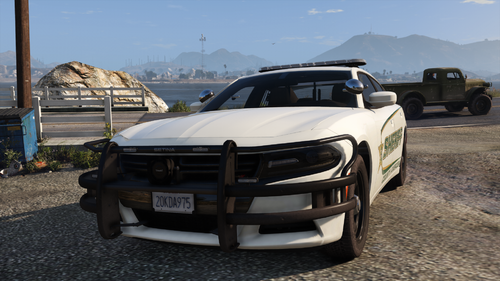
Here is a simple livery I did of my hometown, Ottawa, KS PD. Not 100% accurate. Especially the charger. Let me know of any comments and/or feedback about my work and recommendations for future work. 


Could contain: vehicle, land vehicle, outdoor, wheel, text, sky, transport, full-size car, auto part, tire, automotive exterior, family car, car, blue, parked


Models Used:

Matt's 2018 Dodge Charger

Raz3r's 2021 Chevrolet Tahoe

Georgie Moon's 2018 Chevrolet Tahoe

HP Deskjet's 2020 Ford Explorer

Raz3r's 2021 Ford Explorer 

Apex & Melanesian's 2020-2021 Chevrolet Silverado 

OfficerTenPenny's 2020-2021 Chevrolet Silverado 

Raz3r's 2022 F150

Raz3r's 2023 F150 Lighting Pro

Kane104's 2020 FPIU


Links to Models:

2021 Tahoe - (T.R.Development)

2018 Tahoe - (arrexx)

2018 Charger - (Rabbit GTA V Development) - Modification Universe 

2020 FPIU - (XxOJLxX Designs)

2018 Charger - (Scorpionfam)

2018 Tahoe - (The Sugar Shack)

2021 Silverado - (Deputy75451)

2021 Durango - (Rabbit GTA V Development) - Modification Universe 

2021 Silverado - (EmergencyDistributors)

2021 Tahoe -(xJDMxLIMIT)

2021 Durango - (OfficerAirman)

2021 FPIU - (majorpaine2015)

2020 FPIU K9 - (Allen Development)

2022 F150 - (OfficerArk)

2023 F150 Lighting Pro - (Rabbit GTA V Development)


Notice:

The models I use are for screenshot purposes, so please, don't ask questions /requests about making it a pack.  I'll leave that to you guys & gals to choose. 


Disclaimer:

Please do not redistribute these files, claim them as your own, modify them for redistribution, or use any parts of these textures without my permission. Thank you.


Installation:

1. Replace: mods > update > x64 > dlcpacks >YOUR PATCHDAY > dlc.rpf > x64 > levels > gta5 > vehicles.rpf

2. Open the .ytd file of the vehicle you want to change by double clicking or right clicking and hitting edit

3. Scroll through until you find e.g. example_sign_1 and right click and hit replace

4. In my folder just make sure that the first name e.g. fpiu_sign_1 are the same as the models. The "sign_1,2,3,4" can be whatever when replacing. Then hit save.


Edited by QTexs

What's New in Version 1.4.0

Released

-Added 2020 K9 Ford EXP
-Added 2022 F150
-Added 2023 Ford Lighting Pro

-Fixed Spelling on "Emergency"


Short Description

Lore-Friendly Texture Pack

User Feedback

Recommended Comments

SheriffJones55

Members

Hey, so i just started playing lspdfr maybe a week ago I've learned a lot from YouTube, i like the textures used for the pack but i saw that you posted the links to the vehicle models but it would be great if you could find a way to make just one link to where you can download all the models at once but good job on this mod and keep up the work and Goodluck to you!

ThinlineGaming.

Members

(edited)

cool

Edited by Floridagaters7

SheriffJones55

Members

can someone make a tutorial video for this specific mod

QTexs

Members Author

43 minutes ago, SheriffJones55 said:

Hey, so i just started playing lspdfr maybe a week ago I've learned a lot from YouTube, i like the textures used for the pack but i saw that you posted the links to the vehicle models but it would be great if you could find a way to make just one link to where you can download all the models at once but good job on this mod and keep up the work and Goodluck to you!

I picked these vehicles because they are based on my hometown. There is no pack on LSPDFR or Modification Universe that has the 5-vehicle pack. So, that's why I made them separate models. Believe me, if there was, I would have done it.

44 minutes ago, Floridagaters7 said:

Yo i think it would be cool if you could add a f150 for this pack because i like using f150 for k9 and CVE  but i normally do it my self if you can then thank but love it ill definitely be using this.


Any other vehicle request will have to be through commissions, I picked these vehicles for a reason, my hometown PD uses only those vehicles. 

dan fr

Members

(edited)

hey the link for the HP deskjet 2020 FPIU doesn't work.. can you update it? whenever you can.. thank you. these are nice liveries btw 


*** edit: nvm i found it. heres the link so u can update it tho 


Edited by dan fr

QTexs

Members Author

1 hour ago, dan fr said:

hey the link for the HP deskjet 2020 FPIU doesn't work.. can you update it? whenever you can.. thank you. these are nice liveries btw 


*** edit: nvm i found it. heres the link so u can update it tho 


My bad, thanks for pointing it out, will update it. 

mrpeterpaner

Members

the scorpianfam dodge charger link doesnt work


QTexs

Members Author

19 minutes ago, mrpeterpaner said:

the scorpianfam dodge charger link doesnt work


Fixed, sorry for that.

mrpeterpaner

Members

2 hours ago, QTexs said:

Fixed, sorry for that.

Doesn't seem to be working still.

QTexs

Members Author

1 hour ago, mrpeterpaner said:

Doesn't seem to be working still.

Should be, I just tried the link.

mrpeterpaner

Members

26 minutes ago, QTexs said:

Should be, I just tried the link.

Alr now its working tysm:) also wheres the link for the rabbit modifaction universe charger?

QTexs

Members Author

1 hour ago, mrpeterpaner said:

Alr now its working tysm:) also wheres the link for the rabbit modification universe charger?

I can't link any external links outside of lspdfr due to their upload policy agreement.  All you need to do is search his name and literally has all his release in one download. 

SoarHawk

Members

(edited)

Awesome pack. Can you add an FPIS and 2016 FPIU by chance?? And also the 2021 FPIU black version.. can you see if you can make a lore friendly version? 🙏

Edited by SoarHawk

QTexs

Members Author

(edited)

57 minutes ago, SoarHawk said:

Awesome pack. Can you add an FPIS and 2016 FPIU by chance?? And also the 2021 FPIU black version.. can you see if you can make a lore friendly version? 🙏

Thank you for the feedback, and I picked these models based off of what my hometown uses, except for the charger. For the 2021 FPIU I can add the lore-friendly version to it on my next update. I was not planning on adding other vehicles to it, but I can make them up for you (FPIS, 16FPIU) through a small commission price, just DM me on Discord. this_guy_is#0000.

Edited by QTexs

SoarHawk

Members

1 hour ago, QTexs said:

Thank you for the feedback, and I picked these models based off of what my hometown uses, except for the charger. For the 2021 FPIU I can add the lore-friendly version to it on my next update. I was not planning on adding other vehicles to it, but I can make them up for you (FPIS, 16FPIU) through a small commission price, just DM me on Discord. this_guy_is#0000.

Thanks 🙂 Can you add a lore friendly for the 2020 explorer too?

QTexs

Members Author

(edited)

18 minutes ago, SoarHawk said:

Thanks 🙂 Can you add a lore friendly for the 2020 explorer too?

The 2020 is lore-friendly, are you referring to the black or black/white version? I couldn't find any 2020 fpius that had full pushbars and lightbar, so that's why I went with a 2021 fpiu for the black/white version. 

Edited by QTexs

SoarHawk

Members

50 minutes ago, QTexs said:

The 2020 is lore-friendly, are you referring to the black or black/white version? I couldn't find any 2020 fpius that had full pushbars and lightbar, so that's why I went with a 2021 fpiu for the black/white version. 

Black version... I think you have the Kansas version.. just not the lore friendly version

QTexs

Members Author

33 minutes ago, SoarHawk said:

Black version... I think you have the Kansas version.. just not the lore friendly version

So, I checked, and I did include a lore-friendly 2020 fpiu version that is black. It's named "polint_sign_1"

SoarHawk

Members

5 minutes ago, QTexs said:

So, I checked, and I did include a lore-friendly 2020 fpiu version that is black. It's named "polint_sign_1"

Oh I see it, thanks!

Hey dude! I so love this pack!! By far the best police skin pack on here.  Any chance we could get the file labeled polint_sign1 but in a black and white version? Only black is listed.  Thank you for all your work on this!!!

QTexs

Members Author

(edited)

23 hours ago, justintdavis99 said:

Hey dude! I so love this pack!! By far the best police skin pack on here.  Any chance we could get the file labeled polint_sign1 but in a black and white version? Only black is listed.  Thank you for all your work on this!!!

Appreciate it, means a lot.  And I can definitely add the black/white version for the 2020 FPIU. Will update it tomorrow. 

Edited by QTexs

CMendez

Members

These are SEXY! are you able to make a pack for me to use in my FiveM server? I can give you the car' templates! These would look great with out fleet! 

QTexs

Members Author

On 4/21/2024 at 3:25 PM, CMendez said:

These are SEXY! are you able to make a pack for me to use in my FiveM server? I can give you the car' templates! These would look great with out fleet! 

Please DM on Discord if you have discord. @this_guy_is#0000

KineticTempest

Members

"EMERGENCY 911" is mispelled on the sides of the vehicles.

QTexs

Members Author

17 hours ago, KineticTempest said:

"EMERGENCY 911" is mispelled on the sides of the vehicles.

My guy, the first person to notice it, thanks for pointing it out, never even noticed it ever lol, will fix that in the next update.


Create an account or sign in to comment

Latest Mods

Account

Navigation

Search

Search

Configure browser push notifications

Chrome (Android)
  1. Tap the lock icon next to the address bar.
  2. Tap Permissions → Notifications.
  3. Adjust your preference.
Chrome (Desktop)
  1. Click the padlock icon in the address bar.
  2. Select Site settings.
  3. Find Notifications and adjust your preference.