





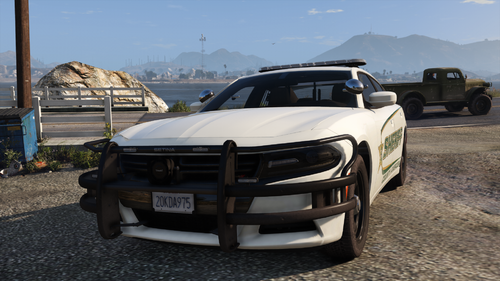
Thank you for installing. This is a 2018 FPIU with a Code 3 lighting package. It is very loosely based off of Tupelo, Mississippi Police. This is an addon model. I hope you enjoy, lmk if there are any issues, Otherwise enjoy. Am I going to add to this, possibly, But I tend to say that about every single car I upload and then never add to it so don't get your hopes up, but maybe. 🙂 Also for the first time I added a park pattern to the XML so we'll see how well that goes.
The DLC does come with the all blue lighting model but I have added the ytd and XML for the red blue version if you prefer. Happy modding!
Lighting Showcase:
All blue - https://streamable.com/hxfy8u
Red blue - https://streamable.com/qaonop
Discord - https://discord.gg/pNDZG55trf

Short Description
Original 2012 Ford Explorer from NFS Series, revamped, remodeled, and turned into a 2016 Police Interceptor Utility by GeorgieMoon.
Purchased by OfficerAirman
Lighting:
Code 3 Defender - Code 3 Defender Modeled and Texured by GTAxB0SS
Mounts by Otaku modified and textured by GTAxB0SS
Code 3 XT lights modeled and textured by Cj24
Code 3 4-Pack Hide a blast scratch modeled by Five0/OfficerFive0
converted to gta 5 by Five0/OfficerFive0
main texture by five0
groove texture by neonlazer
emis textures by Five0/OfficerFive0, based off of CJ24's
Outer:
Unity 335 LED Spotlight 3.1 - cj24
Interior:
2013-2019 FPIS Havis Console - Brendo
Havis MDT Stands - badger.dev
Motorola O2 Radio - kleo
Setina Weapon Mount 1.0 - cj24
Toughbook CF-31 1.2 - cj24
Partition Pack - Twurtle
Motorola O2 Radio - kleo






.thumb.png.4d59e30ff8b8385589769cf607a5e1aa.png)



![[ELS][REPLACE] Volkswagen Transporter T6 - Jandarmeria Romana](http://s3-screenshots.int-cdn.lcpdfrusercontent.com/resize/500/-/monthly_2026_07/20260705194538_1copy.thumb.png.f236d31db833d6a8e79fdfbd0758fe37.png)
![[ELS][REPLACE] Volkswagen Transporter T6 - Politia Romana SIAS](http://s3-screenshots.int-cdn.lcpdfrusercontent.com/resize/500/-/monthly_2026_07/9.thumb.png.7331e8f0d8666f073eb5b9a3a0c35837.png)

Recommended Comments
Create an account or sign in to comment