jonatan65
Members
-
Joined
-
Last visited
Everything posted by jonatan65
-
Try to see if it is not the trainer that is activating the chrome mode!
-
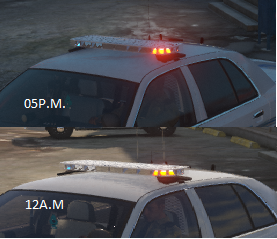
during the day ELS red looks yellow in color. ELS red looks yellow in color I have the mods of VISUAL V, RADIANCE V, ELS vanilla unmodified. where do I have to edit in visualsettings to change this? help me please.
-
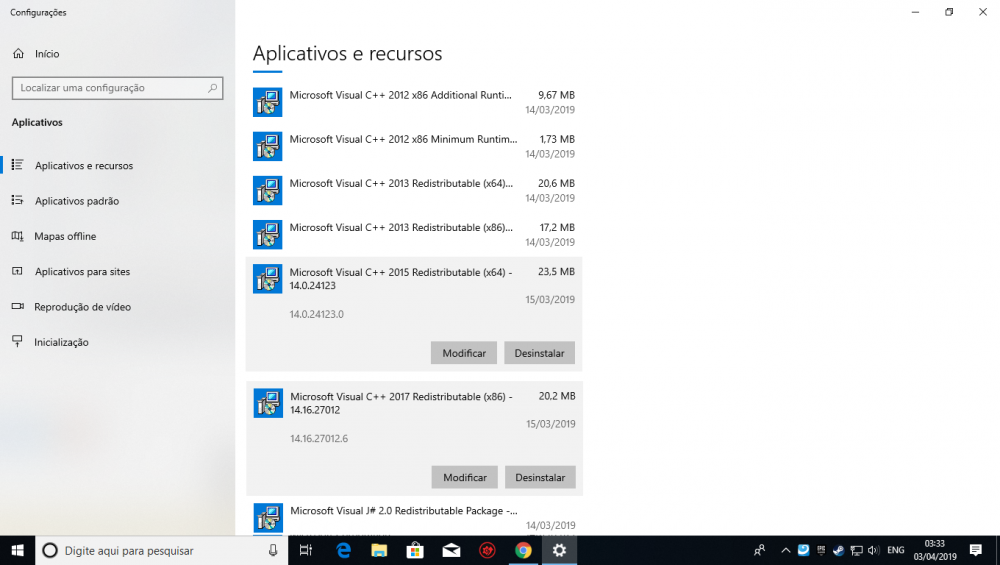
I also had this problem, so after installing C ++ 2017, I uninstalled 1 of them, because in the list there were 2 '' c ++ 2017 or 2015 '', I'll send you a print of my screen, so you know which c ++ 2017 to uninstall! after that and install c ++ 2015 and 2017. unistall c++ 2015 (x86), and retry.
-
Currency Exchange ↑↑ look at my topic, I had the same problem with you! Look at that one too! and check the information in your game! ↓↓↓↓↓↓↓↓↓↓↓↓↓↓↓↓↓↓↓↓↓↓↓↓↓↓↓↓↓↓↓↓↓↓↓↓↓↓↓↓↓↓↓↓↓↓↓↓ ↓↓
-
try this, anything, the links are on the MOD page. I just solved it after installing all the mods of requirement!
-
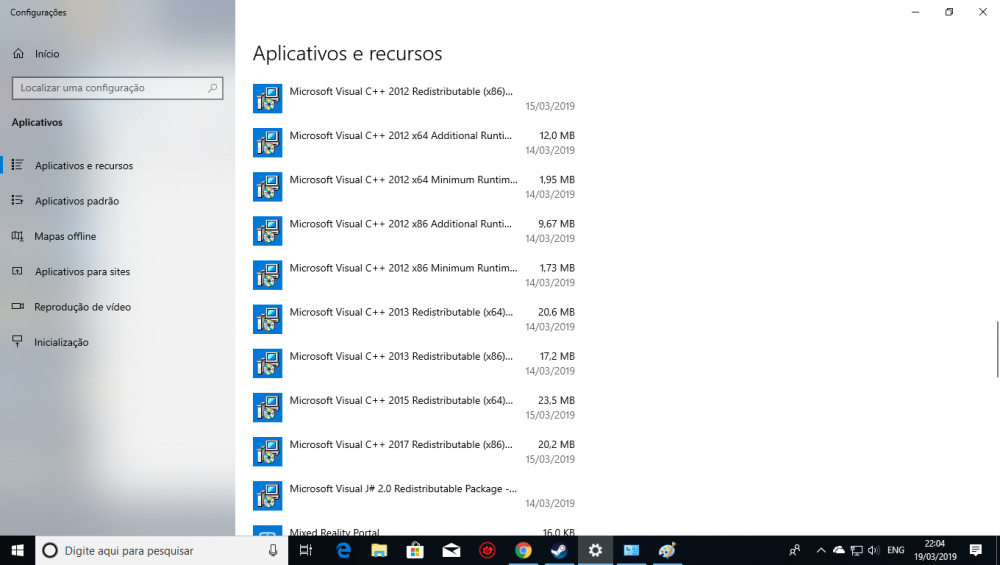
I was having the same problem, and unfortunately I just managed to solve it by formatting the PC. check if c ++ 2015 is installed!
-
-
So, personally, I was able to solve my problem, unfortunately, I can only solve it by reformatting my computer.
-
@LMS I'm sorry, and I was following some tutorials on the internet, and one of them asked me to add, you are amazing, now it works normally! i love you man
-
@LMS please, help me.
-
@LMS Please help me. I got my log file. RagePluginHookLauncher.log
-
so I realized, when installing microsoft c ++ 2017, it automatically uninstalls c ++ 2015, I believe this is the problem, but I already tried to install both manually, and it did not solve the problem.
-
yes, now it's called GTAVLauncher.exe. before the RPH crashed, when it came in "skipping api-ms-crt-math-l1-1-0.dll" So I re-formatted my computer and now, it just closes alone.
-
in my case it closes when arriving at '' skipping api-ms-crt-math-l1-1-0.dll ''
-
in my case it closes when arriving at '' skipping api-ms-crt-math-l1-1-0.dll ''
-
I also have the same problem and I do not use any anti-virus.
-
Good night, when you click to start the Rage Plugin Hook, it starts loading, but when you enter '' api-ms-crt-math-l1-1-0.dll '', it closes. I have a clean installation of windows 10 pro, and I have all the necessary programs to run the plugin, GTA V Steam, I already uninstalled the plugin, I formatted the PC several times, and I already have the RPH in the latest version. and I can not find the log file, could anyone tell me what the file name is in the latest version of the plugin. my specifications: AMD Ryzen 3 2200G 16 GB Corsair 2400Mhz RAM GTX 1060 Gigabyte 3 GB B450M 600W Power Supply Note: I followed several tutorials, from LCPDFR.com and from youtube and other sites. -------------------------------------------------- -------------------------------- ================== ======== ------------------------------------------ ---------- ====================== ------------------ ------------------------------------------- Quando você começa a ligar o Rage Plugin Hook, ele começa a carregar, mas quando você entra em 'pular api-ms-crt-math-l1-1-0.dll', ele se fecha. Tenho uma instalação limpa do windows 10 pro, e tenho todos os programas necessários para rodar o plug-in, GTA V Steam, já desinstalei o plugin, formei o PC várias vezes, e já tenho o RPH na última versão. e eu não consigo encontrar o arquivo de log, alguém poderia me chamar o nome do arquivo na última versão do plugin. minhas especificações: AMD Ryzen 3 2200G 16 GB de RAM Corsair 2400Mhz GTX 1060 Gigabyte de 3 GB B450M 600 W fonte de abastecimento Obs: Eu segui vários tutoriais, do LCPDFR.com e do youtube e outros sites. RagePluginHookLauncher.log