


CobraEmergencyGames
Members
-
Joined
-
Last visited
Everything posted by CobraEmergencyGames
-
-
-
-
-
-
GTA V*
-
Classic! One of my most favourite parts of history. I wonder what it would be like if it happened today in the U.K. =D. Would be pointless though since we're an island, it wouldn't make any good difference. All though it'd be interesting to see a bridge over the channel where slip roads go to the other side of the road so people drive on a different side from France =D
-
Yep way too many US CVPI cop cars! I like it, but there's just so many mods that it is in no way unique.
-
And now it's time to invade your Americanised topic with some good ol' British Police mobiles! P.S Sorry about the poor quality of some, some of this is before I got good at photography! Your files all appear to be corrupt. :s But here, I have included an old CHP CVPI from my archives, just for you!
-
Goold old Merseyside Astras! Only seen one of these and that was last year in August. It's mostly Hyundai i30 estates, a few Ford Focus estates!
- 13 comments
- 3 reviews
-
Interesting debate this and I have mixed opinions. I personally don't care if all my personal data is being reviewed by law enforcement how-ever I respect the onions of others who do (Whether I'm in the U.K. or U.S., all though definitely not countries plagued with corruption (Yes I know the U.K. and U.S. does have corruption, but it's not on such a scale as others) - but that's another debate for another time). Either way, if you're suspected of something serious which requires your personal data being looked through on your 'cell' phone, then it shouldn't be too much of a problem getting a warrant, it just won't be an on the spot search through your phone, it'll be done at a later date (And the data won't be deleted because it'll be kept in a secure location). In conclusion, I'd be happy to show my phone to law enforcement, and for those who don't, then it's your choice and unless you're suspected of something serious, then it won't be searched, if you are how-ever then they can just get a warrant by presenting their evidence of why you're suspected of something serious.
-
Another tantrum by the spoilt toddler! Let's give him some popcorn so he enjoys the film!
-
Ah right yes. I knew I knew it, but I for the life of me couldn't remember.
-
What exactly does the 'SNT' mean? I take it, it's not Safer Neighbourhood Team!
-
*For ever alone* Only kidding, Happy Birthday =D
-
I remember people used to say things like that when I went to school. I would look them in the face and do: And then I found the meme, of what I used to do at school, on the Internet, and my life was complete.
-
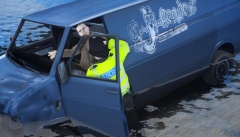 Thanks It was found that he was high!
 -
That's brilliant, nice work ;) Really effective and well done. Good video editing, camera angles and theme, captures the mood well =D Love the bit with the building fire and the rescue. Bravery! Really good, well done indeed. :D Deserves a medal!
-
From the album: General - Metropolitan Police on LCPD:FR
A brave officer from the Roads Policing Unit drags a person out of their vehicle as they sink into the beds of the River Thames. -
General Metropolitan Police images on GTA IV well using LCPD:FR This can be from arrests to traffic duties and everything else.
-
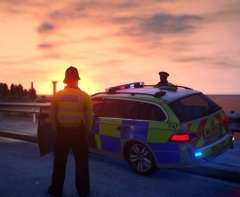
From the album: General - Metropolitan Police on LCPD:FR
The sun rises over two officers from the Roads Policing Unit of the Metropolitan Police -
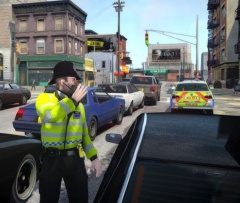
From the album: General - Metropolitan Police on LCPD:FR
A bobby from the Roads Policing Unit does a traffic check well wearing his helmet (As oppose to the RPU hats) -
-
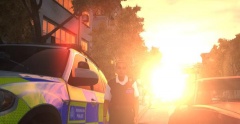
From the album: Effect & Graphical
The sun glares over a Metropolitan Police Officer's shoulder as she steps out of her Roads Policing BMW X5 ENB - CryENB Skin - Double Dopplers Metropolitan Police Female Officer's Pack Vehicle - Doubler Dopplers BMW X5 pack


