


Casey26
Members
-
Joined
-
Last visited
Everything posted by Casey26
-
10/13/2013 Credits go all to myself (Casey1989 & Casey24) For creating these two awesome Whelen Siren Control Boxes. I am also releasing this as Development and all fair credits should be given if edited and released! And thank you for downloading this. A Note: I forgot to scale the meshes to a console size so the meshes need to be scaled down to the correct size. any questions about my great mods that i make please email me at casey.sakli@aol.com
- 7 comments
- 5 reviews
-
 @Stacey Silver, i made that in a free 3d modeling program called Autodesk 123d Design. and it's not a sketchup model at all so you know. and i tried my best to make the texture look good.
 -
Your very welcome Carrythxd! :-) i hope you like it! also please let me know if you have any issues with the model.
- 7 comments
- 3 reviews
-
10/11/2013 Panasonic Toughpad Credits go to myself (Casey24) and (Casey1989) for making this awesome Tablet PC model/mesh. (I am releasing this as Development Support.) This mesh can be edited as long as fair credits are given! Thank you for downloading my new Panasonic Toughpad model! -Casey24- (LCPDFR) & -Casey1989- (GPM)
- 7 comments
- 3 reviews
-
Thank you everyone! :-) i will release it in a bit.
-
From the album: Casey24's Modifications
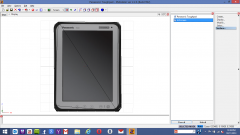
This is the all new Panasonic Toughpad that i have just created today! :-) I made it in Autodesk 123d Design and then i exported it as a .stl and then i imported the mesh into 3ds Max 2014 and then after that i exported it as a .obj file and then i imported it into Zmodeler 2.2.6. and i made a LCD screen and i also UV mapped the whole mesh. i hope everyone likes this! :-) and i made sure that it was a high quality mesh and the textures too. i may release this as Dev, if anyone likes this a lot i will definitely release this today. cause no one has never ever made something like this before so i decided to make this Tablet PC. :-) and this will be made for GTA IV so everyone knows. -
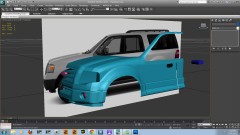 Looks very nice! :-)
 -
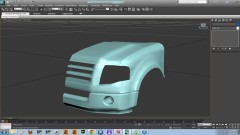 Looks really good EVI, keep up the great work! :-) i think that looks like a Ford Explorer or a Ford Expedition. But not sure which one all i know it looks like a Ford.
 -
I saw videos of that game and it looks really awesome. I just cannot wait to get this awesome PC game!
-
Looks really good, Keep up the great work! I love the new Dodge Darts.
-

