



AkASlow
Members
-
Joined
-
Last visited
Everything posted by AkASlow
-
 Little update as I've not been continuing this project: I've uploaded the source for anyone to use (under Creative Commons license) here: https://github.com/CrispyNinja/MoreRadioChatter Have fun with it!
- 96 comments
- 33 reviews
-
The NAudio.dll goes in the main directory of GTAV (where your GTA V exe file is located)
- 96 comments
- 33 reviews
-
Ok, let's just clear this up; sorry, it was a simple mistake from my side. Sorry for any inconvenience this may have caused. Enjoy your holidays!
- 96 comments
- 33 reviews
-
Haha. Now when radio chatter is played, the console states what is played by a number. So when you hear a call that is too quiet, open up the console (default hit F4) and read the latest message by MoreRadioChatter. Then reply the number to me and I'll see what I can do about it ;)
- 96 comments
- 33 reviews
-
-
Oh yeah, that's right! Thanks for reminding me, gotta add credits for the audio files. And thanks ;) Will definitely hit you up if I need anything!
- 96 comments
- 33 reviews
-
-
-
I've been running on 49 and experienced no errors. So you should be good to go ;)
- 96 comments
- 33 reviews
-
Sure, I'll get on that ASAP EDIT: I added a private video from YouTube, just check the description.
- 96 comments
- 33 reviews
-
-

- 1
-
-
Source have been uploaded here: https://github.com/CrispyNinja/MoreRadioChatter Want a more realistic experience while playing LSPDFR? Download this and feel more immersed in your gameplay! This adds that background chatter that will really immerse you into the role of an officer! And the best of it all? You can create as many chatter lines as you want! No limitations. Preview video (outdated, doesn't properly show what this plugin is capable of): Features: No external programs needed! Customizable volume for the chatter! It plays a random line of chatter between a custom time of your choosing. Easy to setup, just drag and drop, then play! Easily create your own chatter lines! 35 different chatter lines by default! Setup: The setup procedures are provided in the README.txt file. It's really simple! In the ZIP file there's a folder called "Grand Theft Auto V", just drag the contents of this into your Grand Theft Auto V folder and you're all set! Credits: BetterDispatchAudio Will add more as I look through the used files again
- 96 comments
- 33 reviews
-
-
-

- 32
-
-
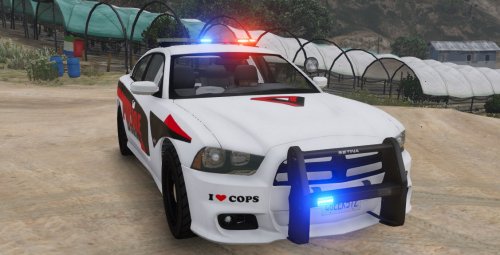 Thanks to martinct for the awesome Dodge Charger model! On this model I made some slight adjustments: edited the car for city use (changed textures, removed some items on the car, etc.). How to install: - Open up OpenIV, then click on Grand Theft Auto V. - Navigate to: update/x64/dlcpacks/patchday4ng/dlc.rpf/x64/levels/gta5/vehicles.rpf - Once you're there, drag in the files provided. If police2 files already exists there, just replace them. - Rebuild and launch your game! Credits: martinct: Vehicle model. Go read his post for all of the credits. Current issues with vehicle: - Windows won't break. - Door handles are not loading textures correctly on all sides.
 -
Lol' I'm such a noob! I did try to import a locked model, and the trail license does not support importing. Well, at least now I know the problems! Thanks to both of you!
-
I'm sorry if this is a problem with an easy solution, but I can't seem to find that solution. Searched everywhere. I downloaded Zmodeler 3.1.2 and got the trial license activated on my account. It is activated correctly and it says "passed today". But when I'm trying to import a vehicle, Zmodeler 3 only highlights the file name and fades out the import button. I did put all of the textures used on the vehicle in to that pre-load section. I did try with other vehicles, but still nothing. Does anyone know why it is doing this? Thanks for all answers in advance!
-
-
-
-
-
It Worked! Thx!
-

