



TheProneGuy
Members
-
Joined
-
Last visited
Everything posted by TheProneGuy
-
-
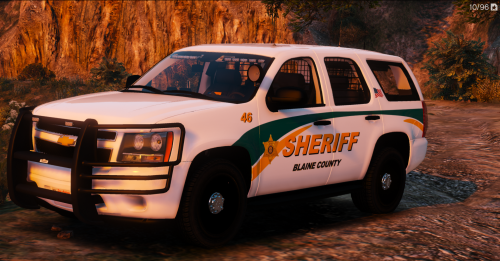 Awesome skin, love it! Perfect fit if your looking to add a lore friendly Blaine County pack! 5/5 Top Notch dude!
- 6 comments
- 6 reviews
-
-

- 1
-
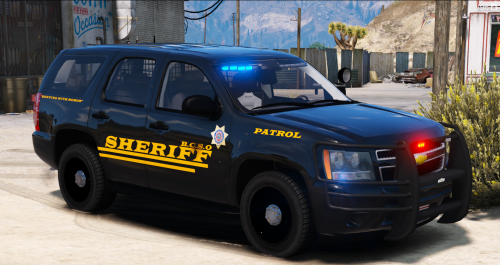 sexy skin! Very sleek and fits nicely.... plus its one of my fav. colors. Top notch as usual!
- 10 comments
- 5 reviews
-
-
- 1
-
 Deffo a must have! Its a huge time saver as well, don't have to dig thru the trainer to get a flashlight attachment anymore. Great Work!
- 75 comments
- 33 reviews
 dang, this thing is slick perfect model! Cant wait to see some amazing skins for it! 5/5 amazing work!
- 85 comments
- 45 reviews
Account
Navigation
Search
Configure browser push notifications
Chrome (Android)
- Tap the lock icon next to the address bar.
- Tap Permissions → Notifications.
- Adjust your preference.
Chrome (Desktop)
- Click the padlock icon in the address bar.
- Select Site settings.
- Find Notifications and adjust your preference.
Safari (iOS 16.4+)
- Ensure the site is installed via Add to Home Screen.
- Open Settings App → Notifications.
- Find your app name and adjust your preference.
Safari (macOS)
- Go to Safari → Preferences.
- Click the Websites tab.
- Select Notifications in the sidebar.
- Find this website and adjust your preference.
Edge (Android)
- Tap the lock icon next to the address bar.
- Tap Permissions.
- Find Notifications and adjust your preference.
Edge (Desktop)
- Click the padlock icon in the address bar.
- Click Permissions for this site.
- Find Notifications and adjust your preference.
Firefox (Android)
- Go to Settings → Site permissions.
- Tap Notifications.
- Find this site in the list and adjust your preference.
Firefox (Desktop)
- Open Firefox Settings.
- Search for Notifications.
- Find this site in the list and adjust your preference.


