Skip to content
View in the app

A better way to browse. Learn more.

LCPDFR.com

A full-screen app on your home screen with push notifications, badges and more.

To install this app on iOS and iPadOS
  1. Tap the Share icon in Safari
  2. Scroll the menu and tap Add to Home Screen.
  3. Tap Add in the top-right corner.
To install this app on Android
  1. Tap the 3-dot menu (⋮) in the top-right corner of the browser.
  2. Tap Add to Home screen or Install app.
  3. Confirm by tapping Install.

JarheaDx38

Members
  • Joined

  • Last visited

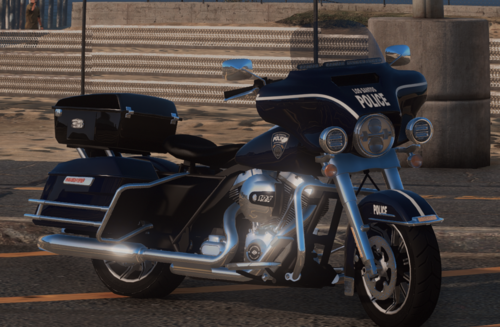
  1.    Taino67u reacted to a comment on a file: [ELS] LSPD Harley Davidson
  2. Eleanor Disdier     Was killed by Emilio Mendoza in Mission Row, Vespucci Boulevard
  3. Eleanor Disdier     Responded to a Solicitation in Sandy Shores, Marina Drive
  4. Eleanor Disdier     Finished responding to a Solicitation in Gd. Senora Desert, Smoke Tree Road
  5. Eleanor Disdier     Was killed by Susan White in Gd. Senora Desert, Smoke Tree Road
  6. Eleanor Disdier     Performed a traffic stop on a Dark Silver Minivan with registration 20YSB752 in Gd. Senora Desert, Smoke Tree Road
  7. Eleanor Disdier     Performed a traffic stop on a Dark Silver Minivan with registration 20YSB752 in Gd. Senora Desert, Smoke Tree Road
  8. Eleanor Disdier     Responded to a Solicitation in Paleto Bay, Great Ocean Highway
  9. Eleanor Disdier     Finished responding to a HighSpeedChase in Paleto Bay, Great Ocean Highway
  10. Eleanor Disdier     Arrested Lamar Davis in Paleto Bay, Great Ocean Highway
  11. Eleanor Disdier     Responded to a HighSpeedChase in Mount Chiliad, Great Ocean Highway
  12. Eleanor Disdier     Arrested Antonio Cipriani in Mount Chiliad, Great Ocean Highway
  13. Eleanor Disdier     Performed a traffic stop on a Silver Mesa with registration 28DDC435 in Paleto Bay, Paleto Boulevard
  14. Eleanor Disdier     Finished responding to a BackupRequired in Paleto Bay, Paleto Boulevard
  15. Eleanor Disdier     Arrested John Peterson in Paleto Bay, Paleto Boulevard
  16. Eleanor Disdier     Responded to a BackupRequired in Paleto Forest, Procopio Promenade
  17. Eleanor Disdier     Went on-duty at Paleto Bay Sheriff Station in Mission Row, Atlee Street
  18. Eleanor Disdier     Went off-duty at Paleto Bay Sheriff Station in Mission Row, Atlee Street
  19. Eleanor Disdier     Finished responding to a ToiletPaperBandit in Paleto Bay, Paleto Boulevard
  20. Eleanor Disdier     Responded to a ToiletPaperBandit in Mount Chiliad
  21. Eleanor Disdier     Finished responding to a Holdup in Mount Chiliad
  22. Ok thanks it works, but not at 100%... 98% of the texture is coming from Harley_sign_2 as you suggested BUT the top case cover is coming from Harley_sign_1. So, you need 2 textures Harley_sign_1 and Harley_sign_2 inside the policeb.ytd file to have a complete paint job 🙂 Of course both of them have to be the same png file... To be more explicit : Only Harley_Sign_1 : Only Harley_Sign_2 : With both : Does anyone knows how to fix that ? Is there an text file to modify ? This must be done with Zmodeler ?
  23. Hi ! In my case Harley_sign_1 doesn't works... I don't know why but the bike remains default color... I don't know how to tell GTA to use the texture... And here is what it looks ingame :
  24. Yup, these two entries already have been deleted as mentionned in the readme file (so I havn't these car ingame because they should be replaced with the modded)
  25. Hi ! I'm a bit confused cause I've followed all the steps but it seems my dlc folder is not loading well. I've checked the dlclist.xml couple of times and everything seems good... Asiloader is OK + OpenIV.asi is working well... I'm sure the problem is coming from me cause the pack seems working for you, but I can't find where... Edit : I've found on setup2.xml <deviceName>dlc_bcso</deviceName> shouldn't it be following cause the folder name is only bsco ? <deviceName>bcso</deviceName> Another question, all my mods are in the "mods" folder : do I have to modify something on your files to make it works properly ?

Account

Navigation

Search

Search

Configure browser push notifications

Chrome (Android)
  1. Tap the lock icon next to the address bar.
  2. Tap Permissions → Notifications.
  3. Adjust your preference.
Chrome (Desktop)
  1. Click the padlock icon in the address bar.
  2. Select Site settings.
  3. Find Notifications and adjust your preference.