


Vayerr
Members
-
Joined
-
Last visited
Everything posted by Vayerr
-
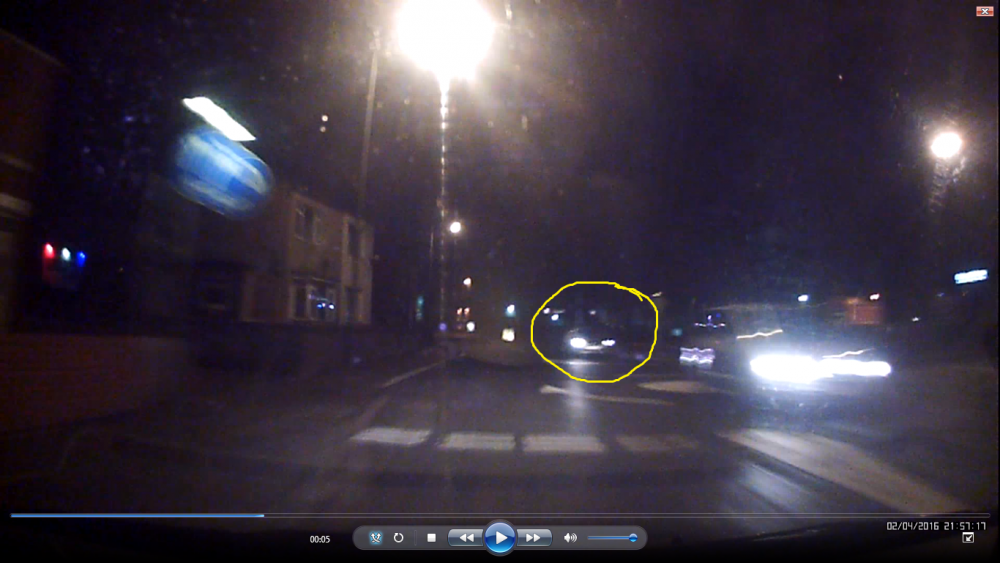
Hello, I have a clip from dashcam from my dad's car and we need to be able to see the vehicle registration mark (VRM) of the vehicle going the other way. I have tried to clear it up myself but as I am amature in this area I failed... Please let me know asap if you could do this within few days. The quality of the clip isn't HD or anything but when I was going through it frame by frame I think there's a chance that advaned video editor can clear it up nicely. Alternatively if there's a chance of making a screenshot and editing the still to see the VRM that would work too. I attach screenshot of POSSIBLE frame I identified as perhaps being good to be edited. All help much appreciated. Thank you
-
-
I personally think that Microsoft are a bit more on the money side rather than the fun etc. but it's like they described Xbox, they want it to be All-in-one entertainment that's why they are putting so much features in it which for some might be cool & useful. I found out today that Xbox One is supposed to be somewhere around £600 which is insane! I bulit my PC with decent specs for £550 and when I turned on BF3 on both Xbox and PC to compare it then PC is so much better with graphics not to mention all the other features that Xbox have etc. Even though I love Xbox, PC is way better and has more + better things so the next money I'll have I'll probably spend it on upgrading my PC like getting SDD or a new GPU instead of buying a new console and besides I have the old Xbox 360 and it works for 4 years now so Im happy! ;) For the PS though... I get pushed away from it because of the fact they got hacked and like someone said before, PS Network is free unlike Xbox LIVE which leads to more annoying kids having PS because their parents don't have to pay every month/year (and Im not talking about everyone just the younger players so don't get offended) but then again on Xbox you get more features that are useful for some. Other than that PS isn't that bad if we were to look and their products so far and neither is Xbox but it's the matter of who likes what. I just know for a fact I prefer to keep with PC as it's the best technology for everything while Xbox / PS are starting to look like they soon will be making XC's or PSC's (some sort of Xbox/PlayStation Computer :P ).
-
I found an ok skin with light jeans and white t-shirt but give me a bit of time to get the link cause Im on my phone :P It looks not so good on the pics but its alright in the game... I just wish I knew how to change few things like the hair :)
-
Thats exactly what I want but it's important for me for the person to be white and with blonde hair. Perhaps would it be easier possibly to edit an existing ped (if the author allows it) or start from scratch? Im not sure what's better as Im only into car textures right now but I know starting from scratch will have few more benefits...
-
Hello, Im gonna appologize straight away if this is posted in the wrong section. Now. I would really love to have a cop skin in plain clothes, I want darkish jeans, white t-shirt/shirt and most important, I really want the ped to be blond haired ;) Also if this isn't a problem I really want a belt with holster and badge on the belt (please no neck badges). If anyone could give me a link or perhaps make me a ped like that I would really appreciate it. Thank you and sorry again if this isn't the right spot for this topic.
