
VinceKaufman
Members
-
Joined
-
Last visited
Files posted by VinceKaufman
-
This took 3 attempts to even get it remotely sounding decent.
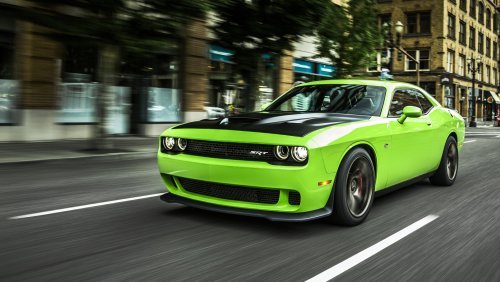
This will replace your Franken Stange (btype2) engine sounds with a Dodge Challenger Hellcat. This sound is commonly used on FiveM servers for Gauntlet interceptors.
THIS ONE HAS A LONG DIRECTORY. FOLLOW THESE STEPS EXACTLY AS THEY ARE WRITTEN.
HOW TO INSTALL:
- MAKE BACKUPS!!!
- OpenIV must be in "edit mode"
- update/x64/dlcpacks/mphalloween/dlc.rpf/x64/audio/sfx/dlc_halloween/musclecar_8_us_v8_halloween.awc
- New -> Import Openformats -> Install "musclecar_8_us_v8_halloween.oac." Do the same for the NPC version ("musclecar_8_us_v8_halloween_npc.oac.") The readme says "NPC folder," don't do that.
- Use ArchiveFix (you can find this in the Crown Victoria sound mod below). Drag and drop "dlc.rpf" from "mp_halloween" onto ArchiveFix.exe.
- Load your game and see what you installed. Check your favorite FiveM servers or spawn "btype2" in singleplayer.
SOUND DEMO:
- 1,758 Downloads
- 2 Comments
Updated -
Looking to beef up your Buffalo S sounds/Buffalo Police engines? This is the tried and true muscle car sounds that were iconic to the Need for Speed franchise in the 2000s.
How to install:
- MAKE A BACKUP OF "STREAMED_VEHICLES_GRANULAR.rpf" and "STREAMED_VEHICLES_GRANULAR_NPC.rpf!"
- OpenIV must be in "edit mode"
- x64/audio/sfx/STREAMED_VEHICLES_GRANULAR.rpf. "New -> Import Openformats -> Install "musclecar_3_us_v8.oac." Do the same in the NPC Folder for "musclecar_3_us_v8_npc.oac." This gets installed in x64/audio/sfx/STREAMED_VEHICLES_GRANULAR_NPC.rpf.
- Use ArchiveFix to get the sounds to work ingame!
- Load up the game and enjoy! If the game loads proper, your sound is installed properly.
Demo:
- 80 Downloads
- 1 Comments
Updated -
So,
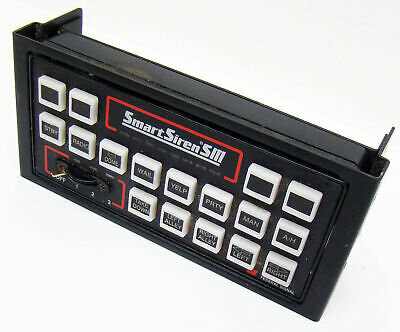
You're looking for yet ANOTHER Federal Signal Smart Siren.
This is being uploaded to LCPDFR.com as a result of content creators getting DMCA strikes on their VODs as a result of the default sirens being picked up as well as other siren sound mods muting VODs. This sound mod has rendered no issues as of yet for my twitch streams and is hopefully going to work for your game as well should you face issues.
(Sound files are also added separately in here in case you have other sounds in your resident.rpf that you wish to keep, like car door sounds, other horns, etc. YOU DON'T NEED TO ADD THESE IF YOU'RE ONLY INSTALLING THE SIRENS)
How to install:
1. OpenIV -> Edit Mode
2. x64 -> Audio -> sfx -> Resident.RPF
3. Install openformats (.oac) -> locate the vehicles.oac from this mod. You won't need openIV after this stage.
4. Use Archivefix to fix the resident.rpf file you just modified. Don't have Archivefix? I have it included in this sound mod:
https://www.lcpdfr.com/downloads/gta5mods/audio/31180-keyboard-cops-cvpi-sound-mod-npc-add-on/
Launch singleplayer/fivem and test it out!
Please message me if this mod is giving you DMCA strikes. The sounds come from people demonstrating the Smart Siren on youtube and are not from professional/royalty based sources.
https://clips.twitch.tv/BashfulDeadHamAllenHuhu-SFqdxeF88bvw4_NZ (test for the siren)
- 446 Downloads
Submitted -
This replaces the base model Buffalo sounds, not the Buffalo S. I'm working on replacing that with a more powerful engine.
This is my first attempt at making a 5.7 V8 Dodge Charger. Unfortunately the car shifts too early in real life and sound mods have to be the exact length as they are ingame, so this mod uses dyno track sounds.
How to install:
- MAKE A BACKUP OF "STREAMED_VEHICLES_GRANULAR.rpf" and "STREAMED_VEHICLES_GRANULAR_NPC.rpf!"
- OpenIV must be in "edit mode"
- x64/audio/sfx/STREAMED_VEHICLES_GRANULAR.rpf. "New -> Import Openformats -> Install "sports_saloon_2_eur_5cyl.oac." Do the same in the NPC Folder for "sports_saloon_2_eur_5cyl_npc.oac." This gets installed in x64/audio/sfx/STREAMED_VEHICLES_GRANULAR_NPC.rpf.
- Use ArchiveFix to get the sounds to work ingame!
- Load up the game and enjoy! If the game loads proper, your sound is installed properly.
- 3,263 Downloads
- 11 Comments
Updated -
This is an edit of Keyboard Cop's CVPI sound mod for the default POLICE cruiser.
How to install:
- MAKE A BACKUP OF "STREAMED_VEHICLES_GRANULAR.rpf" and "STREAMED_VEHICLES_GRANULAR_NPC.rpf!"
- OpenIV must be in "edit mode"
- x64/audio/sfx/STREAMED_VEHICLES_GRANULAR.rpf. "New -> Import Openformats -> Install "saloon_7_us_v8.oac." Do the same in the NPC Folder for "saloon_7_us_v8_npc.oac." This gets installed in x64/audio/sfx/STREAMED_VEHICLES_GRANULAR_NPC.rpf.
- If you don't have archivefix on your computer, it is included in the mod. Drag and drop your modded rpf archives on top of the .exe file.
- Press the "any key."
- Load up the game and enjoy! If the game loads proper, your sound is installed properly.
Sounds by Keyboard Cop
NPC Edit by VinceKaufman
Works with FiveM!
- 440 Downloads
- 3 Comments
Submitted