


byankeesjeter
Members
-
Joined
-
Last visited
Everything posted by byankeesjeter
-
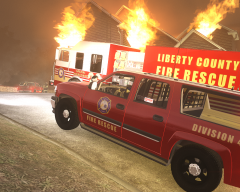
From the album: House Fire in Alderney
-
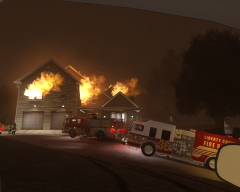
From the album: House Fire in Alderney
Three story residential house fire -
I have no problem using ELS and SNT in conjunction. What I discovered is that if there is a an ELS key that doesn't work first time hold down another key (I use J) and then press the ELS key. After the a few or even one press of both the keys the function will work.
-
Here are a few simple native trainer shortcuts. Not sure if people know about these, but I recently discovered them and they are very useful. I made a list of them and thought that I could share it to benefit everyone. Sorry if this is widely known, I'm sure it can help a few people. Anyway some of them appear to be missing one or two shortcuts, it's possible that they didn't work in my game but they might in yours so if that is the case feel free to share it in this topic. Thanks and enjoy. Just hold down the associated key at the beginning of each list plus the one of the sub keys in each key category (ex: hold down J + NUM 8 for Speedometer enabled/disabled). J +: NUM 8 = Speedometer enabled/disabled (MPH) NUM 9 = Player, car visible/invisible K +: NUM 0 = Vehicle lights on/off NUM 1 = Save car NUM 2 = Teleport to saved car NUM 3 = Switch seats NUM 4 = Remove driver window NUM 5 = Remove passenger window NUM 6 = Remove driver-side back window NUM 7 = Remove passenger-side back window NUM 8 = Remove all windows NUM 9 = Parking lights L +: NUM 0 = Opens some locked doors ("Open Sesame!") NUM 1 = Spawn attacking ped NUM 2 = Unlock all islands NUM 3 = Spawn random bodyguard NUM 4 = Spawn random ped NUM 5 = Spawn ped NUM 6 = Hide hud/radar NUM 7 = Mobile radio NUM 8 = Radio channel down NUM 9 = Radio channel up RAlt +: NUM 0 = Sync game time to system time NUM 1 = Extra sunny NUM 2 = Sunny NUM 3 = Sunny-windy NUM 4 = Cloudy NUM 5 = Raining NUM 6 = Drizzle NUM 7 = Foggy NUM 8 = Lighting NUM 9 = Player visible/invisible RCtrl +: NUM 0 = Lock car doors NUM 1 = Fix car NUM 3 = Clean car NUM 4 = Car color 1 NUM 5 = Car color 2 NUM 6 = Car color 3 NUM 7 = Car color 4 NUM 8 = Car color 5 NUM 9 = Car color 6
-
Wow, I thought you'd never be back. Still remember some of your great comments as a support staff haha. Welcome, awesome to have you back.
-
It's not conventional, but for each ped that you spawn move niko into the direction that you want the ped to face. Then go to ped task menu and change it to "face player", he will rotate. After that in the same menu change it to "stand still". You have to do this for each ped whose direction you want to change. As of now it's the only way I've found and it works fairly well. Edit: Nevermind David beat me to it.
-
I appreciate the suggestion, but I also tried a version with that changed to M_Y_Construct_01 and it had no effect. I'm inclined to believe that it can only be aligned accurately in a modeling program.
-
Alright well thanks for your help guys. I guess I'll just leave it as is for the time being.
-
Thank you SvendseN, I plan on releasing it as soon as I fix the problems. Still running into the same problem. Here's my odd file, maybe I haven't done it right. Sorry it lost most of the formatting. FILE:
-
That could be it, since it's a combination I didn't think I could do that. But thanks i'll try to mix and match. It's a combination of police, fbi, and construct 1 with a few of the textures and meshes removed from construct 1. construct 1 was the main model that I added to.
-
Hi I was wondering if someone could help me out. I was messing with some ped meshes and combining a few. In the final result there's a problem with the torso not fitting very well in relation to the legs, as well as the badge being partly inside the shirt. Is there any way to fix this problem without a modeling program? I've had the issue with each itteration as well as other models. Thanks. (sorry for the large images)
-
So far unless I missed it they haven't given one. They almost never give an expected release date, and they generally do not appreciate people asking. Clearly you're new here so you didn't know this, so don't worry about asking this time but in the future try not to. Also, welcome to the forums!
-
Haha wow I was doing the same thing after reading this.
-
Pictures from the scene
-
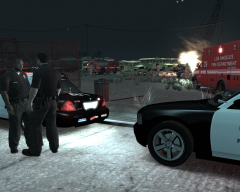
From the album: Late Night Arson
Two teenagers set a stolen vehicle on fire after a joy ride. One of the two received 1st degree burns after the fire reached it's ignition point before the suspect had an opportunity to escape. The second fled the scene. -
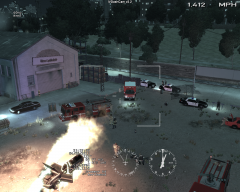
From the album: Late Night Arson
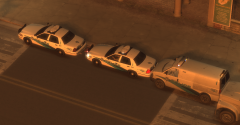
Two teenagers set a stolen vehicle on fire after a joy ride. One of the two received 1st degree burns after the fire reached it's ignition point before the suspect had an opportunity to escape. The second fled the scene. This is a view from the LAPD helicopter that arrived to assist in the search of the second suspect. -
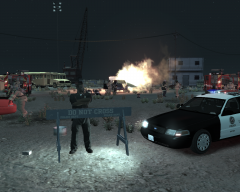
From the album: Late Night Arson
Two teenagers set a stolen vehicle on fire after a joy ride. One of the two received 1st degree burns after the fire reached it's ignition point before the suspect had an opportunity to escape. The second fled the scene. -
 That's sweet! Are you going to release the speedo skin? I am currently using the rest, and would love to have that one too.
 -
 It looks awesome
 -
That is absolutely beautiful. Awesome job!
-
Beautiful! I was looking for a new skin pack to use.
-
Wow, what a great shot of the black and white city with only the police lights in color! Awesome job!
-
Thank you, that worked.
-
-
Will this cause them to hold a rifle in one hand while running?

