Skip to content
View in the app

A better way to browse. Learn more.

LCPDFR.com

A full-screen app on your home screen with push notifications, badges and more.

To install this app on iOS and iPadOS
  1. Tap the Share icon in Safari
  2. Scroll the menu and tap Add to Home Screen.
  3. Tap Add in the top-right corner.
To install this app on Android
  1. Tap the 3-dot menu (⋮) in the top-right corner of the browser.
  2. Tap Add to Home screen or Install app.
  3. Confirm by tapping Install.

Horseman

Members
  • Joined

  • Last visited

  1. Would like to point out that the RPH website no longer has the updated version of RPH, its been outdated by over a year. They lost their website dev and got lazy to find someone else to upload a simple file to the web server and change out a tiny line to list the new version.
  2.    Gelse16 reacted to a file: [ELS] 2020 Chevy Tahoe SAEMS
  3.    paulchopping1986 reacted to a comment on a file: [DEV] Code 3 M180 Series
  4. Code 3 doesn't make ION's.... Those are just called M180 Series...
  5. Can't say I have, it's frowned upon to use the wrong tool for the wrong job at my department lol
  6. Not the proper term, thats not what "Irons" are. The "Irons" are a Halligan bar and a flathead axe. That's just hydrant tools.
  7. EchoWolf started following Horseman
  8. Narva95 started following Horseman
  9. So wait, you used someone elses skin but made it so it fits the ram? Did you even get their permission because as far as I'm concerned you just re-uploaded someone elses work....
  10. TrooperDuckyYT started following Horseman
  11.    Horseman reacted to a comment on a file: [ELS] 2014 Dodge Charger LCPD Slicktop/Unmarked
  12.    Horseman reacted to a comment on a file: [ELS] 2014 Dodge Charger LCPD Slicktop/Unmarked
  13.    Horseman reacted to a comment on a file: [ELS] 2014 Dodge Charger LCPD Slicktop/Unmarked
  14. I was thinking about side runners for it, might add them yet or something down the door side of the car not sure yet. In a real world situation it possibly would, but hey this is GTA nothing R* themselves did was overly legit anyways. I did just have a peek in Zmod and they do look like they are not blocked by the ALPR's Thanks and I am actually not 100% sure, the only time I am ever in first person is to check my parts and screenshots of the equipment.
    • 2,783 downloads
    • Version 1.0.0
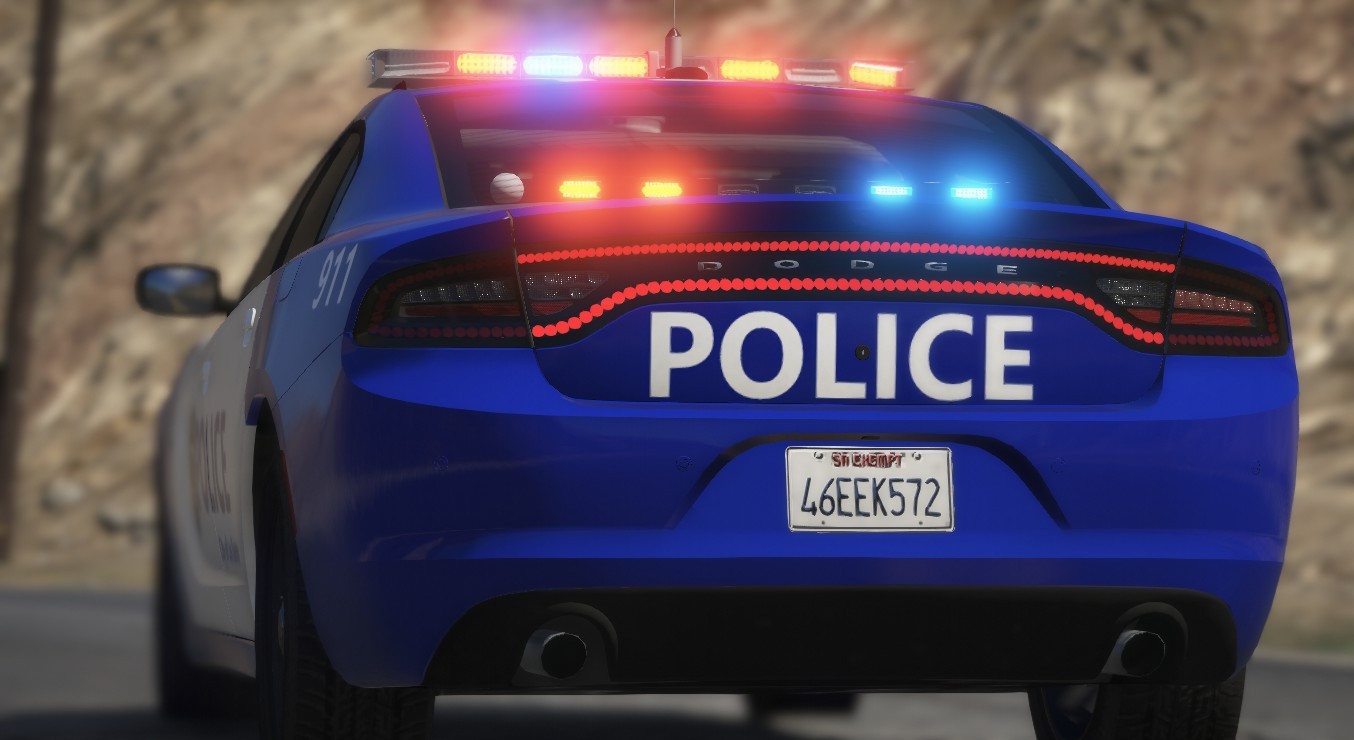
    Remember that LCPD 14 charger I did a while back? Yea well here's a slicktop & unmarked version of it.
  15. I might make a slicktop version at some point but I wasnt going for a pack, it was a unused livery we had lying around for the car and wanted to use it for something.
  16. Its totally a FS Legend I thought about it, I might yet still move them else where on the grill. The ALPR's where a after thought
    • 2,477 downloads
    • Version 1.0.0
    Built this thing, the car is not based on the real department that the livery was made from. There are no known bugs but if you find something please let me know about it so I can fix it. The TA lights on the siren controller are matched to the rear deck TA. Template included. This is a replace vehicle, it replaces police2 but can work in any slot or as an addon if you know how to make it an addon vehicle. I hope you all enjoy this vehicle and let me know what you think. To install In OpenIV -> Mods -> Update -> X64 -> dlcpacks -> patchday22 -> dlc.rpf -> x64 -> levels -> gta5 -> Vehicle.rpf Don't re-upload to other websites Don't try to rip/unlock the model Don't claim as your own Don't try and resell the model Come join my discord @ https://discord.gg/E9EV49A

Account

Navigation

Search

Search

Configure browser push notifications

Chrome (Android)
  1. Tap the lock icon next to the address bar.
  2. Tap Permissions → Notifications.
  3. Adjust your preference.
Chrome (Desktop)
  1. Click the padlock icon in the address bar.
  2. Select Site settings.
  3. Find Notifications and adjust your preference.