


Trisrand
Members
-
Joined
-
Last visited
Everything posted by Trisrand
-
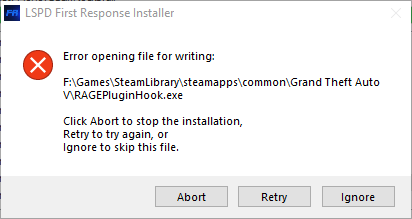
I just downloaded the new LSPDFR and RageHook. when I attempt to install it using the installer I get in error message saying cant opening file for writing. I also even tried the manual install way and it even states that i need permission to copy RageHook to my GTAV folder. I even changed the GTAV folder to where its not read only.
-
-
just tried that but getting a response saying that the model isn't found
-
I have installed a DLC pack of vehicles but they are not showing up in the game. I have double-checked the DLClist and reinstalled everything in ASI Manager in OpenIV.
-
having the same issue again even using the correct gameconfig file
-
I have. Its working now. it ended being using the lastest gameconfig file instead of 2699 gameconfig fle which was causing the problem
-
I have reinstall the mods folder and the dlc cars and replace cars as well but they are showing up what so ever.
-
Thanks for the help. Following the instructions on page 4 helped out a lot.
-
I just tried that and still getting the same issue. I even disabled my anti-virus and still no luck
-
Everytime I try to start Rage Hook it wont work stating that it wasnt able to hook the game instance due to "slow system or insufficient permissions". I have reinstalled the game and LSPDFR. I even gave Rage Hook full permissions and even ran it as administrator with no luck. I even have put rage Hook as an exception in my anti-virus. RagePluginHookLauncher.log
-
Just updated both ragehook and Scripthook and its working fine now
-
 I just updated my both ragehook and script hook and its working for me now.
- 2,699 comments
- 240 reviews
-
Did all of that but my GTA updated this morning i guess so i will have to wait for scripthookV to get updated
-
-
Here is the log ScriptHookV.log
-
I have it installed
-
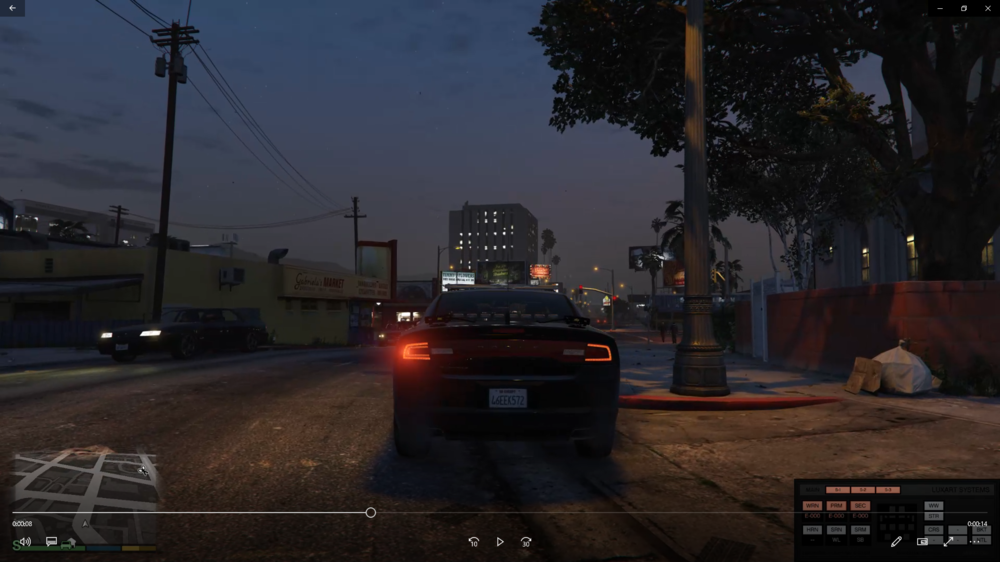
I just loaded up my game today and my vehicle lights are not working. I completely reinstalled the game and only added the ELS mod with the required things it needed as well and the vehicle and still no luck. The only lights that work are the tail lights. Pic is provided showing all light stages are on in the ELS control Panel.
-
I just reinstalled the game completely and ELS isn't working fully. None of the lights on the vehicle work except the tail lights flashing. pic provided. Didnt have an issue with the mod at all till today when i played the game.
- 2,699 comments
- 240 reviews
-
-

- 1
-


