


vici30
Members
-
Joined
-
Last visited
Everything posted by vici30
-
Great! How do I identify modelers? :D
-
Ahh, okay then. Thanks. I'm going to push this and ask again, I don't suppose you know some basic zmodeler? :D I still got questions on stuff.
-
It's and added vehicle, actually (I didn't mention that) - currently using police2 audioNameHash
-
Wouldn't that make the police car engines sound like muscle cars?
-
Sorry if therese are noob questions, but I just started dabbling in vehicle modding a few days ago. Where would I find these sounds and how would I extract/replace them? Also, you don't happen to have (really) basic experience in zmodeler3 and texturing? So far I'm limited to adding invisible lights because any solid model I do requires textures :)
-
Do you know if the siren and engine sounds can be separated? Say if I have and undercover 'gauntlet' I want the engine to sound like a 'gauntlet' (muscle), but the siren to sound like a police car. If I just use 'gauntlet' in the <audioNameHash>, the engine works but there's no siren.
-
I will try to lay it out to you in broad terms, if there is something specific you need help with I can try to help. Every mod can have different problems, so you need to be more elaborate than "fuck up my game and nothing works" First of all, have a fresh install of gta5 and a full backup (ideally) - so that if you break something, you can copy the original files back. Secondly, use openIV with mods folder like this. Really helps with not breaking the game. Once you have your car mod make sure to read the README file before doing anything else. Usually eveything is explained in the readme file of each mod. If there is something you don't understand in the instructions of the mod, the you can ask here. The general workflow for replacing a car in gta5 is: - with openIV navigate to a specific folder (specified in the mod's README installation instructions) - drag and drop the modded files (that you downloaded) into that folder and replace the existing ones. REMEMBER to have a BACKUP (like I told you in the beginning). If you have a backup it's easy to 'unbreak' your game. More advanced installations include manual editing of meta files, but even then there are detailed instructions in README files. Good luck! Ask if you need specific help.
-
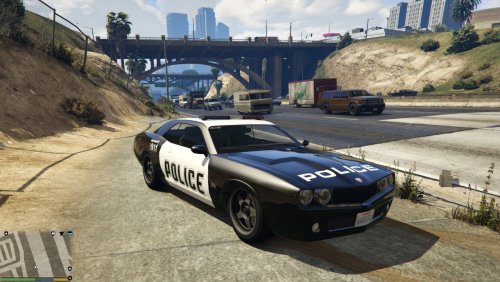 Good job! Unmarked/undercover version coming maybe? :D I tried making one myself but I don't know how to add the police computer on 'E' press.
 -
Hello LSPDFR community! I'm part of this wonderful community for a while now and I am having lots of fun in gta 5 playing cop :) What I am asking in the title is less of how to model cars (I bet there's plenty of tutorials for that), but more of how the basic game file structure works for vehicles and how to modify existing ones. What I am trying to achieve for starters is take any vehicle from the game, and make an emergency vehicle version of it as an added car. That is, simply add flashing lights to it (either light bars on undercover lights - no decals, or custom lights or anything; just pre-existing in-game content for now) and of course make it be recognized as a police vehicle, so it can be used to do traffic stops and so on. So, if I want to do that, where do I begin?
-
Slightly off-topic, but where does one start if they want to become a car-modder? What tools are required? How does the game file structure work? I'm particularly interested in converted in-game vehicles as undercover add-on cars :)
-
 I tried adding the vehicles in patchday3ng and the meta files in mpchristmas2, like Skilfil suggested, but I have the same problem. Cannot load invalid model.
- 371 comments
- 38 reviews
-
No matter what I do, I can't spawn any of them :( Invalid Model. Tried spawning through RageHook and NativeTrainer by name. They do show up in Tab auto suggestions in RageHook, though. Placed model files correctly, double-checked names, replaced carvariations and vechiles.meta as well. Been trying for a week now, even advanced install, but I finally have to ask for help, it's not working for me. I am attaching the .meta files, maybe something is wrong? P.S. I am trying to install all models, from 2.1, 2.2 and CVPI update. Also I noticed police felon model is nowhere to be seen, but it shows up in the meta files. carvariations.meta vehicles.meta
- 371 comments
- 38 reviews
-
My police station icons along with the red things that spawn you inside disappear after I install this script. Help This mods worked fine until I installed the policing script and a couple of other mods ( a graphic mod, a FPS mod and a blood re-texture). After that the police station icons disappeared along with the red things that teleport you inside. I thought it was the policing script so I removed it, but nothing. I also removed the other mods and re-installed LCPDFR using the installer but the mod doesn't work (no police stations, nothing happens when I press Shift+Tab). The files are however in the scripts foldeer (the .dll, the .ini and the LCPDFR folder ). Any suggestions?
-
I have a problem with this mod. After I installed it, the red things from the LCPDFR mods disappeared. now I can't get in the police stations to pick a character model and a car. How is this supposed to work? Help.
- 356 comments
- 140 reviews
