Rooster XVII
Members
-
Joined
-
Last visited
-
Personally, so far, I'm in love with this mod. The things that I find appealing include: Being able to patrol as a variety of agencies.Being able to select head/uniform accessories.Being able to modify squad cars, to the extent the mod lets you.Being able to stand where I please on traffic stops, i.e. not having to walk into a set marker.Animations, i.e. ticket book, cuffing, etc.The things that I'd like to see in the near/far future include: Better pull over mechanics by AI's. I'd love to see them merge into the actual shoulder when conducting stops on the interstate.More actions, i.e. frisking, searching vehicles, etc.Less pursuit-oriented calls. Pursuits are the must unoriginal incident. Too Hollywood.Unique calls, i.e. low-risk disturbances, open carry incidents, animal(s) crossing roadway, jumper scenarios, etc.Ability to customize squad cars in Los Santos Customs, i.e. not a separate mod (it would be nice to have this as a feature of LSPDFR itself).Ability to pull over commercial vehicles.Civil asset forfeiture system, i.e. being able to seize cash/narcotics from AI's.Possible K-9 feature.Multiplayer, obviously.Commercial vehicle enforcement stops, i.e. being able to conduct equipment inspections and weigh trucks with portable scales. Or, implementing an actual weigh station.More insignias on uniforms, i.e. Sergeant, Lieutenant, Commander/Captain, even Chief. Having four brass stars on your collar would be pretty freaking cool.Overall, I'm very pleased with this mod as is. Big thanks to G17. You guys to amazing work all for our enjoyment and I truly appreciate it. Thank you.
-
Is it possible to search vehicles in LSPDFR? I saw a screenshot in someone's gallery in which they were going through the trunk of a stopped car. Thanks in advance.
-
-
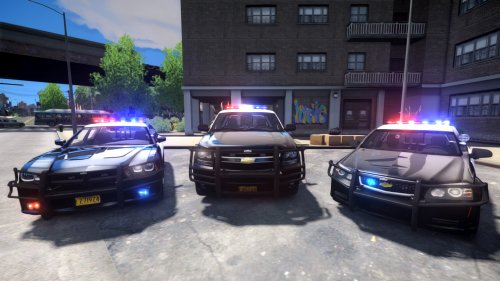 Great job on the pack. I'm a huge fan of the wraparound push-bars. Quick question: which ENB do you use? I downloaded the pack, but the ELS doesn't look great with my ENB (EyeCandy). Thanks in advance.
- 54 comments
- 5 reviews
-
-
That's cool, Indiana! CVE is awesome. I'll definitely download TrafficFlow. By the way, which two islands specifically? Is it the bridge that connects the far left island (Alderney) when looking at the map and the middle island (Algonquin)? There are four islands in the game each having multiple bridges that connect to different islands. I know it's confusing. If you aren't sure, no biggie. I appreciate the reply either way. Thanks! -Rooster
-
-
Greetings all, I'm interested in conducting commercial vehicle enforcement within LCPDFR single player, but cannot seem to find trucks anywhere. So my question is: do I need to download some sort of traffic spawner mod in order to spawn trucks driving around, or do I simply need to edit a file within the game? By the way, by "trucks" I mean semi-trucks (Phantoms, Flatbeds, etc.). For those of you that take interest in commercial vehicle enforcement, have any of you had luck finding trucks within the game? Is there a certain island/roadway in GTA that spawns a lot of trucks? Forgive me if I sound silly. I'm fairly new to LCPDFR. Thanks! -Rooster