


NeoJD
Members
-
Joined
-
Last visited
Everything posted by NeoJD
-
-
-
The new Captchas a re not working for me. I get the "Your not a robot" msg and the green check. But It wont start the download after I click submit.
-
Hey, for some reason the rotator lights dont work for me. They are like stedy burn to different locations. The Led lights work proper. I have installed it correctly with your els files.
- 14 comments
- 3 reviews
-
-
-
-
Hi, corleone you really made a great toturial. I was trying to UV map some months ago but now I actually started one car. But I have a Big problem, after the left side done, and the right side selected. In UV Mapper , I cannot select the object: Neither with quadre or single... I just cant select it so I cant move and scale it to the right position. Is that a bug or whats the problem? EDIT: Its a bug! After restarting It worked again lol
-
-
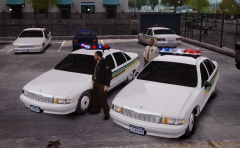 Off cause, I mean are they ELS-H or is that nonELS? Anyway, release them, ;)
 -
Since you didint asked for Permission you are currently only allowed to edit/use parts of our skins on the following vehicels:AMBBCHARGERIMPALATAHOEThe other skins like the LAN2 Skin and specially the CVPI Skin are not free to edit.I dont want to be a dick! + I like the looks of your edit!,but you could have ask for permission specially on the skins witch had that marking like the LAN2 and even If you leaved my copyright markings.Please contact me on GPM or here via PM so we can talk about this. I wont report this for now, since I like your work.good day
- 3 comments
- 5 reviews
-
-

- 1
-
-
-
-
Hey cool I will give that a try! thx Hey this is pretty nice, it still looks good I have more FPS, my ENB Lighting is still great with ELS, and LCPDFR works even with the policecomp... Ok its a bit different then wtih downsampling but it still looks pretty nice. Thank you so much Cj
-
So, whats going on here? I still cant play this nice mod, are we going to get a fix with this problem? I would preffer the "Key can close the comp" solution. Anyone?
-
Well, on the other side, why isint it possbile to close the Police Computer with a Key like ESC. I also have this problem and its driving me nuts. You guys should at least make it able to close the PolComp while pressing ESC or an option to disable it in the .ini . The other thing would be to allow user to choose the resulution in the .ini . For now I cant use LCPDFR (very sad!) cause I sometimes stuck in the policecomp. And no key will close it. Sucks :-(
