- 134 downloads
- Version 3.3.0.0
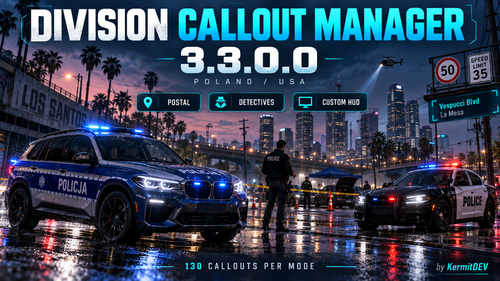
Division Callout Manager MY US/ENG DISCORD https://discord.gg/XrghQczBN MY PL DISCORD https://discord.gg/vjCHsUqrU YOUTUBE https://youtu.be/OXiZLkX7Bhk 🚔 Division Callout Manager 3.3.0.0 Autor: KermitDEVWybierz jednostkę, zarządzaj wezwaniami i dostosuj policyjny HUD do swojej rozgrywki. Division Callout Manager łączy tryby Polska i USA, oferując wybór dewizji, filtrowanie calloutów oraz ręczne rozpoczynanie i kończenie wezwań z menu. Modyfikacja zawiera 130 autorskich calloutów dla Polski i 130 dla USA, w tym rozbudowaną sekcję detektywistyczną z zabójstwami, podejrzanymi zgonami, oględzinami miejsc przestępstw i rozmowami ze świadkami. Najważniejsze funkcje: Jednostki takie jak Patrol, K9, CBS, SWAT, Ruch Drogowy i Wydział Śledczy. Filtrowanie wezwań według wybranej jednostki. Ręczny start i koniec calloutu oraz odświeżanie listy. Niezależny wybór języka PL/US i trybu kraju Polska/USA. Polskie i amerykańskie znaki ograniczenia prędkości, widoczne w radiowozie. Postal z ulicą, rejonem i kodem pocztowym, działający również pieszo. Wybór adresów AUTO/PL/US; polskie nazwy oparte na Warszawie i okolicach. Osobne ustawianie położenia znaku i Postalu. Zmiana bindów i odsetka szybkich kierowców NPC. Uporządkowane menu ustawień oraz zapis konfiguracji w INI. Wersja bez funkcji AI. Polskie adresy i przypisania stref służą do RP — nie odwzorowują rzeczywistej geografii Warszawy. Instalacja: skopiuj zawartość paczki do głównego folderu GTA V. Przy aktualizacji zachowaj własny DivisionCallouts.ini. Domyślny klawisz menu: F10. Wymagania: GTA V, LSPDFR, RAGE Plugin Hook, RAGENativeUI i .NET Framework 4.8. Zewnętrzne paczki calloutów należy zainstalować osobno; automatyczne przypisania do dewizji można zmieniać w INI. 🚔 Division Callout Manager 3.3.0.0 Author: KermitDEVChoose your division, manage calls, and customize your police HUD. Division Callout Manager combines Poland and USA modes with division-based callout filtering and manual callout start and end through the menu. The mod includes 130 built-in Polish calls and 130 built-in US calls, featuring an expanded detective selection with homicides, suspicious deaths, crime-scene investigations, and witness interviews. Main features: Divisions including Patrol, K9, Major Crimes, SWAT, Traffic, and Detectives. Callout filtering based on your selected division. Manual callout start, end, and list refresh. Separate interface-language and country-mode settings. Polish and American speed-limit signs displayed in police vehicles. Postal information showing the street, area, and postal code, including while on foot. AUTO/PL/US address modes, with Warsaw-area names in Polish mode. Independent positioning of the speed sign and Postal display. Customizable keybindings and speeding NPC settings. Organized settings menus with persistent INI configuration. This release contains no AI features. Polish addresses and zone assignments are intended for roleplay and do not recreate Warsaw’s real geography. Installation: copy the package contents into your GTA V root folder. Keep your existing DivisionCallouts.ini when updating. Default menu key: F10. Requirements: GTA V, LSPDFR, RAGE Plugin Hook, RAGENativeUI, and .NET Framework 4.8. Third-party callout packs must be installed separately; automatic division assignments can be adjusted in the INI.


 Division Callout Manager MY US/ENG DISCORD https://discord.gg/XrghQczBN MY PL DISCORD https://discord.gg/vjCHsUqrU YOUTUBE https://youtu.be/OXiZLkX7Bhk 🚔 Division Callout Manager 3.3.0.0 Autor: KermitDEVWybierz jednostkę, zarządzaj wezwaniami i dostosuj policyjny HUD do swojej rozgrywki. Division Callout Manager łączy tryby Polska i USA, oferując wybór dewizji, filtrowanie calloutów oraz ręczne rozpoczynanie i kończenie wezwań z menu. Modyfikacja zawiera 130 autorskich calloutów dla Polski i 130 dla USA, w tym rozbudowaną sekcję detektywistyczną z zabójstwami, podejrzanymi zgonami, oględzinami miejsc przestępstw i rozmowami ze świadkami. Najważniejsze funkcje: Jednostki takie jak Patrol, K9, CBS, SWAT, Ruch Drogowy i Wydział Śledczy. Filtrowanie wezwań według wybranej jednostki. Ręczny start i koniec calloutu oraz odświeżanie listy. Niezależny wybór języka PL/US i trybu kraju Polska/USA. Polskie i amerykańskie znaki ograniczenia prędkości, widoczne w radiowozie. Postal z ulicą, rejonem i kodem pocztowym, działający również pieszo. Wybór adresów AUTO/PL/US; polskie nazwy oparte na Warszawie i okolicach. Osobne ustawianie położenia znaku i Postalu. Zmiana bindów i odsetka szybkich kierowców NPC. Uporządkowane menu ustawień oraz zapis konfiguracji w INI. Wersja bez funkcji AI. Polskie adresy i przypisania stref służą do RP — nie odwzorowują rzeczywistej geografii Warszawy. Instalacja: skopiuj zawartość paczki do głównego folderu GTA V. Przy aktualizacji zachowaj własny DivisionCallouts.ini. Domyślny klawisz menu: F10. Wymagania: GTA V, LSPDFR, RAGE Plugin Hook, RAGENativeUI i .NET Framework 4.8. Zewnętrzne paczki calloutów należy zainstalować osobno; automatyczne przypisania do dewizji można zmieniać w INI. 🚔 Division Callout Manager 3.3.0.0 Author: KermitDEVChoose your division, manage calls, and customize your police HUD. Division Callout Manager combines Poland and USA modes with division-based callout filtering and manual callout start and end through the menu. The mod includes 130 built-in Polish calls and 130 built-in US calls, featuring an expanded detective selection with homicides, suspicious deaths, crime-scene investigations, and witness interviews. Main features: Divisions including Patrol, K9, Major Crimes, SWAT, Traffic, and Detectives. Callout filtering based on your selected division. Manual callout start, end, and list refresh. Separate interface-language and country-mode settings. Polish and American speed-limit signs displayed in police vehicles. Postal information showing the street, area, and postal code, including while on foot. AUTO/PL/US address modes, with Warsaw-area names in Polish mode. Independent positioning of the speed sign and Postal display. Customizable keybindings and speeding NPC settings. Organized settings menus with persistent INI configuration. This release contains no AI features. Polish addresses and zone assignments are intended for roleplay and do not recreate Warsaw’s real geography. Installation: copy the package contents into your GTA V root folder. Keep your existing DivisionCallouts.ini when updating. Default menu key: F10. Requirements: GTA V, LSPDFR, RAGE Plugin Hook, RAGENativeUI, and .NET Framework 4.8. Third-party callout packs must be installed separately; automatic division assignments can be adjusted in the INI.