DarthDrew
Insiders
-
Joined
-
Last visited
Everything posted by DarthDrew
-
-
-
 you shouldnt be getting notifications unless you have debug mode on. if you have a white underlay with all the text at the bottom of your screen then you are in debug mode. hold F10 to exit debug mode. if you want debug mode but dont want notifications then yes there is a setting for that. if you tap F10 everything you need is there with descriptions of what every setting does….
- 49 comments
- 3 reviews
-
-
-
-
 apparently this is me claiming i coded 100% of this by hand. of course i didnt. But its kinda crazy for you to assume i could make something like this by just throwing prompts to a LLM like any joe blow can do it. I also have utmost respect for developers before AI. But i still dont understand the unnecessary hate. Granted yes there is tons of AI slop out there. But before you start being disrespectful next time actually look at it. Just because i use AI to help me doesnt mean idk what im doing.
- 29 comments
- 2 reviews
-
someone doesnt understand sarcasm. tell me you didnt watch the preview without telling me. this is an excellent mod. Ive spent months working on this. I'm sorry you feel that way though.
- 29 comments
- 2 reviews
-
-
No, its just something behind the scenes. if you hold F10 for the debug menu you can see it then. but no its just meant for enforcing speed limits and calculating the speeder rolls
- 49 comments
- 3 reviews
-
-

- 1
-
-
-
-
That because of the customization. Down to the bones of it all its not a big mod
- 49 comments
- 3 reviews
-
-
-
No worries! I would lower active speeders limit and increase the spawn interval time. That will make a big difference! something like 3 speeders and 45500ms for interval
- 49 comments
- 3 reviews
-
okay! new update out, i added the ability to add any vehicle you want to the vehicle pool as well as change the spawn chance weights. Also idk if you realized this but if you press F10 you can change everything in the ini live without the need to reload or open the ini itself. this also applies for adding vehicles, if you're sitting there running radar and yopu think "man an adder would be nice to pull over" then you can open up the F10 menu, scroll down to the vehicle pool options and add one right there, hit the reload pool button and boom! its added. you can also add dlc vehicles so it doesnt need to be existing models. just find what handle the vehicles.meta uses for it and type that into the menu! Hope you enjoy!
- 49 comments
- 3 reviews
-
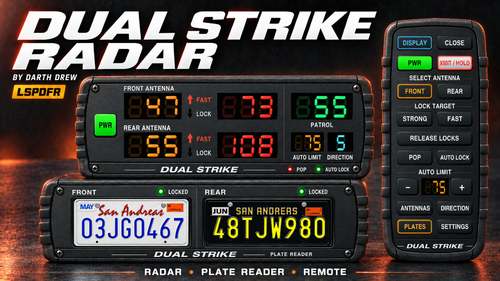
in the new update i changed the plate designs. i wont change the bezel design but i did add a option to remove the bezel and show only the plates.
- 29 comments
- 2 reviews
-
-
- 1
-
-
-
makes perfect sense. I kinda had planned on making that possible and forgot hehe. Will work on an update to include that. I will probably make it an INI edit, just to make things easier. How are you liking it so far?
- 49 comments
- 3 reviews
-
-

- 1
-
-
i would lower the active speeder limit and raise the spawn interval. and no my plugin only keeps ambient traffic from speeding if they see a cop, it doesnt boost normal traffic up to the posted speed. For highway style gameplay this is perfect. not so much for inner city where the ambient traffic struggles to follow realistic speeds.
- 49 comments
- 3 reviews
-
-

- 1
-
-
-
Well there is a reason it doesn't look that way. I didn't want to just straight rip those designs off. I went with something more original. If enough people want that then I might consider it. But i do hope you enjoy this mod!
- 29 comments
- 2 reviews
-
-
- 1
-
-
-