


six7even
Members
-
Joined
-
Last visited
Everything posted by six7even
-
Yes No Attempted a clean reinstall, unfortunately same results. 11:58:39.792: Checking for process name: GTA5
-
yeah i tried all that even disabling windows security and the log just repeats RagePluginHookLauncher.log "19:59:06.172: Checking for process name: GTA5" im pretty sure i installed the mod for Enhanced, which i am using enhanced.
-
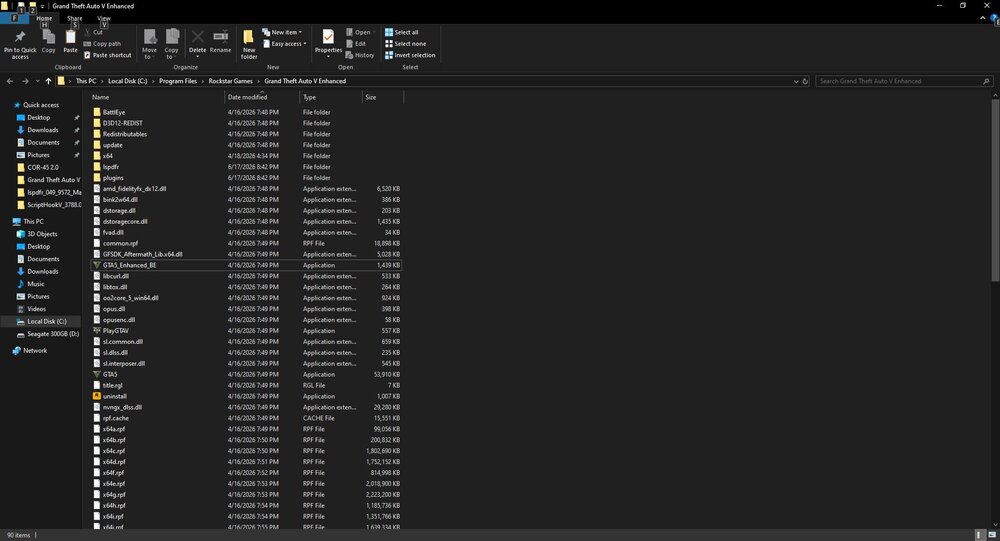
I didn't see that file name in the main game folder, just the RagePluginHookLauncher.log. i'm running gta enhanced if that matters.
-
this file RagePluginHookLauncher.log
-
hi im trying to launch the mod on enhanced, removed all other mods/scripts. The game loads, i go to story mode but nothing has changed and i toggle F4 nothing happens. I added to windows defender exclusions and changed all permissions to allow all. Running windows 10 and GTA version 1.0.1013.34 The log file just shows this: .... 20:53:23.892: Dependency OK 20:53:23.903: Checking api-ms-win-crt-convert-l1-1-0.dll 20:53:23.914: Skipping api-ms-win-crt-convert-l1-1-0.dll 20:53:23.925: Checking api-ms-win-crt-heap-l1-1-0.dll 20:53:23.936: Skipping api-ms-win-crt-heap-l1-1-0.dll 20:53:23.947: Checking api-ms-win-crt-runtime-l1-1-0.dll 20:53:23.959: Skipping api-ms-win-crt-runtime-l1-1-0.dll 20:53:23.970: Checking api-ms-win-crt-string-l1-1-0.dll 20:53:23.982: Skipping api-ms-win-crt-string-l1-1-0.dll 20:53:23.994: Checking api-ms-win-crt-stdio-l1-1-0.dll 20:53:24.005: Skipping api-ms-win-crt-stdio-l1-1-0.dll 20:53:24.017: Checking api-ms-win-crt-utility-l1-1-0.dll 20:53:24.029: Skipping api-ms-win-crt-utility-l1-1-0.dll 20:53:24.040: Checking d3dx9_43.dll 20:53:24.051: Resolved to C:\Windows\system32\d3dx9_43.dll 20:53:24.062: Dependency OK 20:53:24.074: Checking XINPUT9_1_0.dll 20:53:24.085: Resolved to C:\Windows\system32\XINPUT9_1_0.dll 20:53:24.096: Dependency OK 20:53:24.107: Checking api-ms-win-crt-math-l1-1-0.dll 20:53:24.119: Skipping api-ms-win-crt-math-l1-1-0.dll 20:53:24.130: Checking api-ms-win-crt-filesystem-l1-1-0.dll 20:53:24.141: Skipping api-ms-win-crt-filesystem-l1-1-0.dll 20:53:24.153: Dependencies check: True 20:53:24.166: Waiting for game launch 20:53:24.181: Checking for process name: GTA5 20:53:24.196: Game is not already running 20:53:24.207: Launching game 20:53:24.220: Is steam version: False 20:53:24.262: Waiting for launcher 20:53:24.280: Checking for process name: GTA5 20:53:24.295: Checking for process name: GTA5 20:53:24.311: Checking for process name: GTA5 20:53:24.326: Checking for process name: GTA5 20:53:24.342: Checking for process name: GTA5 20:53:24.357: Checking for process name: GTA5 20:53:24.373: Checking for process name: GTA5 20:53:24.390: Checking for process name: GTA5 20:53:24.406: Checking for process name: GTA5 20:53:24.423: Checking for process name: GTA5 20:53:24.441: Checking for process name: GTA5 20:53:24.457: Checking for process name: GTA5
