


LilCuteli
Members
-
Joined
-
Last visited
Everything posted by LilCuteli
-
Creating custom sirens for GTA 5 can be tedious, but with the right workflow, you can get perfectly looping, loud, and high-quality tones in-game. This guide covers everything from sourcing the audio to editing loops, maximizing volume, importing via OpenIV, and making it work for FiveM. Prerequisites & Golden Rules Tools Required: Audacity (for audio editing) OpenIV (for GTA 5 archive modding) ArchiveFix (only required if you are porting this to FiveM) Golden Rule: Always create backups of your game files and strictly use the mods folder in OpenIV. Make sure Edit Mode is clicked ON in OpenIV before starting. Organization: Create a dedicated project folder on your PC. Keep your original downloaded videos/audio separated from your edited files and final game-ready exports. Phase 1: Sourcing the Perfect Audio The foundation of a great siren is a clean source file. Find Clean Audio: Search YouTube (or other sources) for clips of the siren you want. Look for videos with the absolute minimum amount of background noise. Avoid the Doppler Effect: Find a clip where the emergency vehicle is stationary or moving very slowly. The Doppler effect alters both the pitch and speed of the sound as the vehicle passes, which is incredibly difficult to fix later. Download: Use an audio downloader website (like NoTube) to rip the audio from the video. Phase 2: Audacity - Creating the Perfect LoopThis is the most meticulous part of the process. You want the siren to loop seamlessly without any clicking or popping. Isolate the Tone: Right click on your downloaded sound and open with Audacity, go to Mix>Resample>Mix Stereo Down to Mono. Find the cleanest single cycle of the siren. Trim the Fat: Click and drag to highlight the section you want to keep. Copy, click on an empty area down and paste it there and delete the old one by selecting and pressing Backspace. The Zero-Crossing Method (Fixing Pops): If the start and end of your audio clip don't align perfectly, you will hear a "pop" every time it loops. Zoom all the way into the audio track usingCtrl + Mouse Wheel until you can see the individual dots on the waveform line. Let Audacity do the hard work for you: Highlight your clip and press Z on your keyboard (or go to Select > At Zero Crossings). This snaps your selection edges perfectly to the horizontal center line (zero amplitude). Test the Loop: Use Shift + Space to play the selection in a continuous loop. Save Your Project: Go to File > Save Project > Save Project. The hardest part is done, lock in this progress before altering the volume. Phase 3: Audacity - The "Flat Volume" Method To ensure your siren sounds consistently loud and powerful in-game without volume fluctuations, flatten its dynamic range. 1. Compression and Limiting Highlight your audio, then navigate to Effect > Volume and Compression > Compressor Threshold: -20 dB to -25 dB Make Up Target: 0 dB Knee Width: 0 dB Ratio: 10.1 Lookahead: 1.0 ms Attack/Release: 0.1 ms 2. Forced Amplification (Optional) If it still needs more punch, force it right to the edge of clipping: Go to Effect > Volume and Compression > Amplify... Check the box for "Allow clipping" and increase the New Peak Amplitude by a few dB. 3. Export the File: When you are done, go to File > Export Audio... * Format: WAV (Microsoft) Encoding: Signed 16-bit PCM 32000hz Name the file exactly as the siren you intend to replace (look into the box at the end of this guide to see the siren names). Phase 4: OpenIV - Injecting the Audio (vehicles.awc) Now you need to get your new .wav file into the game's audio archive. Locate the File: In OpenIV, navigate to mods/x64/audio/sfx/RESIDENT.rpf. Export to openFormats: Scroll down to find vehicles.awc. Right-click on it and select Export to openFormats (.oac). Choose a location on your desktop. Replace the Audio: Go to your desktop. You will now see a file named vehicles.oac and a folder paired with it named vehicles. Open that vehicles folder. Find the original siren .wav file, delete it, and drag in your new custom .wav file (ensure it has the exact same name as the one you deleted). Import Back to OpenIV: Go back to OpenIV. Either Right-click in empty space and select Import openFormats, or simply drag and drop the vehicles.oac file directly into the OpenIV window. It will automatically recompile the .awc file with your new siren inside. Tip: Keep your loops short! GTA 5 has a strict file size limit for the vehicles.awc archive. If you exceed it, your game will crash or audio will mute. If you need to save space, download "dead air" (silent) audio files to replace obscure, unused vehicle sounds in the archive. Phase 5: FiveM Specific Step (ArchiveFix)If you are only playing Single Player LCPDFR, skip this step. FiveM requires custom .rpf files to be encrypted properly, otherwise the server will crash or reject the files. After you have successfully imported your .oac back into OpenIV, close OpenIV. Locate the physical RESIDENT.rpf file on your computer (the one you just modified inside your mods/x64/audio/sfx/ folder). Drag and drop the entire RESIDENT.rpf file directly onto your ArchiveFix.exe application. A command prompt window will briefly pop up to confirm it has been encrypted/fixed. Your file is now ready to be streamed to your FiveM server. [TheHC09] ELS Siren Strings Reference After extensive research, I have finally found the siren strings for ELS, and all but two siren tones are now working in-game! They seem to correspond to the OpenIV assigned names, but they have the beginning part of the string added. These were all found by me personally through research and experimenting, so you're welcome (also would appreciate this being a pinned topic for others to find). From what I gather, the string is basically referring to the location of the siren file in the game's archive ('RESIDENT' being the RESIDENT.rpf and 'VEHICLES' being vehicles.awc, followed by the siren name). LSPD Main Police Siren: "VEHICLES_HORNS_SIREN_1" - Police Primary (Note: "RESIDENT_VEHICLES_SIREN_PA20A_WAIL" doesn't work for some reason) "VEHICLES_HORNS_SIREN_2" - Police Secondary (Note: "RESIDENT_VEHICLES_SIREN_2" doesn't work for some reason) Firetruck Siren: "RESIDENT_VEHICLES_SIREN_FIRETRUCK_WAIL_01" - Firetruck Primary "RESIDENT_VEHICLES_SIREN_FIRETRUCK_QUICK_01" - Firetruck Secondary Police Bike Siren: "RESIDENT_VEHICLES_SIREN_WAIL_03" - Police Bike Primary "RESIDENT_VEHICLES_SIREN_QUICK_03" - Police Bike Secondary FIB Siren: "RESIDENT_VEHICLES_SIREN_WAIL_02" - FIB Primary "RESIDENT_VEHICLES_SIREN_QUICK_02" - FIB Secondary Ambulance Siren: "RESIDENT_VEHICLES_SIREN_WAIL_01" - Ambulance Primary "RESIDENT_VEHICLES_SIREN_QUICK_01" - Ambulance Secondary Siren Warning/Priority Tones: "VEHICLES_HORNS_POLICE_WARNING" - Police Warning (Note: "RESIDENT_VEHICLES_POLICE_WARNING" doesn't work) "VEHICLES_HORNS_AMBULANCE_WARNING" - Ambulance Warning (Note: "RESIDENT_VEHICLES_AMBULANCE_WARNING" doesn't work) Siren Horns: "SIRENS_AIRHORN" - Airhorn (Note: "RESIDENT_VEHICLES_AIRHORN_EQD" doesn't work) "VEHICLES_HORNS_FIRETRUCK_WARNING" - Firetruck Horn (Note: "RESIDENT_VEHICLES_FIRE_TRUCK_HORN" doesn't work) [TastyFlavour] Update: Sheriff (Granger) Sirens FixWhile the standard Granger strings (RESIDENT_VEHICLES_SIREN_WAIL_04 and QUICK_04) do not work for some reason, I have found the Granger Sirens that DO work correctly with ELS: Granger Wail: sirens_slow_dir4 Granger Yelp: fast_9oghrv1 [Nazdravi412] Siren file names Airhorn AIRHORN_EQD - Generic Bullhorn Police Bike SIREN_WAIL_03 - PoliceB Main SIREN_QUICK_03 - PoliceB Secondary FIB SIREN_WAIL_02 - FIB Primary SIREN_QUICK_02 - FIB Secondary Police SIREN_PA20A_WAIL - Police Primary SIREN_2 - Police Secondary POLICE_WARNING - Police Warning Sheriff Granger SIREN_WAIL_03 - Sheriff Granger Primary SIREN_QUICK_03 - Sheriff Granger Secondary Ambulance SIREN_WAIL_01 - Ambulance Primary SIREN_QUICK_01 - Ambulance Secondary AMBULANCE_WARNING - Ambulance Warning Fire Trucks FIRE_TRUCK_HORN - Fire Horn SIREN_FIRETRUCK_WAIL_01 - Fire Primary SIREN_FIRETRUCK_QUICK_01 - Fire Secondary
-
Hey everyone, I wanted to share a solution for a specific, somewhat rare crash I encountered recently. After some testing with custom requested add-on vehicles, I noticed the game would immediately CTD (crash to desktop) whenever a car sustained any visible damage or was involved in a high-impact collision. If you are experiencing this, the fix is likely simpler than you think. The CauseThe crash happens because the game looks for a high-detail collision model during an impact, specifically a _hi.yft file. If your custom vehicle folder only contains the standard .yft and .ytd files without the "high" version, the engine can't process the deformation/damage correctly, leading to a crash. Please note that while a _hi.ytd file isn't related to the crash, it is good practice to include one to ensure your high-resolution textures are preserved in-game and I suppose are going to get loaded when you're closer and not when it's further away, saving up resources. The SolutionYou don't necessarily need a dedicated high-poly model to fix this; you just need the game to find a file with the correct naming convention. Navigate to your vehicle's installation folder. Locate your main model file (e.g., police.yft). Duplicate/Copy that file. Rename the copy by adding _hi to the end (e.g., police_hi.yft). Ensure both files (police.yft and police_hi.yft) are in the same directory. Once I added the duplicated _hi.yft file, the crashes stopped instantly. While it’s always better to have a proper high-detail model provided by the author, this "copy-paste" method is a perfect 2-minute workaround if the file is missing. Hope this helps someone else! I’m writing this down mostly so I don't forget it myself if it happens again in six months. Cheers!
-
Note on Audio Calibration:For these two specific sirens, GTA V automatically modifies the playback speed and pitch in-game. To get them sounding correct, you'll need to pre-edit your source audio files to compensate: Pitch: Increase by 12% Speed: Increase by 5% This adjustment is necessary for: RESIDENT_VEHICLES_SIREN_WAIL_01 (Ambulance Primary) RESIDENT_VEHICLES_SIREN_QUICK_01 (Ambulance Secondary)
-
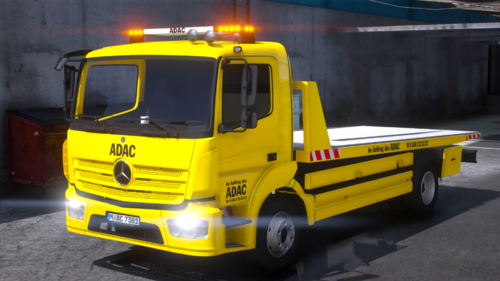 Great work, I haven't tried getting in normally as I just use it as an LSPDFR tow truck and it works perfectly for it and it makes such a good impression
- 3 comments
- 1 review
-
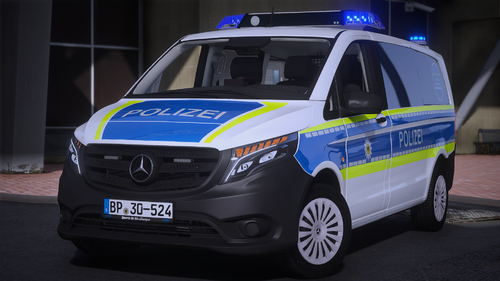 Outstanding work as usual. For some reason the third NPC companion gets in the vehicle very oddly like it's climbing on a boat and squeezing through a tight space. It's quite funny watching them do it but less so when you're trying to chase down someone XD. Also I wish there were coronas applied to the RTK light block as to give it a bigger and more impactful visual impact.
- 3 comments
- 1 review
-
-
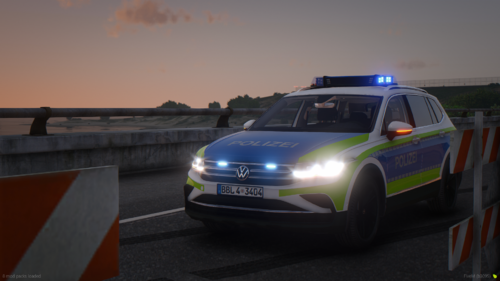 Unfortunately there's something wrong with the Single Player add-on because it won't let me load into the game when this is enabled, won't even give me an error message just immediate crash during loading. I've also added more DLC packs after this one so it's definitely not an issue with the amount of packs. Sucks because it looked fantastic.
- 5 comments
- 2 reviews
-
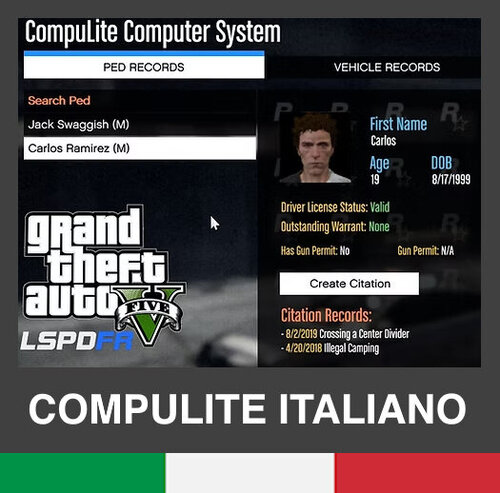 Localizzazione Italiana Compulite con Contravvenzioni e Pene Accurate Questa mod mira a migliorare l'immersione per noi italiani traducendo e localizzando, per esempio Registration con Immatricolazione (intesa come Revisione). La mod non è perfetta, sicuramente mancano ancora alcune pene e ci saranno errori nell'attribuzione degli articoli del Codice Penale e Stradale così come imprecisioni e arrotondamenti. Nonostante ciò, il risultato della mod è molto appropriato e soddisfacente e bisognerà informarsi su internet per capire che contravvenzioni attribuire visto il vocabolario arcaico e la presenza di contravvenzioni rare per l'utilizzo con LSPDFR. PREREQUISITI https://www.bejoijo.com/post/compulite INSTALLAZIONE: semplicemente estrarre la cartella Plugins in quella principale di GTA 5 e i file si sostituiranno automaticamente Tutti i diritti della mod vanno a Bejoljo
 -
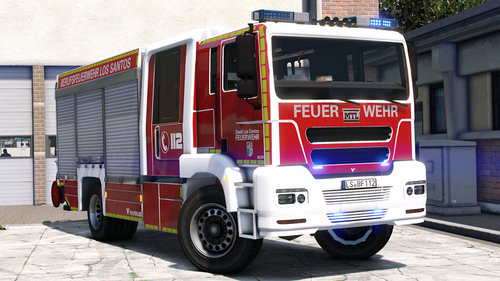 For people who want an ELS version, you can just take a generic ELS file and change the sirens to appropriate ones, then disable at the top the extras 1 2 3 and 4. I made an ELS xml that basically does this in case someone is interested, keep in mind it's just a quick adaptation so that it will use correct sirens. Ita has a few issues but I'm not a modder myself.
 -
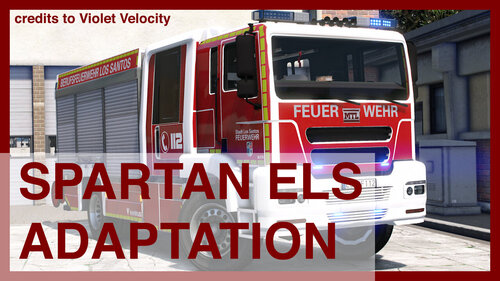 A very quick ELS adaptation for the MTL Brickade German Rescue Fire Engine by Violet Velocity I didn't do much at all, I just took the ELS file from Ebenholz's Benefactor Jogger - German ambulance and renamed it (vengine) and adjusted a couple of lines (the missing components were flashing so I disabled them). I circled the issues but this is just intended to be a quick adaptation so that it can have the correct sirens if you're using Einfach John's ones All credit goes to Violet Velocity, Einfach John and Ebenholz
 -
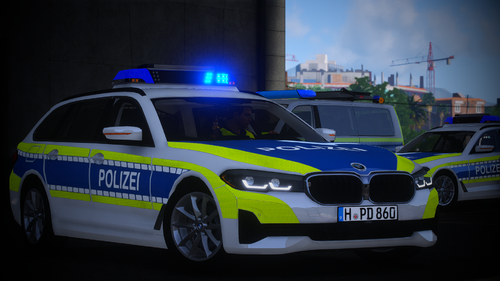 The Add-On handling is all screwed up, but the fix is easy: simply replace the handling.meta with the one from the FIVEM version. On top of that both this and your other Hessen BMW can't initiate traffic stops (talking about the Add-On version), I suspect that's because they're missing a carvariations.meta but I only suspect it because a fix for this issue would be increasing the entry vehiclesirens to 1, but with no carvariations.meta it's not possible. I also tried adding one from another vehicle and adding the entries in content.xml but it still won't work (I may have done something wrong because I'm not a vehicle creator but I had to tweak around with a bunch of vehicles before). Otherwise the car is lovely, good detail and I love the RTK 7.
 -
 Video Dimostrativo Pack Sirene Italiane Accurate V2.6 ATTENZIONE: PRIMA DI PROCEDERE, ABBI CURA DI AVERE SEMPRE UN BACKUP DEI TUOI FILE ORIGINALI! ISTRUZIONI PER L'INSTALLAZIONEMetodo per Single Player / LSPDFR (OpenIV)Apri OpenIV e attiva la "Edit Mode". Naviga in: mods/x64/audio/sfx/RESIDENT.rpf/ Seleziona il file vehicles.oac incluso in questa mod e trascinalo in OpenIV. Metodo per FiveM (LATO CLIENT)Prendi il file Resident.rpf incluso nella cartella "FiveM" di questo pack. Vai nella cartella principale di GTA V sul tuo PC: Grand Theft Auto V/x64/audio/sfx/ Sostituisci il file originale con quello della mod. CREDITIAlcuni dei file audio (Ambulanza e Vigili del Fuoco) provengono dalla mod di Daniele Lovo (https://it.gta5-mods.com/misc/pack-sirene-italiane-estemo-realismo-polizia-carabinieri-ambulanza-e-vigili-del-fuoco). CONFIGURAZIONE CODICI ELS (Manuale) Grazie a tutti e buon divertimento! TAG: GTA 5, GTA V, Grand Theft Auto, Sirene Italiane, Polizia, Carabinieri, Guardia di Finanza, Ambulanza, Vigili del Fuoco, Pompieri, 112, 113, 115, 117, 118, Federal Signal, Intav, LSPDFR, ITALIA
 -
HI all. I've recently downloaded an add-on vehicle, complete of all necessary meta files and the rest. There is only one problem, the texture appears matte or satin and I've found no fix for it by screwing around in the carvariations color section and neither Native Trainer works. The vehicle is always spawned with a livery and there's only one. Does anyone know how I could change it to spawn with a classic (reflective) livery or where I should be looking? The vehicles works fine in everything, it's just that it looks matte while it should look reflective. This must've been a mistake from the creator, but I would like to fix it myself if I can. I'll leave a piece of code, I replaced references to the vehicle as I'd like to keep it private. carvariations.meta <CVehicleModelInfoVariation> <variationData> <Item> <modelName>CUSTOMCAR</modelName> <colors> <Item> <indices content="char_array"> 4 12 0 0 0 </indices> <liveries> <Item value="true" /> </liveries> </Item> </colors> content.xml <Item> <filename>dlc_CUSTOMCAR:/common/carvariations.meta</filename> <fileType>VEHICLE_VARIATION_FILE</fileType> <overlay value="false" /> <disabled value="true" /> <persistent value="false" /> </Item> As I said, I've tried changing color codes to no success and even changing the content.xml overlay to true, disabled to false and persistent to true (just to give it a shot) had no difference. Thanks



